TT Bigdata TT Bigdata
首页
GitHub (opens new window)
JaneTTR

JaneTTR

数据酿造智慧,每一滴都是沉淀!
  • 报错解决

    • Ambari 报错
      • Ambari Views

      • Ambari

        • phantomjs下载失败问题
        • 编译问题:GCC 安装与配置
        • bower CERT_HAS_EXPIRED 错误问题
        • Ambari-admin包出现bower install错误
        • Cannot run program "rpmbuild"
        • Python: No such file or directory
        • Yarn解压报错EOFException排查与解决
        • Rpm-maven-plugin与shebang兼容性报错
        • Rpm-maven-plugin 最佳实践
        • Bower install拉取失败解决
        • 缺少 python3 报错解决
        • Python(>=2.6) but is not installed
          • 一、问题背景
          • 二、源码定位
            • 1. 定位 control 文件
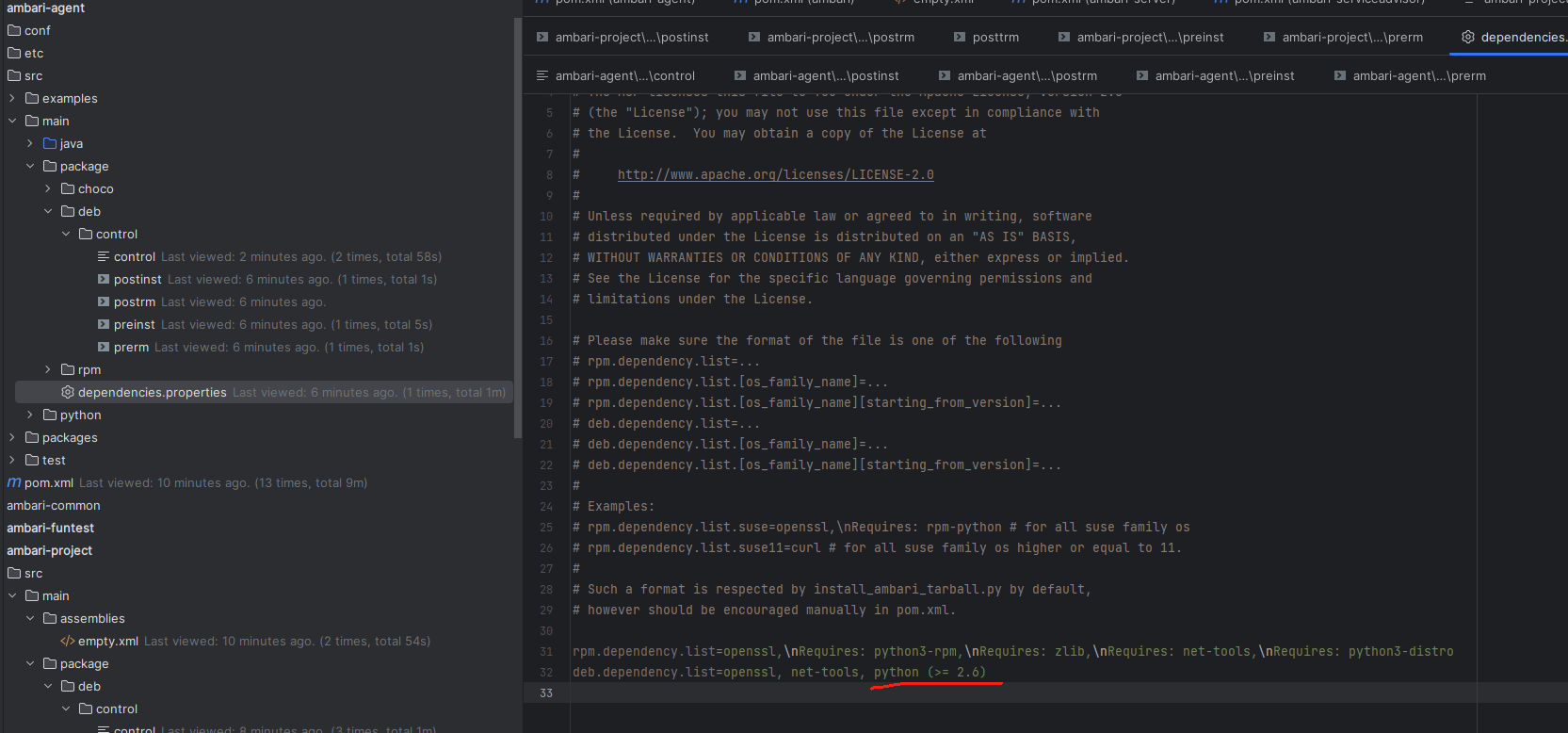
            • 2. 检查 dependencies.properties
          • 三、修改依赖
            • 1. 修改 dependencies.properties
            • 2. 修改 control 文件
          • 四、重新编译
          • 五、验证结果
        • SSL_ERROR_SYSCALL 的修复方法
      • Ambari-infra

      • Ambari-metrics

    • Bigtop 报错
  • 系统适配

  • 监控与调优

  • BUG临时处理
  • 实验室

  • 运维资料
  • 报错解决
  • Ambari 报错
  • Ambari
JaneTTR
2025-08-15
目录
一、问题背景
二、源码定位
1. 定位 control 文件
2. 检查 dependencies.properties
三、修改依赖
1. 修改 dependencies.properties
2. 修改 control 文件
四、重新编译
五、验证结果

Python(>=2.6) but is not installedubuntu22

# 一、问题背景

在基于 Ambari 3.0.0 源码完成构建后,如果直接在 Ubuntu 22.04+ 系统中执行:

apt install -y ambari-agent
1

会触发如下依赖检查错误:
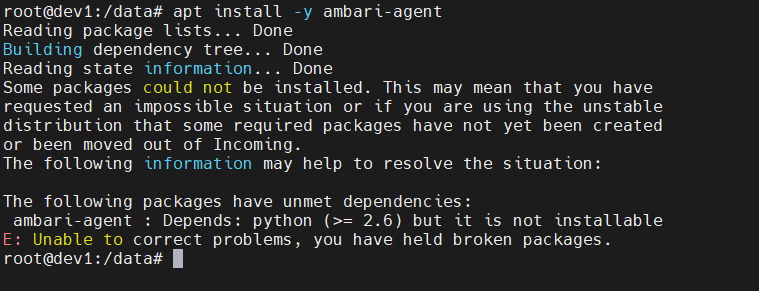
image-20250717095006547

出现该问题的原因是:

  • Ambari 3.0.0 默认在 DEB 包中声明的依赖是 python (>= 2.6)
  • 而自 Ubuntu 22.04 起,系统已移除 python 这一 Python 2.x 软链接包,仅保留 python3

因此在安装时,APT 会因为无法找到匹配依赖而报错。

# 二、源码定位

为了修复该依赖,需要同时调整 control 文件 和 dependencies.properties 文件 中的配置。

# 1. 定位 control 文件

进入路径:

ambari-agent/src/main/package/deb/control/control
1

可以看到原始依赖中仍然是 python:
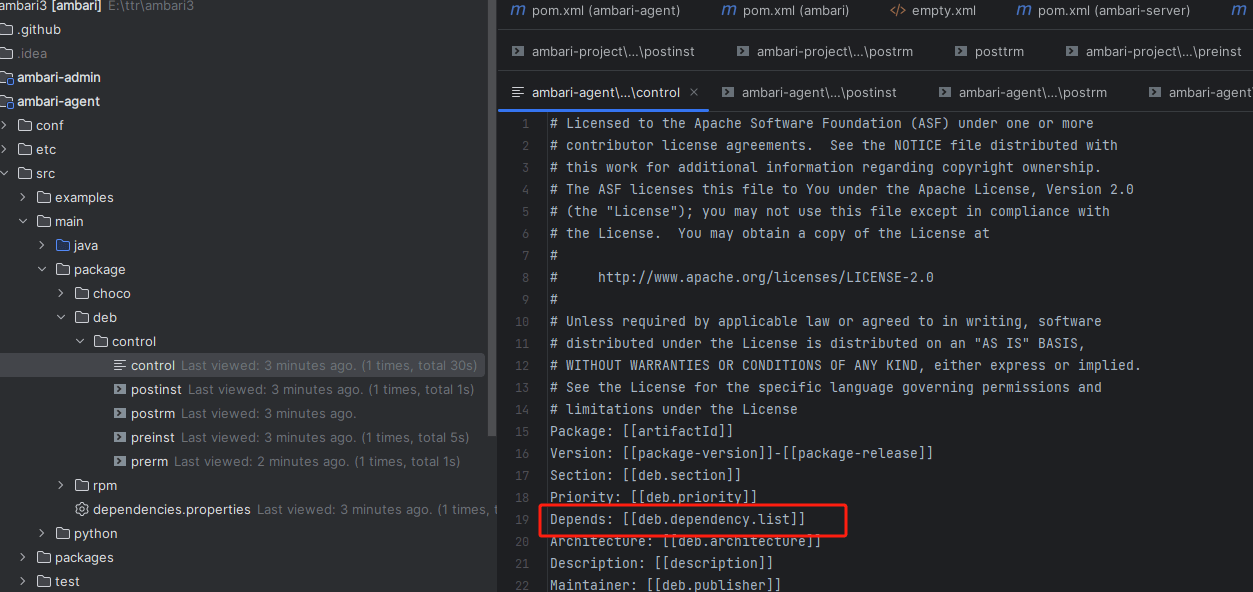
image-20250717095206668

# 2. 检查 dependencies.properties

继续查看:

ambari-agent/src/main/package/dependencies.properties
1

文件内容截图如下:
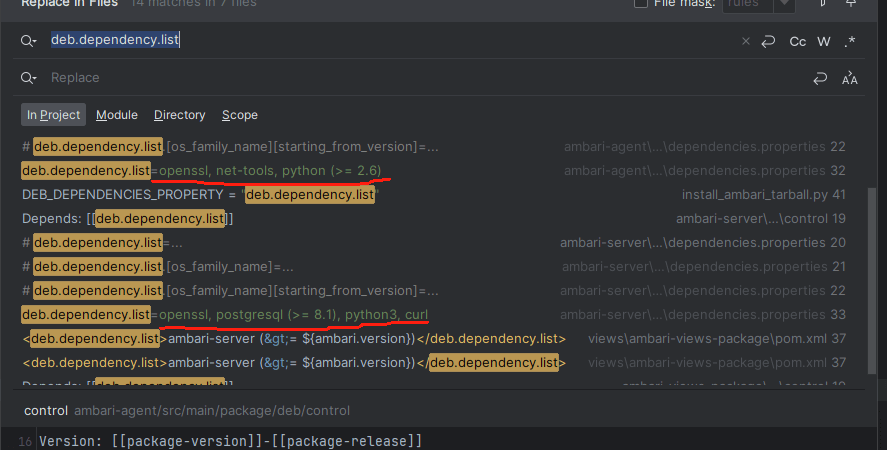
image-20250717095242818

image-20250717095548278

可以看到,这里同样指定了 python,需要和 control 文件一起调整。

# 三、修改依赖

将两处依赖统一替换为 python3。

# 1. 修改 dependencies.properties

deb.dependency.list=openssl, net-tools, python3
1

# 2. 修改 control 文件

将:

Depends: python (>= 2.6)
1

改为:

Depends: python3
1

这样就完成了 DEB 包依赖的更新,避免安装时拉取 Python 2.x。

# 四、重新编译

保存修改后,执行 Ambari 的 DEB 构建流程(可按你的编译环境执行 Maven 或 Gradle 任务)。 编译过程示例截图如下:
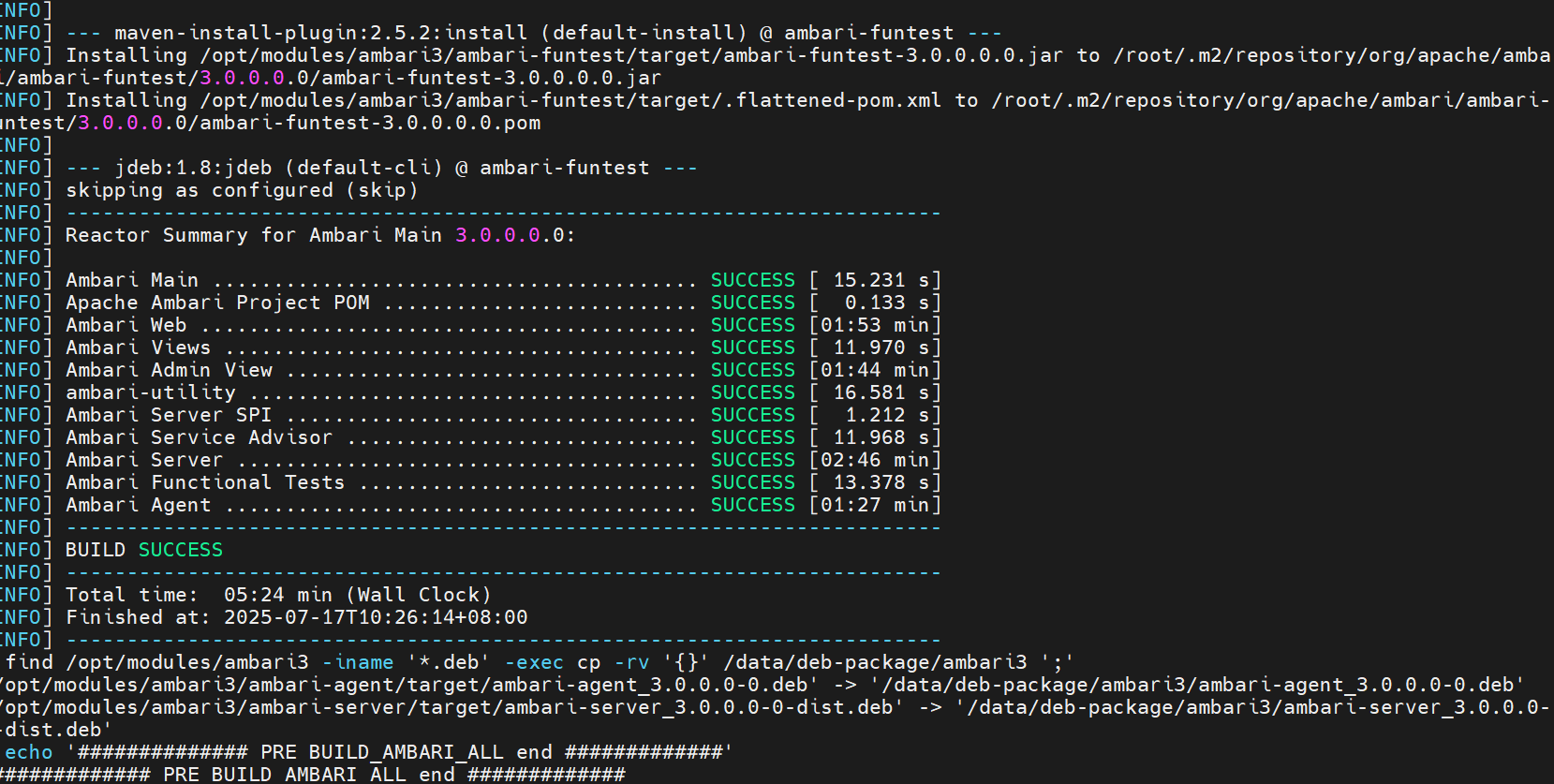
image-20250717102833231

# 五、验证结果

编译完成后,使用以下命令查看新 DEB 包的依赖信息:

dpkg-deb --info ambari-agent_3.0.0.0-0.deb
1
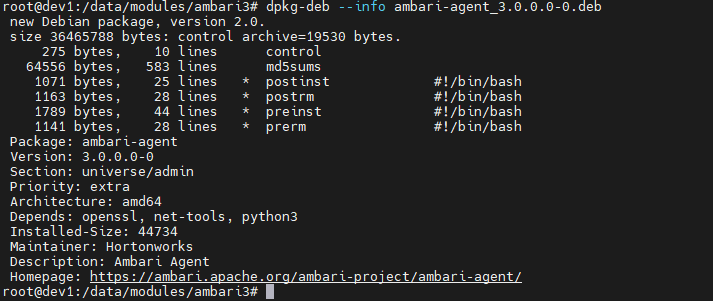
image-20250717103342929

可以看到,依赖已更新为 python3,安装不再有冲突。

最终安装测试成功:
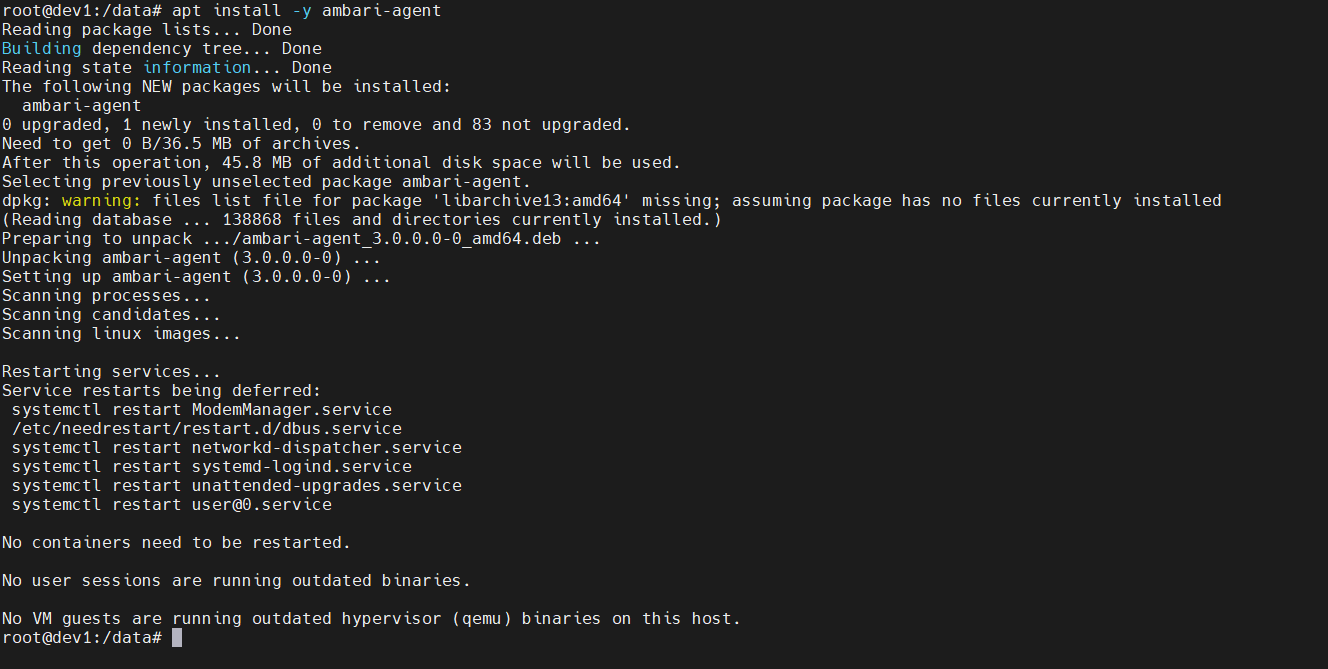
image-20250717110128678

总结

  • Ambari 3.0.0 在新系统中安装失败,核心原因是 DEB 包中仍引用 Python 2.x 依赖。
  • 需要同步修改 control 文件与 dependencies.properties 文件,将依赖替换为 python3。
  • 重新编译后生成的新 DEB 包可在 Ubuntu 22.04+ 系列系统中直接安装,无需额外软链接或兼容包。
#Ambari#错误排查#源码编译#Python#DEB
缺少 python3 报错解决
SSL_ERROR_SYSCALL 的修复方法

← 缺少 python3 报错解决 SSL_ERROR_SYSCALL 的修复方法→

最近更新
01
当前版本 2026/08
08-29
02
把 Ambari Server HA 稳稳地跑起来
08-17
03
从一次启用操作追到主备就绪
08-17
更多文章>
Theme by Vdoing | Copyright © 2017-2026 JaneTTR | MIT License
  • 跟随系统
  • 浅色模式
  • 深色模式
  • 阅读模式