
 Ambari Server 启动失败:no valid keystore
# Ambari Server 启动失败:no valid keystore 修复实战(FreeIPA 签发证书)
需要 ttr-release 版本 >= 2.2.3
Ambari 3.0.0 + Free IPA 部署与认证体系构建,支持 Kylin、Ubuntu、Rocky 系统等 本文环境:Kylin V10 SP3 x86,Realm = TEST.COM
# 一、问题现象与根因分析
安装 FreeIPA Client 之后,Ambari Server 启动失败,日志中出现如下异常:
avax.ws.rs.core.UriInfo,java.lang.String), should not consume any entity.
WARNING: A HTTP GET method, public javax.ws.rs.core.Response org.apache.ambari.server.api.services.users.UserService.getUsers(java.lang.String,javax.ws.rs.core.HttpHeaders,javax.ws.rs.core.UriInfo), should not consume any entity.
WARNING: A HTTP GET method, public javax.ws.rs.core.Response org.apache.ambari.server.api.services.views.ViewService.getView(java.lang.String,javax.ws.rs.core.HttpHeaders,javax.ws.rs.core.UriInfo,java.lang.String), should not consume any entity.
WARNING: A HTTP GET method, public javax.ws.rs.core.Response org.apache.ambari.server.api.services.views.ViewService.getViews(java.lang.String,javax.ws.rs.core.HttpHeaders,javax.ws.rs.core.UriInfo), should not consume any entity.
WARNING: A HTTP GET method, public javax.ws.rs.core.Response org.apache.ambari.server.api.services.views.ViewVersionService.getVersion(java.lang.String,javax.ws.rs.core.HttpHeaders,javax.ws.rs.core.UriInfo,java.lang.String,java.lang.String), should not consume any entity.
WARNING: A HTTP GET method, public javax.ws.rs.core.Response org.apache.ambari.server.api.services.views.ViewVersionService.getVersions(java.lang.String,javax.ws.rs.core.HttpHeaders,javax.ws.rs.core.UriInfo,java.lang.String), should not consume any entity.

2026-02-06 15:10:06,952 ERROR [main] o.a.a.server.controller.AmbariServer:1111 - Failed to run the Ambari Server
org.eclipse.jetty.util.MultiException: Multiple exceptions
        at org.eclipse.jetty.util.MultiException.ifExceptionThrow(MultiException.java:124)
        at org.eclipse.jetty.server.Server.doStart(Server.java:406)
        at org.eclipse.jetty.util.component.AbstractLifeCycle.start(AbstractLifeCycle.java:68)
        at org.apache.ambari.server.controller.AmbariServer.run(AmbariServer.java:568)
        at org.apache.ambari.server.controller.AmbariServer.main(AmbariServer.java:1105)
        Suppressed: [CIRCULAR REFERENCE: java.lang.IllegalStateException: no valid keystore]
        Suppressed: java.lang.IllegalStateException: no valid keystore
                at org.eclipse.jetty.util.security.CertificateUtils.getKeyStore(CertificateUtils.java:50)
                at org.eclipse.jetty.util.ssl.SslContextFactory.loadKeyStore(SslContextFactory.java:1089)
                at org.eclipse.jetty.util.ssl.SslContextFactory.load(SslContextFactory.java:274)
                at org.eclipse.jetty.util.ssl.SslContextFactory.doStart(SslContextFactory.java:241)
                at org.eclipse.jetty.util.component.AbstractLifeCycle.start(AbstractLifeCycle.java:68)
                at org.eclipse.jetty.util.component.ContainerLifeCycle.start(ContainerLifeCycle.java:138)
                at org.eclipse.jetty.util.component.ContainerLifeCycle.doStart(ContainerLifeCycle.java:117)
                at org.eclipse.jetty.server.SslConnectionFactory.doStart(SslConnectionFactory.java:94)
                at org.eclipse.jetty.util.component.AbstractLifeCycle.start(AbstractLifeCycle.java:68)
                at org.eclipse.jetty.util.component.ContainerLifeCycle.start(ContainerLifeCycle.java:138)
                at org.eclipse.jetty.util.component.ContainerLifeCycle.doStart(ContainerLifeCycle.java:117)
                at org.eclipse.jetty.server.AbstractConnector.doStart(AbstractConnector.java:282)
                at org.eclipse.jetty.server.AbstractNetworkConnector.doStart(AbstractNetworkConnector.java:81)
                at org.eclipse.jetty.server.ServerConnector.doStart(ServerConnector.java:235)
                at org.eclipse.jetty.util.component.AbstractLifeCycle.start(AbstractLifeCycle.java:68)
                at org.eclipse.jetty.server.Server.doStart(Server.java:395)
                ... 3 common frames omitted
Caused by: java.lang.IllegalStateException: no valid keystore
        at org.eclipse.jetty.util.security.CertificateUtils.getKeyStore(CertificateUtils.java:50)
        at org.eclipse.jetty.util.ssl.SslContextFactory.loadKeyStore(SslContextFactory.java:1089)
        at org.eclipse.jetty.util.ssl.SslContextFactory.load(SslContextFactory.java:274)
        at org.eclipse.jetty.util.ssl.SslContextFactory.doStart(SslContextFactory.java:241)
        at org.eclipse.jetty.util.component.AbstractLifeCycle.start(AbstractLifeCycle.java:68)
        at org.eclipse.jetty.util.component.ContainerLifeCycle.start(ContainerLifeCycle.java:138)
        at org.eclipse.jetty.util.component.ContainerLifeCycle.doStart(ContainerLifeCycle.java:117)
        at org.eclipse.jetty.server.SslConnectionFactory.doStart(SslConnectionFactory.java:94)
        at org.eclipse.jetty.util.component.AbstractLifeCycle.start(AbstractLifeCycle.java:68)
        at org.eclipse.jetty.util.component.ContainerLifeCycle.start(ContainerLifeCycle.java:138)
        at org.eclipse.jetty.util.component.ContainerLifeCycle.doStart(ContainerLifeCycle.java:117)
        at org.eclipse.jetty.server.AbstractConnector.doStart(AbstractConnector.java:282)
        at org.eclipse.jetty.server.AbstractNetworkConnector.doStart(AbstractNetworkConnector.java:81)
        at org.eclipse.jetty.server.ServerConnector.doStart(ServerConnector.java:235)
        at org.eclipse.jetty.util.component.AbstractLifeCycle.start(AbstractLifeCycle.java:68)
        at org.eclipse.jetty.server.Server.doStart(Server.java:395)
        ... 3 common frames omitted
2026-02-06 15:10:06,952 ERROR [main] o.a.a.server.controller.AmbariServer:1111 - Failed to run the Ambari Server
org.eclipse.jetty.util.MultiException: Multiple exceptions
        at org.eclipse.jetty.util.MultiException.ifExceptionThrow(MultiException.java:124)
        at org.eclipse.jetty.server.Server.doStart(Server.java:406)
        at org.eclipse.jetty.util.component.AbstractLifeCycle.start(AbstractLifeCycle.java:68)
        at org.apache.ambari.server.controller.AmbariServer.run(AmbariServer.java:568)
        at org.apache.ambari.server.controller.AmbariServer.main(AmbariServer.java:1105)
        Suppressed: [CIRCULAR REFERENCE: java.lang.IllegalStateException: no valid keystore]
        Suppressed: java.lang.IllegalStateException: no valid keystore
                at org.eclipse.jetty.util.security.CertificateUtils.getKeyStore(CertificateUtils.java:50)
                at org.eclipse.jetty.util.ssl.SslContextFactory.loadKeyStore(SslContextFactory.java:1089)
                at org.eclipse.jetty.util.ssl.SslContextFactory.load(SslContextFactory.java:274)
                at org.eclipse.jetty.util.ssl.SslContextFactory.doStart(SslContextFactory.java:241)
                at org.eclipse.jetty.util.component.AbstractLifeCycle.start(AbstractLifeCycle.java:68)
                at org.eclipse.jetty.util.component.ContainerLifeCycle.start(ContainerLifeCycle.java:138)
                at org.eclipse.jetty.util.component.ContainerLifeCycle.doStart(ContainerLifeCycle.java:117)
                at org.eclipse.jetty.server.SslConnectionFactory.doStart(SslConnectionFactory.java:94)
                at org.eclipse.jetty.util.component.AbstractLifeCycle.start(AbstractLifeCycle.java:68)
                at org.eclipse.jetty.util.component.ContainerLifeCycle.start(ContainerLifeCycle.java:138)
                at org.eclipse.jetty.util.component.ContainerLifeCycle.doStart(ContainerLifeCycle.java:117)
                at org.eclipse.jetty.server.AbstractConnector.doStart(AbstractConnector.java:282)
                at org.eclipse.jetty.server.AbstractNetworkConnector.doStart(AbstractNetworkConnector.java:81)
                at org.eclipse.jetty.server.ServerConnector.doStart(ServerConnector.java:235)
                at org.eclipse.jetty.util.component.AbstractLifeCycle.start(AbstractLifeCycle.java:68)
                at org.eclipse.jetty.server.Server.doStart(Server.java:395)
                ... 3 common frames omitted
Caused by: java.lang.IllegalStateException: no valid keystore
        at org.eclipse.jetty.util.security.CertificateUtils.getKeyStore(CertificateUtils.java:50)
        at org.eclipse.jetty.util.ssl.SslContextFactory.loadKeyStore(SslContextFactory.java:1089)
        at org.eclipse.jetty.util.ssl.SslContextFactory.load(SslContextFactory.java:274)
        at org.eclipse.jetty.util.ssl.SslContextFactory.doStart(SslContextFactory.java:241)
        at org.eclipse.jetty.util.component.AbstractLifeCycle.start(AbstractLifeCycle.java:68)
        at org.eclipse.jetty.util.component.ContainerLifeCycle.start(ContainerLifeCycle.java:138)
        at org.eclipse.jetty.util.component.ContainerLifeCycle.doStart(ContainerLifeCycle.java:117)
        at org.eclipse.jetty.server.SslConnectionFactory.doStart(SslConnectionFactory.java:94)
        at org.eclipse.jetty.util.component.AbstractLifeCycle.start(AbstractLifeCycle.java:68)
        at org.eclipse.jetty.util.component.ContainerLifeCycle.start(ContainerLifeCycle.java:138)
        at org.eclipse.jetty.util.component.ContainerLifeCycle.doStart(ContainerLifeCycle.java:117)
        at org.eclipse.jetty.server.AbstractConnector.doStart(AbstractConnector.java:282)
        at org.eclipse.jetty.server.AbstractNetworkConnector.doStart(AbstractNetworkConnector.java:81)
        at org.eclipse.jetty.server.ServerConnector.doStart(ServerConnector.java:235)
        at org.eclipse.jetty.util.component.AbstractLifeCycle.start(AbstractLifeCycle.java:68)
        at org.eclipse.jetty.server.Server.doStart(Server.java:395)
        ... 3 common frames omitted
2026-02-06 15:10:06,959 INFO  [main] o.s.m.s.b.SimpleBrokerMessageHandler:117 - Stopping...
2026-02-06 15:10:06,959 INFO  [main] o.s.m.s.b.SimpleBrokerMessageHandler:117 - BrokerAvailabilityEvent[available=false, SimpleBrokerMessageHandler [DefaultSubscriptionRegistry[cache[0 destination(s)], registry[0 sessions]]]]
2026-02-06 15:10:06,959 INFO  [main] o.s.m.s.b.SimpleBrokerMessageHandler:117 - Stopped.
[root@dev1 ambari-server]#
1
2
3
4
5
6
7
8
9
10
11
12
13
14
15
16
17
18
19
20
21
22
23
24
25
26
27
28
29
30
31
32
33
34
35
36
37
38
39
40
41
42
43
44
45
46
47
48
49
50
51
52
53
54
55
56
57
58
59
60
61
62
63
64
65
66
67
68
69
70
71
72
73
74
75
76
77
78
79
80
81
82
83
84
85
86
87
88
89
90
91
92
93
94
95
96
97
98
99
100
101
2
3
4
5
6
7
8
9
10
11
12
13
14
15
16
17
18
19
20
21
22
23
24
25
26
27
28
29
30
31
32
33
34
35
36
37
38
39
40
41
42
43
44
45
46
47
48
49
50
51
52
53
54
55
56
57
58
59
60
61
62
63
64
65
66
67
68
69
70
71
72
73
74
75
76
77
78
79
80
81
82
83
84
85
86
87
88
89
90
91
92
93
94
95
96
97
98
99
100
101
完整堆栈:
026-02-14 10:23:07,706 INFO  [main] o.a.a.server.utils.ShellCommandUtil:64 - Command openssl genrsa -des3 -passout pass:**** -out /var/lib/ambari-server/keys/ca.key 4096  was finished with exit code: 0 - the operation was completely successfully.
2026-02-14 10:23:07,706 INFO  [main] o.a.a.server.utils.ShellCommandUtil:64 - Command openssl genrsa -des3 -passout pass:**** -out /var/lib/ambari-server/keys/ca.key 4096  was finished with exit code: 0 - the operation was completely successfully.
2026-02-14 10:23:07,715 WARN  [main] o.a.a.server.utils.ShellCommandUtil:66 - Command openssl req -passin pass:**** -new -key /var/lib/ambari-server/keys/ca.key -out /var/lib/ambari-server/keys/ca.csr -batch was finished with exit code: 1 - an error occurred parsing the command options.
2026-02-14 10:23:07,715 WARN  [main] o.a.a.server.utils.ShellCommandUtil:66 - Command openssl req -passin pass:**** -new -key /var/lib/ambari-server/keys/ca.key -out /var/lib/ambari-server/keys/ca.csr -batch was finished with exit code: 1 - an error occurred parsing the command options.
2026-02-14 10:23:07,722 WARN  [main] o.a.a.server.utils.ShellCommandUtil:66 - Command openssl ca -create_serial -out /var/lib/ambari-server/keys/ca.crt -days 365 -keyfile /var/lib/ambari-server/keys/ca.key -key **** -selfsign -extensions jdk7_ca -config /var/lib/ambari-server/keys/ca.config -batch -infiles /var/lib/ambari-server/keys/ca.csr was finished with exit code: 1 - an error occurred parsing the command options.
2026-02-14 10:23:07,722 WARN  [main] o.a.a.server.utils.ShellCommandUtil:66 - Command openssl ca -create_serial -out /var/lib/ambari-server/keys/ca.crt -days 365 -keyfile /var/lib/ambari-server/keys/ca.key -key **** -selfsign -extensions jdk7_ca -config /var/lib/ambari-server/keys/ca.config -batch -infiles /var/lib/ambari-server/keys/ca.csr was finished with exit code: 1 - an error occurred parsing the command options.
2026-02-14 10:23:07,730 WARN  [main] o.a.a.server.utils.ShellCommandUtil:66 - Command openssl pkcs12 -export -in /var/lib/ambari-server/keys/ca.crt -inkey /var/lib/ambari-server/keys/ca.key -certfile /var/lib/ambari-server/keys/ca.crt -out /var/lib/ambari-server/keys/keystore.p12 -password pass:**** -passin pass:****
 was finished with exit code: 1 - an error occurred parsing the command options.
2026-02-14 10:23:07,730 WARN  [main] o.a.a.server.utils.ShellCommandUtil:66 - Command openssl pkcs12 -export -in /var/lib/ambari-server/keys/ca.crt -inkey /var/lib/ambari-server/keys/ca.key -certfile /var/lib/ambari-server/keys/ca.crt -out /var/lib/ambari-server/keys/keystore.p12 -password pass:**** -passin pass:****
 was finished with exit code: 1 - an error occurred parsing the command options.
2026-02-14 10:23:07,738 INFO  [main] o.a.a.server.utils.ShellCommandUtil:64 - Command find /var/lib/ambari-server/keys -type f -exec chmod 700 {} + was finished with exit code: 0 - the operation was completely successfully.
2026-02-14 10:23:07,738 INFO  [main] o.a.a.server.utils.ShellCommandUtil:64 - Command find /var/lib/ambari-server/keys -type f -exec chmod 700 {} + was finished with exit code: 0 - the operation was completely successfully.
2026-02-14 10:23:07,744 INFO  [main] o.a.a.server.utils.ShellCommandUtil:64 - Command chmod 600 /var/lib/ambari-server/keys/pass.txt was finished with exit code: 0 - the operation was completely successfully.
2026-02-14 10:23:07,744 INFO  [main] o.a.a.server.utils.ShellCommandUtil:64 - Command chmod 600 /var/lib/ambari-server/keys/pass.txt was finished with exit code: 0 - the operation was completely successfully.
2026-02-14 10:23:07,744 INFO  [main] o.a.a.s.c.utilities.KerberosChecker:128 - Skipping Ambari Server Kerberos credentials check.
2026-02-14 10:23:07,744 INFO  [main] o.a.a.s.c.utilities.KerberosChecker:128 - Skipping Ambari Server Kerberos credentials check.
2026-02-14 10:23:07,745 ERROR [main] o.a.a.s.s.e.MasterKeyServiceImpl:278 - Cannot read master key property {1} or master key file property {3} from environment
2026-02-14 10:23:07,745 ERROR [main] o.a.a.s.s.e.MasterKeyServiceImpl:278 - Cannot read master key property {1} or master key file property {3} from environment
2026-02-14 10:23:07,745 INFO  [main] o.a.a.server.utils.PasswordUtils:176 - Credential provider creation failed
org.apache.ambari.server.AmbariException: Master key initialization failed.
        at org.apache.ambari.server.security.encryption.CredentialProvider.<init>(CredentialProvider.java:54)
        at org.apache.ambari.server.utils.PasswordUtils.loadCredentialProvider(PasswordUtils.java:174)
        at org.apache.ambari.server.utils.PasswordUtils.readPasswordFromStore(PasswordUtils.java:149)
        at org.apache.ambari.server.configuration.ComponentSSLConfiguration.getPassword(ComponentSSLConfiguration.java:121)
        at org.apache.ambari.server.configuration.ComponentSSLConfiguration.init(ComponentSSLConfiguration.java:63)
        at org.apache.ambari.server.controller.AmbariServer.main(AmbariServer.java:1104)
2026-02-14 10:23:07,745 INFO  [main] o.a.a.server.utils.PasswordUtils:176 - Credential provider creation failed
org.apache.ambari.server.AmbariException: Master key initialization failed.
        at org.apache.ambari.server.security.encryption.CredentialProvider.<init>(CredentialProvider.java:54)
        at org.apache.ambari.server.utils.PasswordUtils.loadCredentialProvider(PasswordUtils.java:174)
        at org.apache.ambari.server.utils.PasswordUtils.readPasswordFromStore(PasswordUtils.java:149)
        at org.apache.ambari.server.configuration.ComponentSSLConfiguration.getPassword(ComponentSSLConfiguration.java:121)
        at org.apache.ambari.server.configuration.ComponentSSLConfiguration.init(ComponentSSLConfiguration.java:63)
        at org.apache.ambari.server.controller.AmbariServer.main(AmbariServer.java:1104)
1
2
3
4
5
6
7
8
9
10
11
12
13
14
15
16
17
18
19
20
21
22
23
24
25
26
27
28
29
30
31
32
33
34
35
2
3
4
5
6
7
8
9
10
11
12
13
14
15
16
17
18
19
20
21
22
23
24
25
26
27
28
29
30
31
32
33
34
35
截图如下:
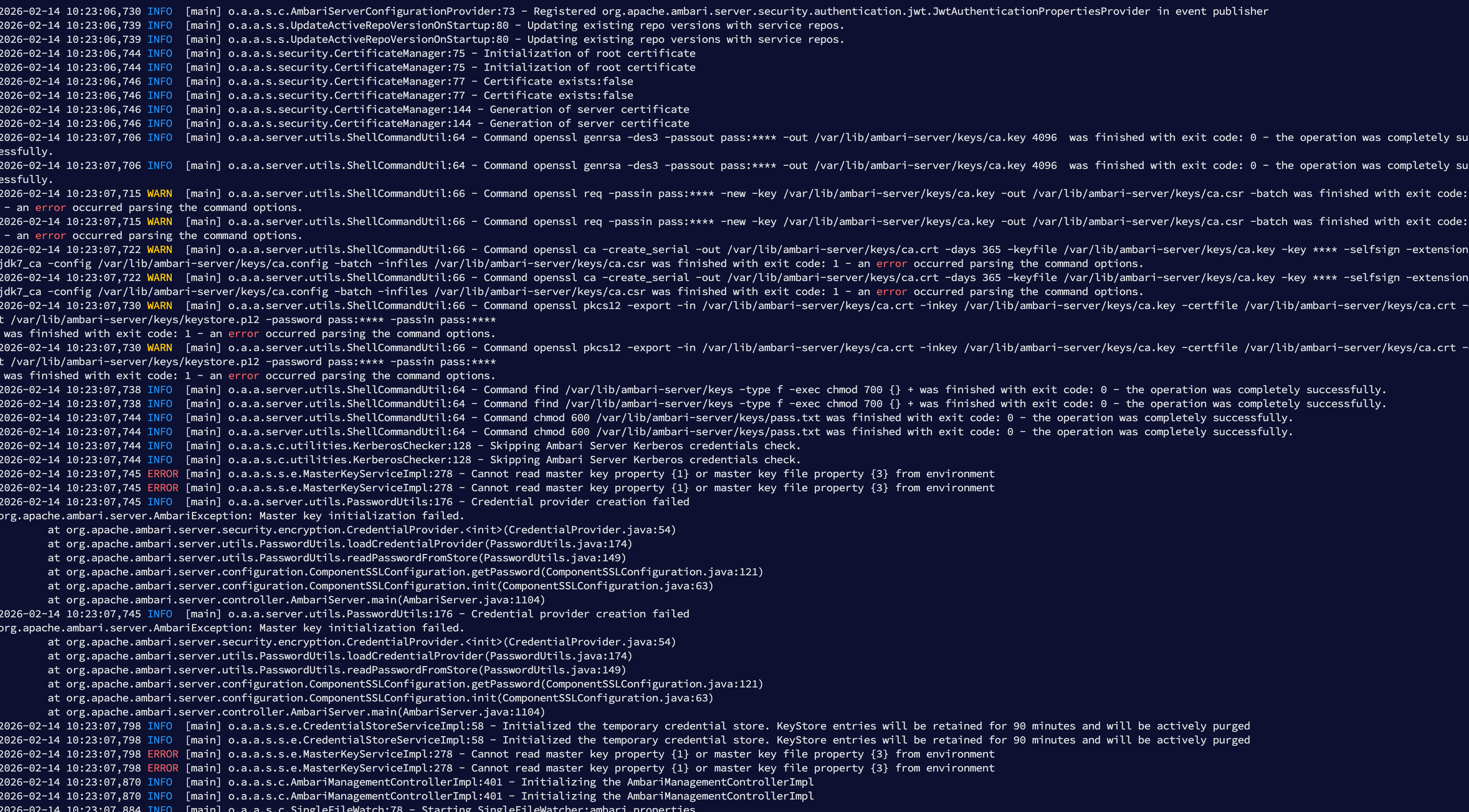
# 1.1 同时出现的 openssl 异常
日志中还能看到:
openssl req ... exit code: 1 - an error occurred parsing the command options.
openssl ca  ... exit code: 1 - an error occurred parsing the command options.
openssl pkcs12 ... exit code: 1 - an error occurred parsing the command options.
1
2
3
2
3
以及:
Master key initialization failed.
Cannot read master key property from environment
1
2
2
说明:
- Ambari 默认自签证书流程执行失败
- keystore.p12 未生成或无效
- Jetty 无法加载 SSL 上下文
# 1.2 问题本质总结
| 现象 | 根因 |
|---|---|
| no valid keystore | keystore.p12 不存在或损坏 |
| Master key failed | 默认 SSL 生成流程异常 |
| Jetty 启动失败 | HTTPS Connector 初始化失败 |
注意
Ambari HTTPS 启动依赖 keystore.p12,一旦该文件异常,Server 必然无法启动。
# 二、修复思路:使用 FreeIPA 统一签发 HTTPS 证书
既然当前环境已经加入 FreeIPA Realm,推荐直接:
- 生成 CSR
- 使用 FreeIPA 以
HTTP/[email protected]签发证书 - 拼接 fullchain
- 生成 keystore.p12
- 替换 Ambari keys 目录文件
- 重启服务
整体流程如下:
CSR → IPA 签发 → fullchain → PKCS12 → 替换 → 重启
1
# 三、修复步骤实操
# 3.1 生成 CSR
# 3.1.1 创建目录
install -d -m 0755 /etc/pki/tls/certs /etc/pki/tls/private
chmod 0700 /etc/pki/tls/private
1
2
2
# 3.1.2 编写 CSR 配置
cat >/tmp/ambari-req.cnf <<'EOF'
[ req ]
prompt = no
default_md = sha256
distinguished_name = dn
req_extensions = req_ext

[ dn ]
CN = dev1.test.com
O  = TEST.COM

[ req_ext ]
subjectAltName = @alt

[ alt ]
DNS.1 = dev1.test.com
EOF
1
2
3
4
5
6
7
8
9
10
11
12
13
14
15
16
17
2
3
4
5
6
7
8
9
10
11
12
13
14
15
16
17
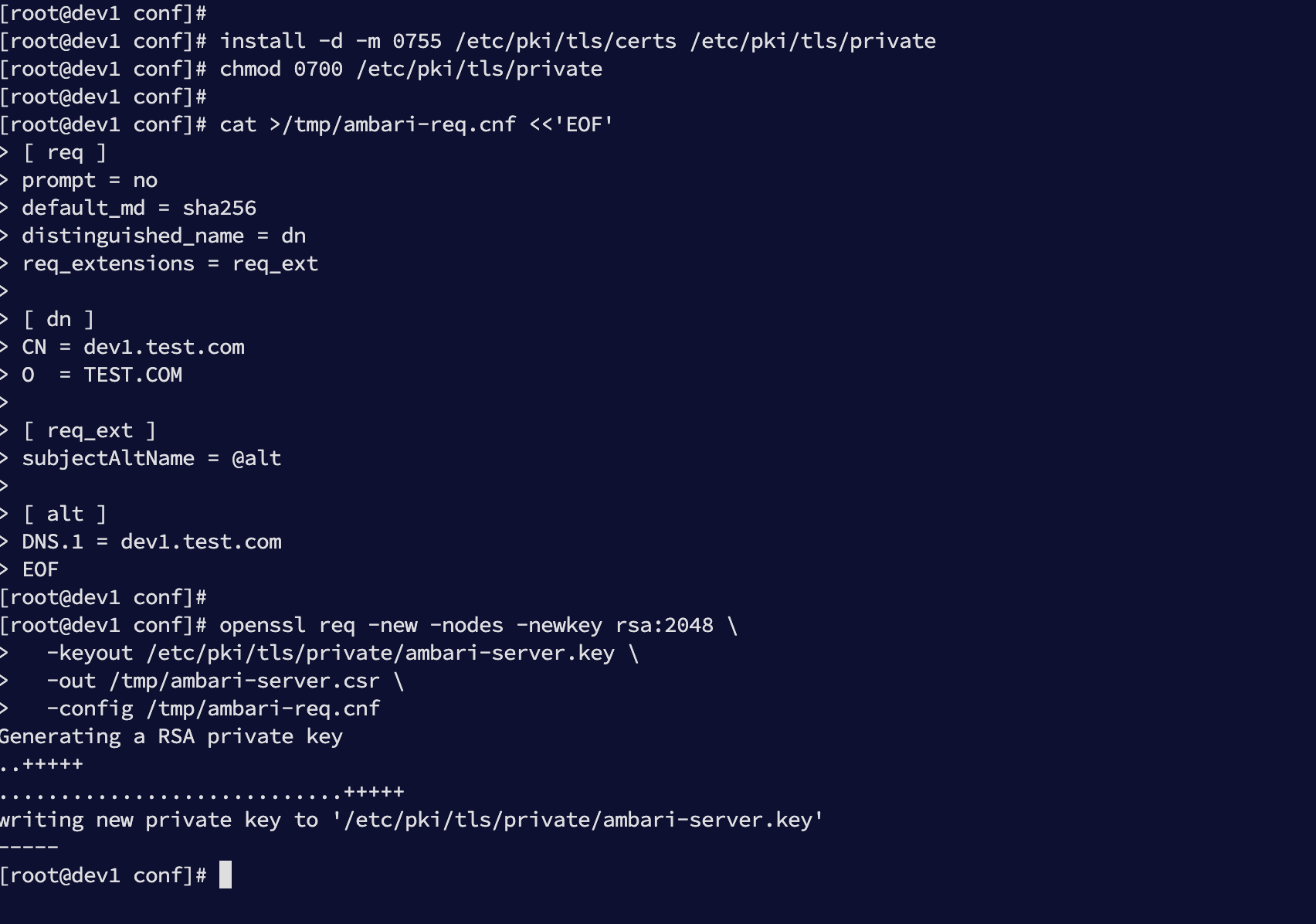
# 3.1.3 生成私钥与 CSR
openssl req -new -nodes -newkey rsa:2048 \
  -keyout /etc/pki/tls/private/ambari-server.key \
  -out /tmp/ambari-server.csr \
  -config /tmp/ambari-req.cnf
1
2
3
4
2
3
4
执行效果如下:
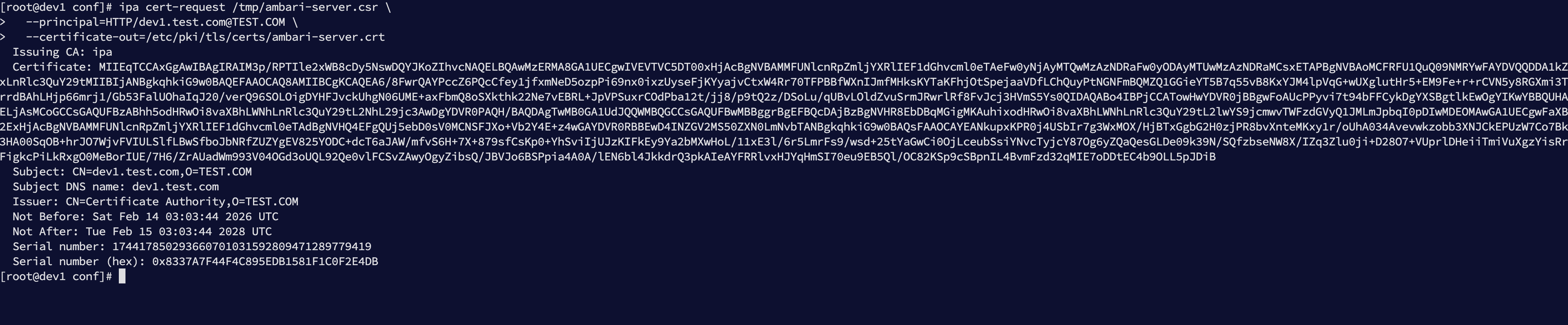
# 3.2 使用 FreeIPA 签发证书
ipa cert-request /tmp/ambari-server.csr \
  --principal=HTTP/[email protected] \
  --certificate-out=/etc/pki/tls/certs/ambari-server.crt
1
2
3
2
3
若出现:
ipa: ERROR: cannot connect to 'https://ipa.test.com/ipa/json': [SSL: CERTIFICATE_VERIFY_FAILED] certificate verify failed: self signed certificate in certificate chain (_ssl.c:1091)
1
截图如下:

先执行:
kinit admin
1
然后重新签发。
签发成功示例如下:
# 3.3 拼接 fullchain
cat /etc/pki/tls/certs/ambari-server.crt \
    /etc/ipa/ca.crt \
> /etc/pki/tls/certs/ambari-server-fullchain.crt

ls -l /etc/pki/tls/certs/ambari-server-fullchain.crt
1
2
3
4
5
2
3
4
5
效果如下:

# 3.4 生成 keystore.p12
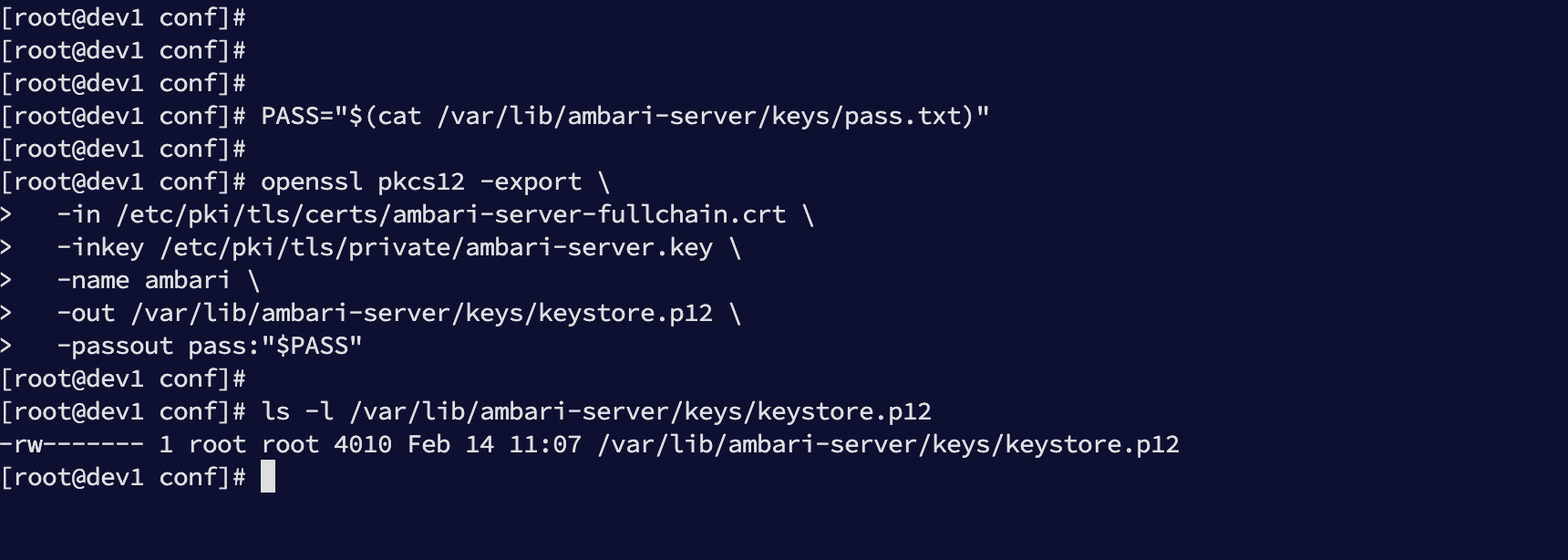
读取密码:
PASS="$(cat /var/lib/ambari-server/keys/pass.txt)"
1
生成 PKCS12:
openssl pkcs12 -export \
  -in /etc/pki/tls/certs/ambari-server-fullchain.crt \
  -inkey /etc/pki/tls/private/ambari-server.key \
  -name ambari \
  -out /var/lib/ambari-server/keys/keystore.p12 \
  -passout pass:"$PASS"
1
2
3
4
5
6
2
3
4
5
6
检查生成结果:
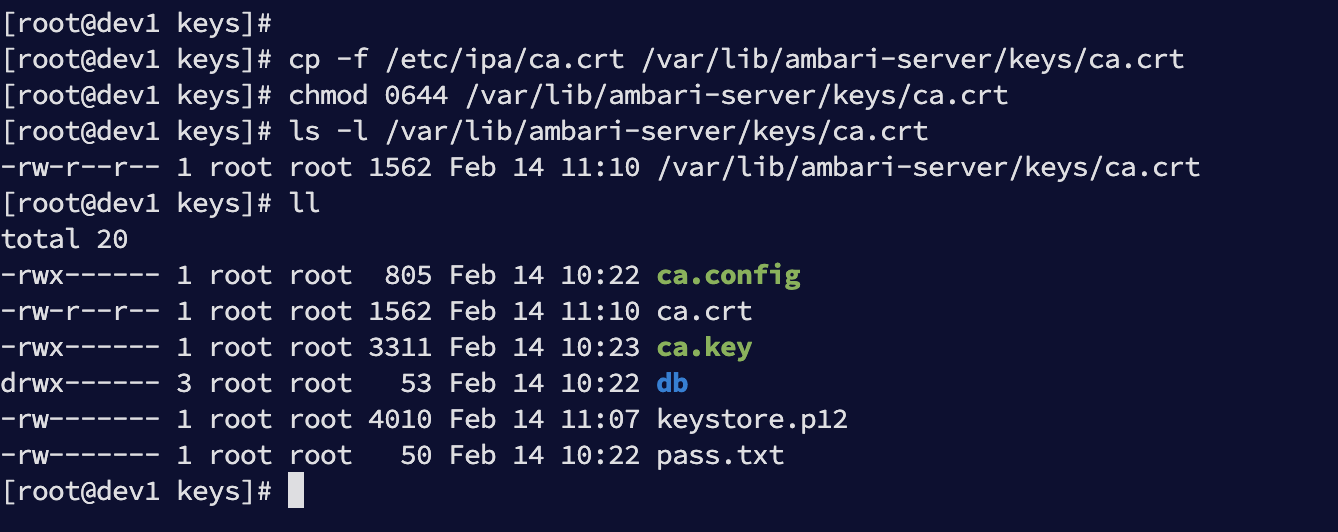
# 3.5 补齐 ca.crt
cp -f /etc/ipa/ca.crt /var/lib/ambari-server/keys/ca.crt
chmod 0644 /var/lib/ambari-server/keys/ca.crt
1
2
2
效果如下:
# 四、重启与验证
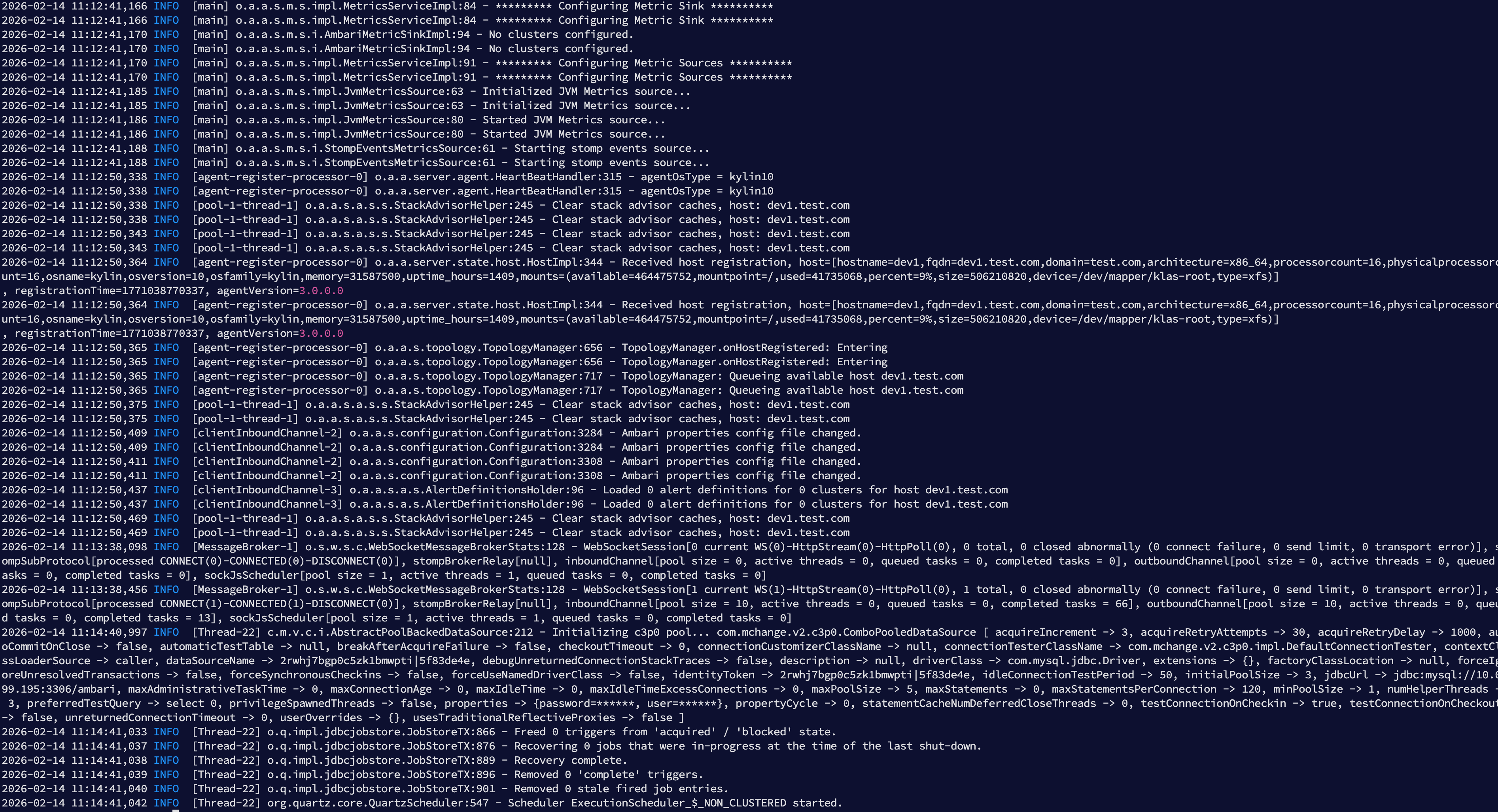
重启 Ambari:
ambari-server restart
1
启动成功示例如下:
# 4.1 最终验证检查

笔记
左侧是未使用ipa时目录结构,右侧是使用ipa时的目录结构