TT Bigdata TT Bigdata
首页
  • 产品中心

    • 当前版本
    • 版本矩阵与下载
  • 安装与使用

    • Ambari Plus 安装
      • 安装前准备
        • 实施总览
        • Step0—源码包下载与目录准备
        • Step1—系统源与基础工具准备
        • Step2—集群免密登录
        • Step3—主机名解析同步
        • Step4—Chrony 时间同步
        • Step5—Nginx 本地 Yum 文件服务
        • Step6—JDK 双环境准备
        • Step7—MySQL 驱动与本地仓库
        • Step8—MariaDB 初始化
        • Step9—AmbariServer 初始化
        • 必须 ambari plus 数据库初始化文件
      • 安装部署
        • 初始化集群
    • 组件安装
      • 组件安装总览
      • Solr 安装
      • Ranger 安装
      • Knox 安装
      • HDFS 安装
      • YARN 安装
      • MapReduce2 安装
      • Tez 安装
      • Hive 安装
      • Sqoop 安装
      • HBase 安装
      • Kafka 安装
      • Flink 安装
      • Spark 安装
      • Hue 安装
      • Livy 安装
      • Zeppelin 安装
      • DolphinScheduler 安装
      • Doris 安装
      • Celeborn 安装
      • Ozone 安装
      • Impala 安装
      • Trino 安装
      • Paimon 安装
      • Hudi 安装
      • Atlas 安装
      • Superset 安装
      • Alluxio 安装
    • 开启高可用
      • 开启高可用总览
      • HDFS 开启 HA
      • YARN 开启 HA
    • 权限与审计
      • 权限与审计总览
      • Kerberos 认证启用
      • LDAP 目录接入
    • Ambari Plus Monitor
      • IoTDB 安装与部署
      • 必须 ambari plus monitor 数据库初始化文件
      • Monitor 安装
      • 监控与告警使用
    • 常见问题
      • 安装使用常见问题
  • 发布与支持

    • 更新日志
    • 服务说明
    • 优惠政策
    • 合作共建
    • 蓝图愿景
    • 历史版本
      • 更新日志 · v2.2.3
      • 更新日志 · v2.2.2
      • 更新日志 · v2.2.1
      • 更新日志 · v2.2.0
      • 更新日志 · v2.1.0
      • 更新日志 · v2.0.0
      • 更新日志 · v1.0.7
      • 更新日志 · v1.0.6
      • 更新日志 · v1.0.5
      • 更新日志 · v1.0.4
      • 更新日志 · v1.0.3
      • 更新日志 · v1.0.2
      • 更新日志 · v1.0.1
      • 更新日志 · v1.0.0
  • 会员与访问

    • 专属内容解锁
  • Ambari 安装

    • 常规安装
      • 适用于Ambari3.0.0-kylin V10-aarch64
        • Step0—源码包下载
        • Step1—基础环境准备
        • Step2—免密登录配置
        • Step3—安装JDK-Bisheng
        • Step5—Nginx安装
        • Step6—本地yum源配置
        • Step7—Mariadb初始化
        • Step8—AmbariServer初始化
        • Step9—Ambari Web UI 初始化安装
        • [快速安装]—脚本极速部署
      • 适用于Ambari3.0.0-kylin V10-x86_64
        • Step0—源码包下载
        • Step1—基础环境准备
        • Step2—免密登录配置
        • Step3—安装JDK17与JDK1.8
        • Step5—Nginx安装
        • Step6—本地yum源配置
        • Step7—Mariadb初始化
        • Step8—AmbariServer初始化
        • Step9—Ambari Web UI 初始化安装
        • [快速安装]—脚本极速部署
      • 适用于Ambari3.0.0-ubuntu22.04
        • Step0—源码包下载
        • Step1—基础环境准备
        • Step3—安装JDK17与JDK1.8
        • Step4—时间同步(Chrony)
        • Step5—Nginx安装
        • Step6—本地apt源
        • Step7—Mariadb初始化
        • Step8—AmbariServer初始化
        • Step9—Ambari Web UI 初始化安装
        • [快速安装]—脚本极速部署
      • 适用于Ambari3.0.0-el7
        • Step0—源码包下载
        • Step3—安装JDK17(Ambari 3.0专用)
        • Step8—AmbariServer初始化
        • Step9—Ambari Web UI 初始化安装
        • [快速安装]—脚本极速部署
      • 适用于Ambari3.0.0-el8
        • Step0—源码包下载
        • Step1—基础环境准备
        • Step3—安装JDK17与JDK1.8
        • Step7—Mariadb初始化
        • Step8—AmbariServer初始化
        • Step9—Ambari Web UI 初始化安装
        • [快速安装]—脚本极速部署
      • 适用于Ambari2.8.0-el7
        • Step1—基础环境准备
        • Step2—免密登陆认证
        • Step3—安装JDK
        • Step4—时间同步(Chrony)
        • Step5—Nginx安装
        • Step6—本地yum源配置
        • Step7—Mariadb初始化
        • Step8—AmbariServer初始化
        • Step9—Ambari Web Ui 初始化安装
    • 一键部署
      • Ambari快速部署—3.0.0
        • 【Kylin V10 aarch64】强力卸载脚本
        • 【Kylin V10 aarch64】自动安装脚本
        • 【Kylin V10 x86_64】强力卸载脚本
        • 【Kylin V10 x86_64】自动安装脚本
        • 【Ubuntu22】强力卸载脚本
        • 【Ubuntu22】自动安装脚本
        • 【Rocky8.10】强力卸载脚本
        • 【Rocky8.10】自动安装脚本
        • 【Centos7.9】自动安装脚本
      • Ambari快速部署—2.8.0
        • 【Centos7.9】自动安装脚本
        • 【Centos7.9】强力卸载脚本
      • 数据库环境
        • PostgreSQL 快速安装脚本
      • JDK环境
        • 安装JDK1.8
        • 安装JDK 17
        • 安装JDK1.8-aarch64
        • 安装JDK 17-aarch64
      • MAVEN环境
        • 安装Maven3.8.4
        • 安装Maven3.9.9
      • GRADLE环境
        • 安装Gradle5.6.4
      • CONDA环境
        • 安装Miniconda2
        • 编译Ambari2.8.0——Miniconda3
      • R环境
        • 【Kylin V10 x86_64】安装R 4.4.2
        • 【Ubuntu22】安装R 4.4.2
        • 【Rocky8.10】安装R 4.4.2
        • 【CentOS7】安装R 4.4.2
  • 组件安装

    • 安装指导
    • 魔改分享
      • Phoenix-JDK17下编译的二进制包适用于Datagrip
        • Q: 高版本 DataGrip 无法使用 Phoenix 驱动
        • A: Phoenix - JDK17 制作&下载
    • 最小化安装(简单)
      • Zookeeper 安装
      • Hadoop 安装
      • Yarn安装
      • Hive 安装
      • Spark 安装
      • HBase 安装
      • Kafka 安装
      • Sqoop 安装
      • Flink 安装
      • DolphinScheduler 安装
      • Zeppelin 安装
      • Redis 安装
      • Doris安装
      • Celeborn安装
      • Ozone安装
      • Impala安装
      • Cloudbeaver 安装
      • Ambari Metrics安装
      • Solr安装
      • Ranger 安装
      • Trino安装
      • Paimon安装
      • Hudi安装
      • Atlas 安装
      • Superset 安装
      • Livy 安装
      • Alluxio 安装
      • Hue 安装
      • Knox 安装
    • 进阶安装技巧(需开启Kerberos)
      • Ambari Metrics 进阶安装技巧
      • Atlas 进阶安装技巧
    • 高可用安装(有难度)
      • Zookeeper
      • Hadoop-Namenode
      • Yarn-ResourceManager
      • Hive
      • Hbase
      • Kafka
      • DolphinScheduler
      • Redis
      • Doris
      • Celeborn
      • Ozone
      • Ranger
  • Kerberos 旧版专题

    • 实战 Kerberos
    • 自建 Kerberos
      • KDC服务初始化安装
        • KDC服务初始化安装(RHEL篇)
        • KDC服务初始化安装(Ubuntu篇)
      • 开启Kerberos认证
        • Ambari 中开启 Kerberos 认证流程详解
        • [不看会报错]-Atlas开启准备工作
        • [不看会报错]-Zeppelin开启准备工作
        • [不看会报错]-Impala开启准备工作
        • [不看会报错]-Trino开启准备工作
      • 关闭Kerberos认证
        • Ambari 中关闭 Kerberos 认证流程详解
    • FreeIPA 认证
      • FreeIPA服务端初始化
        • FreeIPA Server 安装指导
      • FreeIPA客户端初始化及Ambari开启IPA认证
        • [Step1]-FreeIPA Client 安装与入域实战
        • [Step2]-FreeIPA 初始化核心用户
        • [Step3]-Ambari 中开启 Kerberos 认证流程详解
        • [Step3-1]-krb5-conf template调整
      • 部分踩坑-问题发现
        • Ambari Server 启动失败:no valid keystore
        • FreeIPA Client 导致 Ambari 权限异常问题排查
      • 部分踩坑-完美解决
        • Ambari Server 启动失败:no valid keystore
      • 辅助测试
        • FreeIPA Client 调试安装速记
        • Ambari Server 证书调试安装速记
    • 其他优化技巧
      • Atlas-Ranger-StringUtils缺失
      • Atlas-Ranger-commons-compress缺失
    • 部分组件踩坑合集
      • Test Kerberos Client报错:Failed to kinit
      • KERBEROS SERVICE CHECK 报错
      • Ambari开启Kerberos认证加密类型错误
      • [开启Kerberos]-Solr启动失败处理
      • [开启Kerberos]-Kafka启动失败处理
      • [开启Kerberos]-Atlas启动-Hbase权限异常
      • [开启Kerberos]-Atlas启动-Solr权限异常
      • [开启Kerberos]-Atlas启动-Kafka权限异常
      • [开启Kerberos]-Hive服务检查异常处理
      • [开启Kerberos]-Trino启动-配置文件处理
      • [开启Kerberos]-Trino启动-缺失PEM证书处理
      • [开启Kerberos]-Trino启动-连接Hive失败
      • [关闭 Kerberos]-Kafka 注销异常
      • [关闭 Kerberos]-Hive 注销异常
      • Kerberos 客户端模板渲染异常处理(临时处理)
      • Kafka 启动兼容 Kerberos 源码级修改
      • Kerberos 客户端模板渲染异常处理(源码修改)
    • 实战技巧
      • Knox 接入 Trino web-ui 解决方案
      • [开启Kerberos]-Trino启动-配置模板
      • [Knox适配]-Trino-474-转发规则魔改
    • 其他技巧
      • Ambari Security 开启步骤
  • Ranger 旧版专题

    • 实战 Ranger
    • Ranger HA 旧发行版
      • 环境准备
        • [Step1] Haproxy 规划与环境安装
      • Kerberos准备
        • [Step2] 统一访问域名的 Kerberos 票据生成
        • [Step3] 调整 Kerberos Client 配置
      • 安装指导
        • [Step4] Ambari页面开启 Ranger Admin 高可用
        • [Step5] 对齐 Ranger HA 的凭证处理
    • Ranger HA ttr-release
      • [Step2] Ranger Admin HA 自动化安装
    • FreeIPA 与 LDAP
      • [Step1] Ambari 安装 Ranger 并配置 FreeIPA + LDAP
      • [Step2] 制作 Ranger Usersync 证书并应用组件
      • [Step3] 制作 Ranger Admin 证书并应用组件
      • [Step4]Ranger HDFS Repository 创建失败修复
      • [Step5]Ranger HBase Repository 创建失败修复
    • 踩坑汇总
      • 调用 Ranger API 返回 403 问题
      • Ranger Admin LDAP 认证报 Bad credentials 分析
    • 解决方案
      • Ranger Admin LDAP 认证报 Bad credentials 处理
      • Ranger HA 虚拟域名 Principal 缺失修复
      • Ranger Usersync 证书快速导入脚本(LDAPS)
      • Ranger Admin 证书快速导入脚本
      • Ranger HDFS Repository 快速处理
      • Ranger HBase / Yarn Repository 快速处理
  • 开发环境

    • Ambari-Env
      • 环境准备
      • 开始使用
    • 工具与镜像
      • Maven镜像加速
      • Gradle镜像加速
      • Node.js 多版本共存方案
      • Npm镜像加速
      • Bower镜像加速
      • R环境安装+一键安装脚本
      • PostgreSQL 快速安装
  • Ambari 编译

    • Ambari 源码编译
    • 前端开发
    • 后端开发
    • Ambari Web本地启动
  • Bigtop 编译

    • 官方组件编译
    • 扩展组件编译
    • 工具与镜像
      • Ivy配置私有镜像仓库
      • APT仓库增量更新
      • Temurin JDK 23快速安装
  • Ambari 深度专题

    • Ambari Server 原理
    • Ambari Metrics 解读
  • Bigtop 方法论

    • Bigtop 深度专题
  • 自定义集成

    • Redis集成教学
    • Dolphin集成教学
    • Doris集成教学
    • 各组件代码
    • 通用代码模板
  • 报错解决

    • Ambari 报错
      • Ambari Views
        • MDEP-187 从根因到修复
        • Loading node labels问题解决
      • Ambari
        • phantomjs下载失败问题
        • 编译问题:GCC 安装与配置
        • bower CERT_HAS_EXPIRED 错误问题
        • Ambari-admin包出现bower install错误
        • Cannot run program "rpmbuild"
        • Python: No such file or directory
        • Yarn解压报错EOFException排查与解决
        • Rpm-maven-plugin与shebang兼容性报错
        • Rpm-maven-plugin 最佳实践
        • Bower install拉取失败解决
        • 缺少 python3 报错解决
        • Python(>=2.6) but is not installed
        • SSL_ERROR_SYSCALL 的修复方法
      • Ambari-infra
        • org.apache.commons.io does not exist
        • maven-compiler-plugin:3.3:compile
        • java.security.InvalidAlgorithmParameterException
        • ambari-infra-solr-plugin依赖报错解决方案
      • Ambari-metrics
        • psutil 缺失与 archive_util 导入错误
        • Ambari-Metrics Monitor 启动失败
        • Ambari-Metrics Monitor 启动失败
        • Ambari-Metrics Monitor 启动失败
        • Ambari-Metrics Monitor 启动失败
    • Bigtop 报错
      • Hadoop
        • /usr/bin/env: python3: No such file or directory 问题
        • error [email protected]: The engine "node" is incompatible with this module 错误
        • CMake 3.1 or higher is required. You are running version 2.8.12.2 错误
        • fuse is needed by hadoop_3_2_0-3.3.4-1.el7.x86_64 错误
        • Cyrus SASL/GSASL 缺失解决
        • Protobuf PROTOC LIBRARY NOTFOUND
        • EVP CIPHER CTX block size 报错
        • TIRPC_INCLUDE_DIRS NOTFOUND解决
        • 缺失 redhat-rpm-config 报错
      • Spark
        • evaluate,httr2,knitr 包不存在解决办法
        • Pandoc 缺失导致 SparkR 构建失败
      • Trino
        • Trino requires Temurin or Oracle JDK for development
        • GLIBC 与 GLIBCXX 版本过低
      • Hudi
        • javax.annotation.Nullable 缺失
        • 缺失 everit-json-schema 依赖
      • Paimon
        • 缺失 Jindo 依赖
      • Livy
        • apache-incubator-disclaimer-resource-bundle 缺失
      • Flink
        • .git can't be found during `prepare`
        • Angular CLI requires Node >=14.15
        • npm run ci-check 报错退出码 3
        • TypeScript 类型声明错误
      • Atlas
        • Atlas 集成 JanusGraph 启动时报 Solr6Index 实例化失败解决
      • Superset
        • urllib3 v2 only supports OpenSSL 1.1.1+
      • Jsvc
        • jsvc 依赖缺失导致 rpm 构建失败
      • Zookeeper
        • ZooKeeper 构建(缺少 hostname 命令)
        • cppunit-devel 依赖缺失解决方案
      • Hive
        • org.apache.logging.slf4j.Log4j.Marker is not public 解决方案
      • Sqoop
        • xmlto is needed by 解决方法
        • lsb_release、rsync 缺失导致构建中断
        • asciidoc 警告与 relnotes.py 语法不兼容分析
      • Cloudbeaver
        • SelectExpressionItem cannot be resolved 报错分析
      • Bigtop-select
        • bigtop-select 打包缺 compat 报错修复
        • bigtop-select 打包缺 control 文件报错修复
      • Knox
        • xmlsectool 依赖缺失问题解析
        • webhdfs-test 依赖收敛冲突问题处理
        • Invalid keystore format 问题处理
        • Knox is not allowed to impersonate admin
        • X-Forwarded-For 406 错误的原因与处理
      • Hue
        • Hue 访问 Hadoop 权限问题
        • Hue 访问 Yarn 权限问题
        • Hue 访问 Impala 时间格式问题
        • requests-kerberos 兼容性问题
        • libmariadb.so.3 缺失导致 syncdb 失败
        • 生产环境下解决方案——Hue/query_api.py
  • 系统适配

    • Kylin V10系列
      • 通用部分
        • not set for current OS
          • 解读-不支持操作系统解读
          • 解决-增加系统支持范围(一)
          • 解决-增加系统支持范围(二)
          • 解决-增加系统支持范围(三)
          • 解决-增加系统支持范围(四)
        • 解决-TLS1.3导致依赖下载失败终极办法
    • Rocky系列
      • 案例-Ambari重启失败
        • 解读-Ambari3.0.0重启失败问题
        • 解决-追加日志锚点
        • 解决-进一步分析与改造[一]
        • 解决-进一步分析与改造[二]
      • 案例-数据库连接问题
        • 解读-安装完毕后出现Unable to load version data from server
      • 案例-日志级别控制问题
        • 解读-Ambari3.0.0无法调整日志输出级别
        • 解决-临时处理日志级别不生效
        • 解决-源码级处理日志不生效
      • 案例-找不到snappy-devel
        • 解决-HDFS报snappy-devel包缺失现象
      • 案例-编译高级功能
        • 解读-开启Hadoop下ISAL-L和PMDK功能
        • 解决-ISAL-L和PMDK功能完整环境包
    • Ubuntu系列
      • 案例-首次编译环境处理
        • 解决-dpkg-buildpackage依赖缺失
        • 解决-devscripts依赖缺失
        • 首次编译-环境初始化
      • 案例-Bigtop适配Debian
        • 解读-bigtop-select支持deb
        • 解决-Step1-解除限制拥抱deb
        • 解决-Step2-补全代码结构
      • 案例-安装中遇到的问题
        • 解读-APT私有镜像验证失败剖析
        • 解决-快速处理APT私有镜像验证失败问题
      • 案例-编译高级功能
        • 解读-开启Hadoop下ISAL-L和PMDK功能
        • 解决-ISAL-L和PMDK功能完整环境包
    • Centos系列
    • OpenEuler系列
  • 监控与调优

    • Ambari-Metrics插件
    • Infinity插件
      • 准备工作
        • Ambari-Metrics插件失效原因
        • Infinity 插件选择与安装小技巧
        • Grafana9.3.2+Infinity2.3.1
          • Grafana快速安装Infinity插件
        • Grafana11.5.2+Infinity3.4.1
          • Grafana快速安装Infinity插件
      • 创建最简DEMO
        • Grafana9.3.2+Infinity2.3.1
          • 快速创建一个简单demo
          • Panel JSON 配置示例
        • Grafana11.5.2+Infinity3.4.1
          • 快速创建一个简单demo
          • Panel JSON 配置示例
    • 组件配置调优
      • HDFS
        • [0001]访问 HDFS Web UI Logs Unauthorized 失败
        • [0001]>>>>>>Hadoop管理员配置优化
      • RANGER
        • [0002]Ranger 审计日志时间与系统时间不一致调整
        • [0002]>>>>>日期统一规则调优
        • [0001]Resource lookup fail 线程池超时优化
        • [0001]>>>>>>线程池与超时参数调优
    • 组件调优指南
    • 1v1指导调优
  • BUG临时处理

    • 版本-v2.2.2-以前
      • [22213]Ambari 3.0.0 滚动重启只执行一台主机修复
      • [22213]解决办法
      • [22212]Ambari 3.0.0 左侧服务菜单滚动条缺失修复
      • [22212]解决办法
      • [22211]Atlas 缺失 __AtlasUserProfile
      • [22211]解决办法
      • [22210]Atlas Hook 无权限访问 Kafka Topic
      • [22210]解决办法
      • [22209]Ranger Kafka Lookup 缺少 JAAS 配置
      • [22209]解决办法
      • [22208]Atlas Hook 消费 Kafka 报错
      • [22208]解决办法
      • [22207]Hue 内访问 SparkSql 失败
      • [22207]解决办法
      • [22206]Ranger 调用 Knox Topologies 失败
      • [22206]解决办法
      • [22205]Ranger Admin 轮刷ZK 缺失 JAAS
      • [22205]解决办法
      • [22204]KNOX policymgr-ssl 启动告警
      • [22204]解决办法
      • [22203]Hue 服务启动后秒退
      • [22203]解决办法
      • [22202]Hue 启动失败: hadoop 用户不存在
      • [22202]解决办法
      • [22201]Hive 使用 Tez 引擎插入数据失败
      • [22201]解决办法
    • 版本-v2.1.0-以前
      • Sqlline 启动卡死问题处理
  • 实验室

    • VIEW插件
      • CAPACITY-SCHEDULER-VIEW
        • Ambari CAPACITY-SCHEDULER 插件安装详解
      • FILE-VIEW
        • Ambari FILE-VIEW 插件安装详解
    • JIRA速查
    • 虚拟环境思路
GitHub (opens new window)

JaneTTR

数据酿造智慧,每一滴都是沉淀!
首页
  • 产品中心

    • 当前版本
    • 版本矩阵与下载
  • 安装与使用

    • Ambari Plus 安装
      • 安装前准备
        • 实施总览
        • Step0—源码包下载与目录准备
        • Step1—系统源与基础工具准备
        • Step2—集群免密登录
        • Step3—主机名解析同步
        • Step4—Chrony 时间同步
        • Step5—Nginx 本地 Yum 文件服务
        • Step6—JDK 双环境准备
        • Step7—MySQL 驱动与本地仓库
        • Step8—MariaDB 初始化
        • Step9—AmbariServer 初始化
        • 必须 ambari plus 数据库初始化文件
      • 安装部署
        • 初始化集群
    • 组件安装
      • 组件安装总览
      • Solr 安装
      • Ranger 安装
      • Knox 安装
      • HDFS 安装
      • YARN 安装
      • MapReduce2 安装
      • Tez 安装
      • Hive 安装
      • Sqoop 安装
      • HBase 安装
      • Kafka 安装
      • Flink 安装
      • Spark 安装
      • Hue 安装
      • Livy 安装
      • Zeppelin 安装
      • DolphinScheduler 安装
      • Doris 安装
      • Celeborn 安装
      • Ozone 安装
      • Impala 安装
      • Trino 安装
      • Paimon 安装
      • Hudi 安装
      • Atlas 安装
      • Superset 安装
      • Alluxio 安装
    • 开启高可用
      • 开启高可用总览
      • HDFS 开启 HA
      • YARN 开启 HA
    • 权限与审计
      • 权限与审计总览
      • Kerberos 认证启用
      • LDAP 目录接入
    • Ambari Plus Monitor
      • IoTDB 安装与部署
      • 必须 ambari plus monitor 数据库初始化文件
      • Monitor 安装
      • 监控与告警使用
    • 常见问题
      • 安装使用常见问题
  • 发布与支持

    • 更新日志
    • 服务说明
    • 优惠政策
    • 合作共建
    • 蓝图愿景
    • 历史版本
      • 更新日志 · v2.2.3
      • 更新日志 · v2.2.2
      • 更新日志 · v2.2.1
      • 更新日志 · v2.2.0
      • 更新日志 · v2.1.0
      • 更新日志 · v2.0.0
      • 更新日志 · v1.0.7
      • 更新日志 · v1.0.6
      • 更新日志 · v1.0.5
      • 更新日志 · v1.0.4
      • 更新日志 · v1.0.3
      • 更新日志 · v1.0.2
      • 更新日志 · v1.0.1
      • 更新日志 · v1.0.0
  • 会员与访问

    • 专属内容解锁
  • Ambari 安装

    • 常规安装
      • 适用于Ambari3.0.0-kylin V10-aarch64
        • Step0—源码包下载
        • Step1—基础环境准备
        • Step2—免密登录配置
        • Step3—安装JDK-Bisheng
        • Step5—Nginx安装
        • Step6—本地yum源配置
        • Step7—Mariadb初始化
        • Step8—AmbariServer初始化
        • Step9—Ambari Web UI 初始化安装
        • [快速安装]—脚本极速部署
      • 适用于Ambari3.0.0-kylin V10-x86_64
        • Step0—源码包下载
        • Step1—基础环境准备
        • Step2—免密登录配置
        • Step3—安装JDK17与JDK1.8
        • Step5—Nginx安装
        • Step6—本地yum源配置
        • Step7—Mariadb初始化
        • Step8—AmbariServer初始化
        • Step9—Ambari Web UI 初始化安装
        • [快速安装]—脚本极速部署
      • 适用于Ambari3.0.0-ubuntu22.04
        • Step0—源码包下载
        • Step1—基础环境准备
        • Step3—安装JDK17与JDK1.8
        • Step4—时间同步(Chrony)
        • Step5—Nginx安装
        • Step6—本地apt源
        • Step7—Mariadb初始化
        • Step8—AmbariServer初始化
        • Step9—Ambari Web UI 初始化安装
        • [快速安装]—脚本极速部署
      • 适用于Ambari3.0.0-el7
        • Step0—源码包下载
        • Step3—安装JDK17(Ambari 3.0专用)
        • Step8—AmbariServer初始化
        • Step9—Ambari Web UI 初始化安装
        • [快速安装]—脚本极速部署
      • 适用于Ambari3.0.0-el8
        • Step0—源码包下载
        • Step1—基础环境准备
        • Step3—安装JDK17与JDK1.8
        • Step7—Mariadb初始化
        • Step8—AmbariServer初始化
        • Step9—Ambari Web UI 初始化安装
        • [快速安装]—脚本极速部署
      • 适用于Ambari2.8.0-el7
        • Step1—基础环境准备
        • Step2—免密登陆认证
        • Step3—安装JDK
        • Step4—时间同步(Chrony)
        • Step5—Nginx安装
        • Step6—本地yum源配置
        • Step7—Mariadb初始化
        • Step8—AmbariServer初始化
        • Step9—Ambari Web Ui 初始化安装
    • 一键部署
      • Ambari快速部署—3.0.0
        • 【Kylin V10 aarch64】强力卸载脚本
        • 【Kylin V10 aarch64】自动安装脚本
        • 【Kylin V10 x86_64】强力卸载脚本
        • 【Kylin V10 x86_64】自动安装脚本
        • 【Ubuntu22】强力卸载脚本
        • 【Ubuntu22】自动安装脚本
        • 【Rocky8.10】强力卸载脚本
        • 【Rocky8.10】自动安装脚本
        • 【Centos7.9】自动安装脚本
      • Ambari快速部署—2.8.0
        • 【Centos7.9】自动安装脚本
        • 【Centos7.9】强力卸载脚本
      • 数据库环境
        • PostgreSQL 快速安装脚本
      • JDK环境
        • 安装JDK1.8
        • 安装JDK 17
        • 安装JDK1.8-aarch64
        • 安装JDK 17-aarch64
      • MAVEN环境
        • 安装Maven3.8.4
        • 安装Maven3.9.9
      • GRADLE环境
        • 安装Gradle5.6.4
      • CONDA环境
        • 安装Miniconda2
        • 编译Ambari2.8.0——Miniconda3
      • R环境
        • 【Kylin V10 x86_64】安装R 4.4.2
        • 【Ubuntu22】安装R 4.4.2
        • 【Rocky8.10】安装R 4.4.2
        • 【CentOS7】安装R 4.4.2
  • 组件安装

    • 安装指导
    • 魔改分享
      • Phoenix-JDK17下编译的二进制包适用于Datagrip
        • Q: 高版本 DataGrip 无法使用 Phoenix 驱动
        • A: Phoenix - JDK17 制作&下载
    • 最小化安装(简单)
      • Zookeeper 安装
      • Hadoop 安装
      • Yarn安装
      • Hive 安装
      • Spark 安装
      • HBase 安装
      • Kafka 安装
      • Sqoop 安装
      • Flink 安装
      • DolphinScheduler 安装
      • Zeppelin 安装
      • Redis 安装
      • Doris安装
      • Celeborn安装
      • Ozone安装
      • Impala安装
      • Cloudbeaver 安装
      • Ambari Metrics安装
      • Solr安装
      • Ranger 安装
      • Trino安装
      • Paimon安装
      • Hudi安装
      • Atlas 安装
      • Superset 安装
      • Livy 安装
      • Alluxio 安装
      • Hue 安装
      • Knox 安装
    • 进阶安装技巧(需开启Kerberos)
      • Ambari Metrics 进阶安装技巧
      • Atlas 进阶安装技巧
    • 高可用安装(有难度)
      • Zookeeper
      • Hadoop-Namenode
      • Yarn-ResourceManager
      • Hive
      • Hbase
      • Kafka
      • DolphinScheduler
      • Redis
      • Doris
      • Celeborn
      • Ozone
      • Ranger
  • Kerberos 旧版专题

    • 实战 Kerberos
    • 自建 Kerberos
      • KDC服务初始化安装
        • KDC服务初始化安装(RHEL篇)
        • KDC服务初始化安装(Ubuntu篇)
      • 开启Kerberos认证
        • Ambari 中开启 Kerberos 认证流程详解
        • [不看会报错]-Atlas开启准备工作
        • [不看会报错]-Zeppelin开启准备工作
        • [不看会报错]-Impala开启准备工作
        • [不看会报错]-Trino开启准备工作
      • 关闭Kerberos认证
        • Ambari 中关闭 Kerberos 认证流程详解
    • FreeIPA 认证
      • FreeIPA服务端初始化
        • FreeIPA Server 安装指导
      • FreeIPA客户端初始化及Ambari开启IPA认证
        • [Step1]-FreeIPA Client 安装与入域实战
        • [Step2]-FreeIPA 初始化核心用户
        • [Step3]-Ambari 中开启 Kerberos 认证流程详解
        • [Step3-1]-krb5-conf template调整
      • 部分踩坑-问题发现
        • Ambari Server 启动失败:no valid keystore
        • FreeIPA Client 导致 Ambari 权限异常问题排查
      • 部分踩坑-完美解决
        • Ambari Server 启动失败:no valid keystore
      • 辅助测试
        • FreeIPA Client 调试安装速记
        • Ambari Server 证书调试安装速记
    • 其他优化技巧
      • Atlas-Ranger-StringUtils缺失
      • Atlas-Ranger-commons-compress缺失
    • 部分组件踩坑合集
      • Test Kerberos Client报错:Failed to kinit
      • KERBEROS SERVICE CHECK 报错
      • Ambari开启Kerberos认证加密类型错误
      • [开启Kerberos]-Solr启动失败处理
      • [开启Kerberos]-Kafka启动失败处理
      • [开启Kerberos]-Atlas启动-Hbase权限异常
      • [开启Kerberos]-Atlas启动-Solr权限异常
      • [开启Kerberos]-Atlas启动-Kafka权限异常
      • [开启Kerberos]-Hive服务检查异常处理
      • [开启Kerberos]-Trino启动-配置文件处理
      • [开启Kerberos]-Trino启动-缺失PEM证书处理
      • [开启Kerberos]-Trino启动-连接Hive失败
      • [关闭 Kerberos]-Kafka 注销异常
      • [关闭 Kerberos]-Hive 注销异常
      • Kerberos 客户端模板渲染异常处理(临时处理)
      • Kafka 启动兼容 Kerberos 源码级修改
      • Kerberos 客户端模板渲染异常处理(源码修改)
    • 实战技巧
      • Knox 接入 Trino web-ui 解决方案
      • [开启Kerberos]-Trino启动-配置模板
      • [Knox适配]-Trino-474-转发规则魔改
    • 其他技巧
      • Ambari Security 开启步骤
  • Ranger 旧版专题

    • 实战 Ranger
    • Ranger HA 旧发行版
      • 环境准备
        • [Step1] Haproxy 规划与环境安装
      • Kerberos准备
        • [Step2] 统一访问域名的 Kerberos 票据生成
        • [Step3] 调整 Kerberos Client 配置
      • 安装指导
        • [Step4] Ambari页面开启 Ranger Admin 高可用
        • [Step5] 对齐 Ranger HA 的凭证处理
    • Ranger HA ttr-release
      • [Step2] Ranger Admin HA 自动化安装
    • FreeIPA 与 LDAP
      • [Step1] Ambari 安装 Ranger 并配置 FreeIPA + LDAP
      • [Step2] 制作 Ranger Usersync 证书并应用组件
      • [Step3] 制作 Ranger Admin 证书并应用组件
      • [Step4]Ranger HDFS Repository 创建失败修复
      • [Step5]Ranger HBase Repository 创建失败修复
    • 踩坑汇总
      • 调用 Ranger API 返回 403 问题
      • Ranger Admin LDAP 认证报 Bad credentials 分析
    • 解决方案
      • Ranger Admin LDAP 认证报 Bad credentials 处理
      • Ranger HA 虚拟域名 Principal 缺失修复
      • Ranger Usersync 证书快速导入脚本(LDAPS)
      • Ranger Admin 证书快速导入脚本
      • Ranger HDFS Repository 快速处理
      • Ranger HBase / Yarn Repository 快速处理
  • 开发环境

    • Ambari-Env
      • 环境准备
      • 开始使用
    • 工具与镜像
      • Maven镜像加速
      • Gradle镜像加速
      • Node.js 多版本共存方案
      • Npm镜像加速
      • Bower镜像加速
      • R环境安装+一键安装脚本
      • PostgreSQL 快速安装
  • Ambari 编译

    • Ambari 源码编译
    • 前端开发
    • 后端开发
    • Ambari Web本地启动
  • Bigtop 编译

    • 官方组件编译
    • 扩展组件编译
    • 工具与镜像
      • Ivy配置私有镜像仓库
      • APT仓库增量更新
      • Temurin JDK 23快速安装
  • Ambari 深度专题

    • Ambari Server 原理
    • Ambari Metrics 解读
  • Bigtop 方法论

    • Bigtop 深度专题
  • 自定义集成

    • Redis集成教学
    • Dolphin集成教学
    • Doris集成教学
    • 各组件代码
    • 通用代码模板
  • 报错解决

    • Ambari 报错
      • Ambari Views
        • MDEP-187 从根因到修复
        • Loading node labels问题解决
      • Ambari
        • phantomjs下载失败问题
        • 编译问题:GCC 安装与配置
        • bower CERT_HAS_EXPIRED 错误问题
        • Ambari-admin包出现bower install错误
        • Cannot run program "rpmbuild"
        • Python: No such file or directory
        • Yarn解压报错EOFException排查与解决
        • Rpm-maven-plugin与shebang兼容性报错
        • Rpm-maven-plugin 最佳实践
        • Bower install拉取失败解决
        • 缺少 python3 报错解决
        • Python(>=2.6) but is not installed
        • SSL_ERROR_SYSCALL 的修复方法
      • Ambari-infra
        • org.apache.commons.io does not exist
        • maven-compiler-plugin:3.3:compile
        • java.security.InvalidAlgorithmParameterException
        • ambari-infra-solr-plugin依赖报错解决方案
      • Ambari-metrics
        • psutil 缺失与 archive_util 导入错误
        • Ambari-Metrics Monitor 启动失败
        • Ambari-Metrics Monitor 启动失败
        • Ambari-Metrics Monitor 启动失败
        • Ambari-Metrics Monitor 启动失败
    • Bigtop 报错
      • Hadoop
        • /usr/bin/env: python3: No such file or directory 问题
        • error [email protected]: The engine "node" is incompatible with this module 错误
        • CMake 3.1 or higher is required. You are running version 2.8.12.2 错误
        • fuse is needed by hadoop_3_2_0-3.3.4-1.el7.x86_64 错误
        • Cyrus SASL/GSASL 缺失解决
        • Protobuf PROTOC LIBRARY NOTFOUND
        • EVP CIPHER CTX block size 报错
        • TIRPC_INCLUDE_DIRS NOTFOUND解决
        • 缺失 redhat-rpm-config 报错
      • Spark
        • evaluate,httr2,knitr 包不存在解决办法
        • Pandoc 缺失导致 SparkR 构建失败
      • Trino
        • Trino requires Temurin or Oracle JDK for development
        • GLIBC 与 GLIBCXX 版本过低
      • Hudi
        • javax.annotation.Nullable 缺失
        • 缺失 everit-json-schema 依赖
      • Paimon
        • 缺失 Jindo 依赖
      • Livy
        • apache-incubator-disclaimer-resource-bundle 缺失
      • Flink
        • .git can't be found during `prepare`
        • Angular CLI requires Node >=14.15
        • npm run ci-check 报错退出码 3
        • TypeScript 类型声明错误
      • Atlas
        • Atlas 集成 JanusGraph 启动时报 Solr6Index 实例化失败解决
      • Superset
        • urllib3 v2 only supports OpenSSL 1.1.1+
      • Jsvc
        • jsvc 依赖缺失导致 rpm 构建失败
      • Zookeeper
        • ZooKeeper 构建(缺少 hostname 命令)
        • cppunit-devel 依赖缺失解决方案
      • Hive
        • org.apache.logging.slf4j.Log4j.Marker is not public 解决方案
      • Sqoop
        • xmlto is needed by 解决方法
        • lsb_release、rsync 缺失导致构建中断
        • asciidoc 警告与 relnotes.py 语法不兼容分析
      • Cloudbeaver
        • SelectExpressionItem cannot be resolved 报错分析
      • Bigtop-select
        • bigtop-select 打包缺 compat 报错修复
        • bigtop-select 打包缺 control 文件报错修复
      • Knox
        • xmlsectool 依赖缺失问题解析
        • webhdfs-test 依赖收敛冲突问题处理
        • Invalid keystore format 问题处理
        • Knox is not allowed to impersonate admin
        • X-Forwarded-For 406 错误的原因与处理
      • Hue
        • Hue 访问 Hadoop 权限问题
        • Hue 访问 Yarn 权限问题
        • Hue 访问 Impala 时间格式问题
        • requests-kerberos 兼容性问题
        • libmariadb.so.3 缺失导致 syncdb 失败
        • 生产环境下解决方案——Hue/query_api.py
  • 系统适配

    • Kylin V10系列
      • 通用部分
        • not set for current OS
          • 解读-不支持操作系统解读
          • 解决-增加系统支持范围(一)
          • 解决-增加系统支持范围(二)
          • 解决-增加系统支持范围(三)
          • 解决-增加系统支持范围(四)
        • 解决-TLS1.3导致依赖下载失败终极办法
    • Rocky系列
      • 案例-Ambari重启失败
        • 解读-Ambari3.0.0重启失败问题
        • 解决-追加日志锚点
        • 解决-进一步分析与改造[一]
        • 解决-进一步分析与改造[二]
      • 案例-数据库连接问题
        • 解读-安装完毕后出现Unable to load version data from server
      • 案例-日志级别控制问题
        • 解读-Ambari3.0.0无法调整日志输出级别
        • 解决-临时处理日志级别不生效
        • 解决-源码级处理日志不生效
      • 案例-找不到snappy-devel
        • 解决-HDFS报snappy-devel包缺失现象
      • 案例-编译高级功能
        • 解读-开启Hadoop下ISAL-L和PMDK功能
        • 解决-ISAL-L和PMDK功能完整环境包
    • Ubuntu系列
      • 案例-首次编译环境处理
        • 解决-dpkg-buildpackage依赖缺失
        • 解决-devscripts依赖缺失
        • 首次编译-环境初始化
      • 案例-Bigtop适配Debian
        • 解读-bigtop-select支持deb
        • 解决-Step1-解除限制拥抱deb
        • 解决-Step2-补全代码结构
      • 案例-安装中遇到的问题
        • 解读-APT私有镜像验证失败剖析
        • 解决-快速处理APT私有镜像验证失败问题
      • 案例-编译高级功能
        • 解读-开启Hadoop下ISAL-L和PMDK功能
        • 解决-ISAL-L和PMDK功能完整环境包
    • Centos系列
    • OpenEuler系列
  • 监控与调优

    • Ambari-Metrics插件
    • Infinity插件
      • 准备工作
        • Ambari-Metrics插件失效原因
        • Infinity 插件选择与安装小技巧
        • Grafana9.3.2+Infinity2.3.1
          • Grafana快速安装Infinity插件
        • Grafana11.5.2+Infinity3.4.1
          • Grafana快速安装Infinity插件
      • 创建最简DEMO
        • Grafana9.3.2+Infinity2.3.1
          • 快速创建一个简单demo
          • Panel JSON 配置示例
        • Grafana11.5.2+Infinity3.4.1
          • 快速创建一个简单demo
          • Panel JSON 配置示例
    • 组件配置调优
      • HDFS
        • [0001]访问 HDFS Web UI Logs Unauthorized 失败
        • [0001]>>>>>>Hadoop管理员配置优化
      • RANGER
        • [0002]Ranger 审计日志时间与系统时间不一致调整
        • [0002]>>>>>日期统一规则调优
        • [0001]Resource lookup fail 线程池超时优化
        • [0001]>>>>>>线程池与超时参数调优
    • 组件调优指南
    • 1v1指导调优
  • BUG临时处理

    • 版本-v2.2.2-以前
      • [22213]Ambari 3.0.0 滚动重启只执行一台主机修复
      • [22213]解决办法
      • [22212]Ambari 3.0.0 左侧服务菜单滚动条缺失修复
      • [22212]解决办法
      • [22211]Atlas 缺失 __AtlasUserProfile
      • [22211]解决办法
      • [22210]Atlas Hook 无权限访问 Kafka Topic
      • [22210]解决办法
      • [22209]Ranger Kafka Lookup 缺少 JAAS 配置
      • [22209]解决办法
      • [22208]Atlas Hook 消费 Kafka 报错
      • [22208]解决办法
      • [22207]Hue 内访问 SparkSql 失败
      • [22207]解决办法
      • [22206]Ranger 调用 Knox Topologies 失败
      • [22206]解决办法
      • [22205]Ranger Admin 轮刷ZK 缺失 JAAS
      • [22205]解决办法
      • [22204]KNOX policymgr-ssl 启动告警
      • [22204]解决办法
      • [22203]Hue 服务启动后秒退
      • [22203]解决办法
      • [22202]Hue 启动失败: hadoop 用户不存在
      • [22202]解决办法
      • [22201]Hive 使用 Tez 引擎插入数据失败
      • [22201]解决办法
    • 版本-v2.1.0-以前
      • Sqlline 启动卡死问题处理
  • 实验室

    • VIEW插件
      • CAPACITY-SCHEDULER-VIEW
        • Ambari CAPACITY-SCHEDULER 插件安装详解
      • FILE-VIEW
        • Ambari FILE-VIEW 插件安装详解
    • JIRA速查
    • 虚拟环境思路
GitHub (opens new window)
  • 报错解决

    • Ambari 报错
      • Ambari Views

      • Ambari

      • Ambari-infra

      • Ambari-metrics

        • psutil 缺失与 archive_util 导入错误
        • Ambari-Metrics Monitor 启动失败
        • Ambari-Metrics Monitor 启动失败
        • Ambari-Metrics Monitor 启动失败
          • 一、问题现象与环境说明
          • 二、快速定位结论
          • 三、修复步骤(按顺序执行)
            • 1、安装 Python2 与编译依赖
            • 2、临时将系统默认 python 指向 Python2
            • 3、修正 site-packages 目录与权限
            • 4、重试由 Ambari 拉起 Monitor
          • 四、原始报错日志
        • Ambari-Metrics Monitor 启动失败
    • Bigtop 报错
  • 系统适配

  • 监控与调优

  • BUG临时处理
  • 实验室

  • 运维资料
  • 报错解决
  • Ambari 报错
  • Ambari-metrics
JaneTTR
2025-08-28
目录

Ambari-Metrics Monitor 启动失败rocky8

# 一、问题现象与环境说明

现象

Ambari-Metrics Monitor 启动失败,退出码 255;日志中同时出现 psutil 构建失败 与 Python 语法报错:
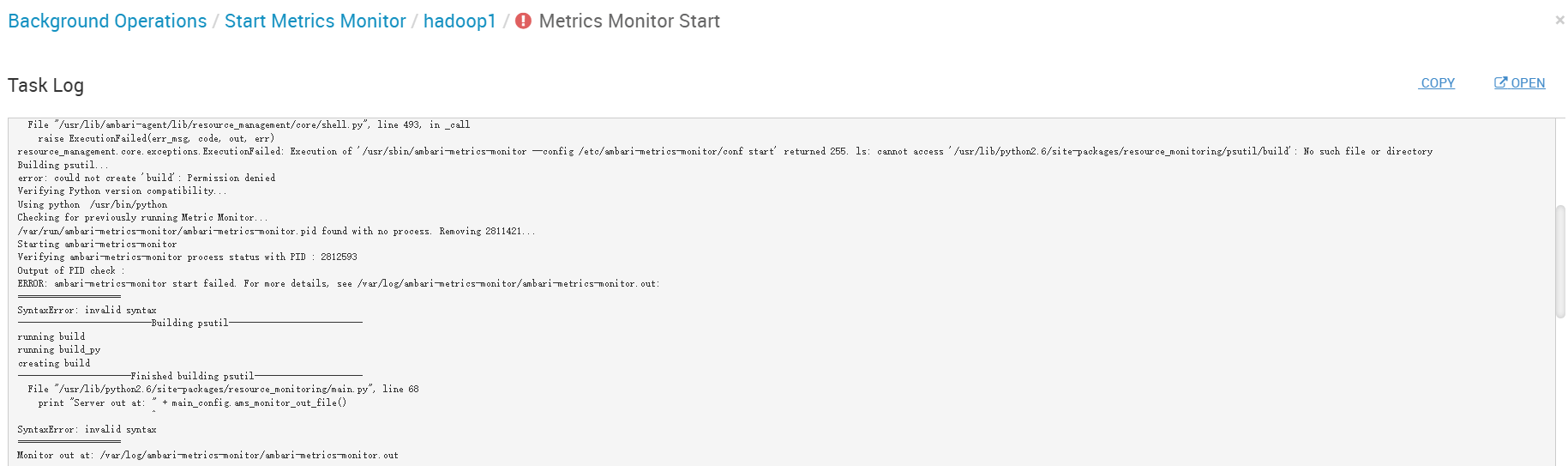
启动报错

resource_management.core.exceptions.ExecutionFailed: Execution of '/usr/sbin/ambari-metrics-monitor --config /etc/ambari-metrics-monitor/conf start' returned 255. ls: cannot access '/usr/lib/python2.6/site-packages/resource_monitoring/psutil/build': No such file or directory
Building psutil...
error: could not create 'build': Permission denied
...
SyntaxError: invalid syntax
  File "/usr/lib/python2.6/site-packages/resource_monitoring/main.py", line 68
    print "Server out at: " + main_config.ams_monitor_out_file()
                          ^
SyntaxError: invalid syntax
1
2
3
4
5
6
7
8
9

运行环境:Rocky Linux 8 / Stack 3.2.0 / 默认 Python3.9(系统) 进程用户:ams:hadoop(由 Ambari 管理)

# 二、快速定位结论

维度 现象 根因 结论
Python 版本 SyntaxError: print "..." 这是 Python2 语法,被 Python3 解释器执行 Monitor 组件依赖 Python2,但当前默认 python 指向 Python3
psutil 构建 Permission denied 于 /usr/lib/python2.6/.../psutil/build 以 ams 用户写入系统级 site-packages,且目标目录(2.6)异常 site-packages 版本路径不匹配(应该是 2.7),同时存在目录权限问题
目录版本 路径固定为 python2.6 老版本脚本中硬编码或变量拼装指向 2.6 需做目录适配(2.6 ↔ 2.7 映射)以兼容

结论

这是一个双重问题: 1)Monitor 的 Python 代码以 Python2 编写,却在 Python3 环境下执行; 2)psutil 需要在 Python2 的站点目录构建,但路径与权限都不对。

# 三、修复步骤(按顺序执行)

# 1、安装 Python2 与编译依赖

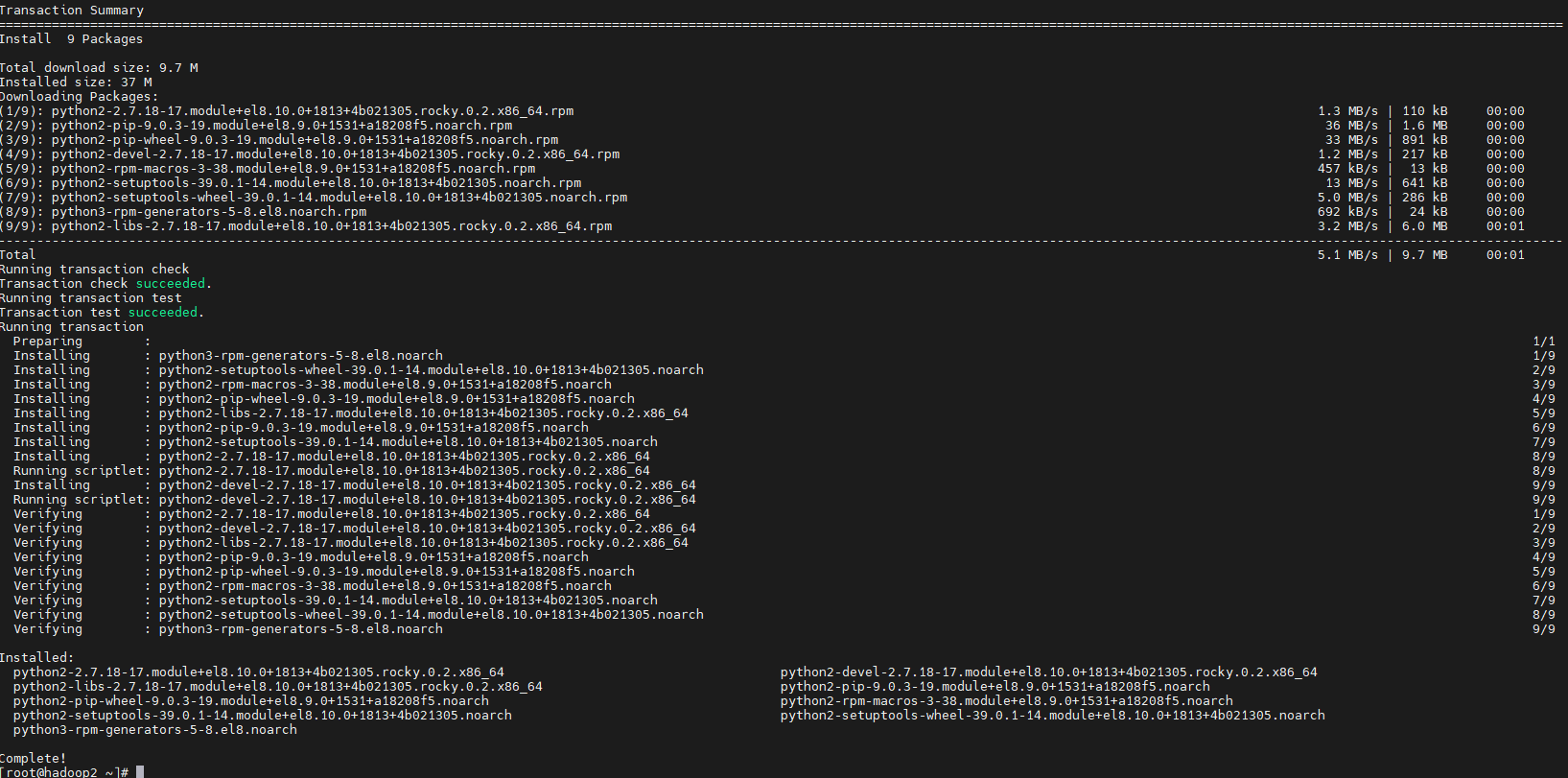
dnf install -y python2 python2-devel gcc gcc-c++ make
1
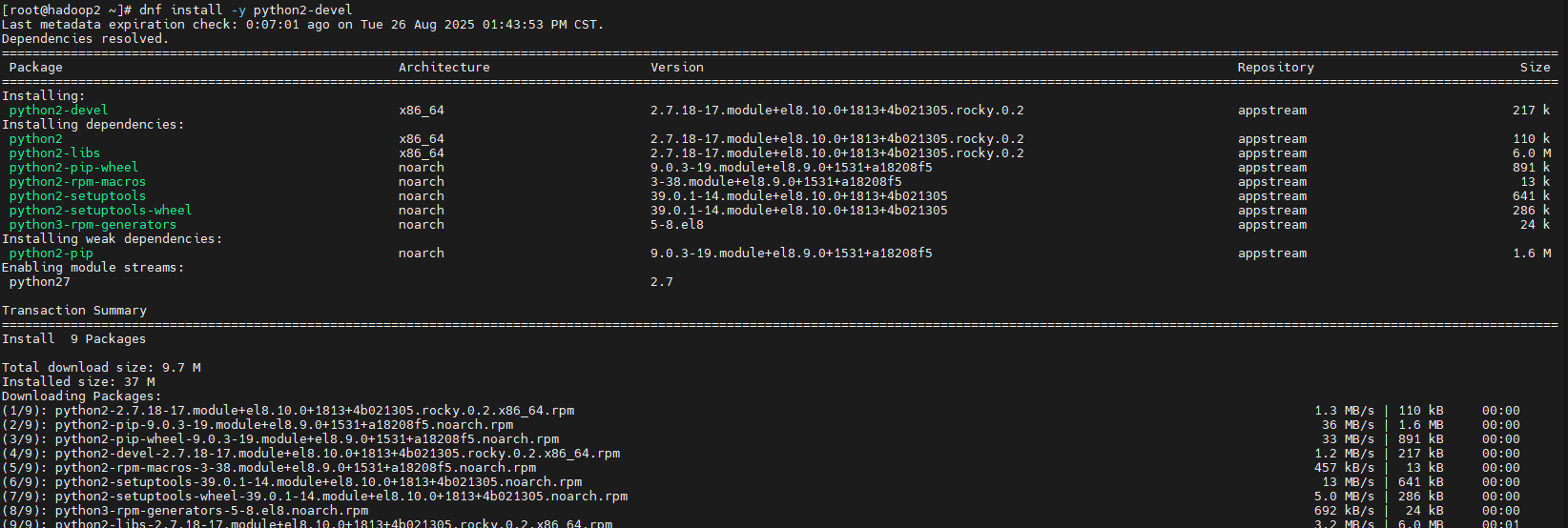
安装依赖示意1

安装依赖示意2

# 2、临时将系统默认 python 指向 Python2

Ambari Agent/Monitor 仍有 Python2 依赖,优先保证其可运行。 生产上可通过 alternatives 管理;这里给出直观做法:

ln -sf /usr/bin/python2 /usr/bin/python
python --version    # 确认为 Python 2.7.x
1
2

# 3、修正 site-packages 目录与权限

部分包在旧脚本中写死为 python2.6 路径;Rocky8 的 python2 实际为 2.7。 这里做一次向后兼容映射,并保证 ams 可写入构建目录。

# 1)若不存在 2.6 目录,做个兼容软链到 2.7
[ -d /usr/lib/python2.6 ] || ln -s /usr/lib/python2.7 /usr/lib/python2.6

# 2)确保 ams 用户对该目录可写(仅限 Monitor 构建期,完毕后按需收紧)
chown -R ams:hadoop /usr/lib/python2.6
chmod -R 0755 /usr/lib/python2.6
1
2
3
4
5
6

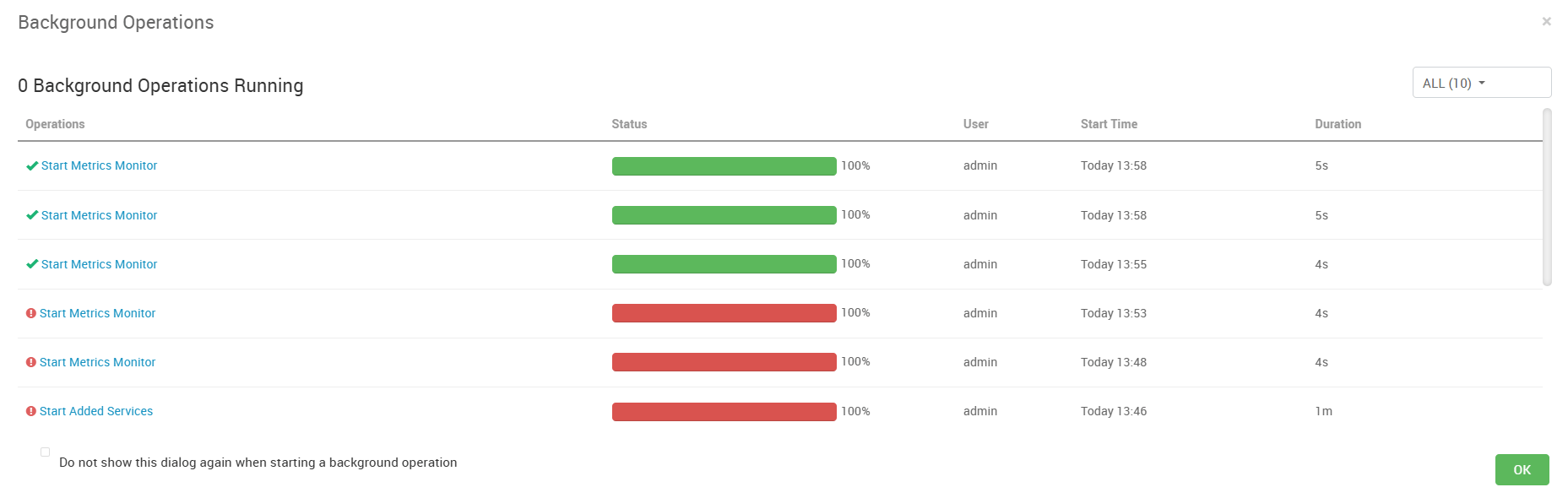
# 4、重试由 Ambari 拉起 Monitor

ambari-server restart   # 如无必要,可只重启 Agent/组件
# 或在 Ambari Web 上对 Metrics Monitor 执行:重试/启动
1
2

完成映射后重试

# 四、原始报错日志

stderr: 
NoneType: None

The above exception was the cause of the following exception:

Traceback (most recent call last):
  File "/var/lib/ambari-agent/cache/common-services/AMBARI_METRICS/3.0.0/package/scripts/metrics_monitor.py", line 86, in <module>
    AmsMonitor().execute()
  File "/usr/lib/ambari-agent/lib/resource_management/libraries/script/script.py", line 413, in execute
    method(env)
  File "/var/lib/ambari-agent/cache/common-services/AMBARI_METRICS/3.0.0/package/scripts/metrics_monitor.py", line 47, in start
    ams_service("monitor", action="start")
  File "/usr/lib/ambari-agent/lib/ambari_commons/os_family_impl.py", line 91, in thunk
    return fn(*args, **kwargs)
  File "/var/lib/ambari-agent/cache/common-services/AMBARI_METRICS/3.0.0/package/scripts/ams_service.py", line 114, in ams_service
    Execute(daemon_cmd, user=params.ams_user)
  File "/usr/lib/ambari-agent/lib/resource_management/core/base.py", line 168, in __init__
    self.env.run()
  File "/usr/lib/ambari-agent/lib/resource_management/core/environment.py", line 171, in run
    self.run_action(resource, action)
  File "/usr/lib/ambari-agent/lib/resource_management/core/environment.py", line 137, in run_action
    provider_action()
  File "/usr/lib/ambari-agent/lib/resource_management/core/providers/system.py", line 350, in action_run
    returns=self.resource.returns,
  File "/usr/lib/ambari-agent/lib/resource_management/core/shell.py", line 95, in inner
    result = function(command, **kwargs)
  File "/usr/lib/ambari-agent/lib/resource_management/core/shell.py", line 161, in checked_call
    returns=returns,
  File "/usr/lib/ambari-agent/lib/resource_management/core/shell.py", line 278, in _call_wrapper
    result = _call(command, **kwargs_copy)
  File "/usr/lib/ambari-agent/lib/resource_management/core/shell.py", line 493, in _call
    raise ExecutionFailed(err_msg, code, out, err)
resource_management.core.exceptions.ExecutionFailed: Execution of '/usr/sbin/ambari-metrics-monitor --config /etc/ambari-metrics-monitor/conf start' returned 255. ls: cannot access '/usr/lib/python2.6/site-packages/resource_monitoring/psutil/build': No such file or directory
Building psutil...
error: could not create 'build': Permission denied
Verifying Python version compatibility...
Using python  /usr/bin/python
Checking for previously running Metric Monitor...
/var/run/ambari-metrics-monitor/ambari-metrics-monitor.pid found with no process. Removing 2811421...
Starting ambari-metrics-monitor
Verifying ambari-metrics-monitor process status with PID : 2812593
Output of PID check : 
ERROR: ambari-metrics-monitor start failed. For more details, see /var/log/ambari-metrics-monitor/ambari-metrics-monitor.out:
====================
SyntaxError: invalid syntax
--------------------------Building psutil--------------------------
running build
running build_py
creating build
----------------------Finished building psutil---------------------
  File "/usr/lib/python2.6/site-packages/resource_monitoring/main.py", line 68
    print "Server out at: " + main_config.ams_monitor_out_file()
                          ^
SyntaxError: invalid syntax
====================
Monitor out at: /var/log/ambari-metrics-monitor/ambari-metrics-monitor.out
 stdout:
2025-08-26 13:48:07,170 - Stack Feature Version Info: Cluster Stack=3.2.0, Command Stack=None, Command Version=3.2.0 -> 3.2.0
2025-08-26 13:48:07,188 - Using hadoop conf dir: /etc/hadoop/conf
2025-08-26 13:48:07,569 - Stack Feature Version Info: Cluster Stack=3.2.0, Command Stack=None, Command Version=3.2.0 -> 3.2.0
2025-08-26 13:48:07,571 - Using hadoop conf dir: /etc/hadoop/conf
2025-08-26 13:48:07,571 - Skipping param: datanode_max_locked_memory, due to Configuration parameter 'dfs.datanode.max.locked.memory' was not found in configurations dictionary!
2025-08-26 13:48:07,572 - Skipping param: dfs_ha_namenode_ids, due to Configuration parameter 'dfs.ha.namenodes' was not found in configurations dictionary!
2025-08-26 13:48:07,572 - Skipping param: falcon_user, due to Configuration parameter 'falcon-env' was not found in configurations dictionary!
2025-08-26 13:48:07,572 - Skipping param: gmetad_user, due to Configuration parameter 'ganglia-env' was not found in configurations dictionary!
2025-08-26 13:48:07,572 - Skipping param: gmond_user, due to Configuration parameter 'ganglia-env' was not found in configurations dictionary!
2025-08-26 13:48:07,572 - Skipping param: nfsgateway_heapsize, due to Configuration parameter 'nfsgateway_heapsize' was not found in configurations dictionary!
2025-08-26 13:48:07,572 - Skipping param: oozie_user, due to Configuration parameter 'oozie-env' was not found in configurations dictionary!
2025-08-26 13:48:07,572 - Skipping param: ranger_group, due to Configuration parameter 'ranger-env' was not found in configurations dictionary!
2025-08-26 13:48:07,572 - Skipping param: ranger_user, due to Configuration parameter 'ranger-env' was not found in configurations dictionary!
2025-08-26 13:48:07,572 - Skipping param: repo_info, due to Configuration parameter 'repoInfo' was not found in configurations dictionary!
2025-08-26 13:48:07,573 - Skipping param: tez_am_view_acls, due to Configuration parameter 'tez-site' was not found in configurations dictionary!
2025-08-26 13:48:07,573 - Skipping param: tez_user, due to Configuration parameter 'tez-env' was not found in configurations dictionary!
2025-08-26 13:48:07,573 - Skipping param: zeppelin_group, due to Configuration parameter 'zeppelin-env' was not found in configurations dictionary!
2025-08-26 13:48:07,573 - Skipping param: zeppelin_user, due to Configuration parameter 'zeppelin-env' was not found in configurations dictionary!
2025-08-26 13:48:07,573 - Group['hdfs'] {}
2025-08-26 13:48:07,574 - Group['hadoop'] {}
2025-08-26 13:48:07,574 - User['zookeeper'] {'uid': None, 'gid': 'hadoop', 'groups': ['hadoop'], 'fetch_nonlocal_groups': True}
2025-08-26 13:48:07,578 - User['ams'] {'uid': None, 'gid': 'hadoop', 'groups': ['hadoop'], 'fetch_nonlocal_groups': True}
2025-08-26 13:48:07,580 - User['ambari-qa'] {'uid': None, 'gid': 'hadoop', 'groups': ['hadoop'], 'fetch_nonlocal_groups': True}
2025-08-26 13:48:07,582 - User['hdfs'] {'uid': None, 'gid': 'hadoop', 'groups': ['hdfs', 'hadoop'], 'fetch_nonlocal_groups': True}
2025-08-26 13:48:07,583 - User['yarn'] {'uid': None, 'gid': 'hadoop', 'groups': ['hadoop'], 'fetch_nonlocal_groups': True}
2025-08-26 13:48:07,585 - User['mapred'] {'uid': None, 'gid': 'hadoop', 'groups': ['hadoop'], 'fetch_nonlocal_groups': True}
2025-08-26 13:48:07,587 - User['hbase'] {'uid': None, 'gid': 'hadoop', 'groups': ['hadoop'], 'fetch_nonlocal_groups': True}
2025-08-26 13:48:07,589 - File['/var/lib/ambari-agent/tmp/changeUid.sh'] {'content': StaticFile('changeToSecureUid.sh'), 'mode': 0o555}
2025-08-26 13:48:07,590 - Execute['/var/lib/ambari-agent/tmp/changeUid.sh ambari-qa /tmp/hadoop-ambari-qa,/tmp/hsperfdata_ambari-qa,/home/ambari-qa,/tmp/ambari-qa,/tmp/sqoop-ambari-qa 0'] {'not_if': '(test $(id -u ambari-qa) -gt 1000) || (false)'}
2025-08-26 13:48:07,598 - Skipping Execute['/var/lib/ambari-agent/tmp/changeUid.sh ambari-qa /tmp/hadoop-ambari-qa,/tmp/hsperfdata_ambari-qa,/home/ambari-qa,/tmp/ambari-qa,/tmp/sqoop-ambari-qa 0'] due to not_if
2025-08-26 13:48:07,598 - Directory['/tmp/hbase-hbase'] {'owner': 'hbase', 'mode': 0o775, 'create_parents': True, 'cd_access': 'a'}
2025-08-26 13:48:07,600 - File['/var/lib/ambari-agent/tmp/changeUid.sh'] {'content': StaticFile('changeToSecureUid.sh'), 'mode': 0o555}
2025-08-26 13:48:07,601 - call['/var/lib/ambari-agent/tmp/changeUid.sh hbase'] {}
2025-08-26 13:48:07,612 - call returned (0, '1017')
2025-08-26 13:48:07,613 - Execute['/var/lib/ambari-agent/tmp/changeUid.sh hbase /home/hbase,/tmp/hbase,/usr/bin/hbase,/var/log/hbase,/tmp/hbase-hbase 1017'] {'not_if': '(test $(id -u hbase) -gt 1000) || (false)'}
2025-08-26 13:48:07,621 - Skipping Execute['/var/lib/ambari-agent/tmp/changeUid.sh hbase /home/hbase,/tmp/hbase,/usr/bin/hbase,/var/log/hbase,/tmp/hbase-hbase 1017'] due to not_if
2025-08-26 13:48:07,623 - User['hdfs'] {'fetch_nonlocal_groups': True}
2025-08-26 13:48:07,625 - User['hdfs'] {'groups': ['hdfs', 'hadoop'], 'fetch_nonlocal_groups': True}
2025-08-26 13:48:07,627 - FS Type: HDFS
2025-08-26 13:48:07,627 - Directory['/etc/hadoop'] {'mode': 0o755}
2025-08-26 13:48:07,655 - File['/etc/hadoop/conf/hadoop-env.sh'] {'owner': 'hdfs', 'group': 'hadoop', 'content': InlineTemplate(...)}
2025-08-26 13:48:07,656 - Writing File['/etc/hadoop/conf/hadoop-env.sh'] because contents don't match
2025-08-26 13:48:07,657 - Changing owner for /tmp/tmp1756187287.6573842_513 from 0 to hdfs
2025-08-26 13:48:07,657 - Changing group for /tmp/tmp1756187287.6573842_513 from 0 to hadoop
2025-08-26 13:48:07,658 - Moving /tmp/tmp1756187287.6573842_513 to /etc/hadoop/conf/hadoop-env.sh
2025-08-26 13:48:07,664 - Directory['/var/lib/ambari-agent/tmp/hadoop_java_io_tmpdir'] {'owner': 'hdfs', 'group': 'hadoop', 'mode': 0o1777}
2025-08-26 13:48:07,698 - Skipping param: hdfs_user_keytab, due to Configuration parameter 'hdfs_user_keytab' was not found in configurations dictionary!
2025-08-26 13:48:07,700 - Execute[('setenforce', '0')] {'only_if': 'test -f /selinux/enforce', 'not_if': '(! which getenforce ) || (which getenforce && getenforce | grep -q Disabled)', 'sudo': True}
2025-08-26 13:48:07,710 - Skipping Execute[('setenforce', '0')] due to not_if
2025-08-26 13:48:07,710 - Directory['/var/log/hadoop'] {'create_parents': True, 'owner': 'root', 'group': 'hadoop', 'mode': 0o775, 'cd_access': 'a'}
2025-08-26 13:48:07,713 - Directory['/var/run/hadoop'] {'create_parents': True, 'owner': 'root', 'group': 'root', 'cd_access': 'a'}
2025-08-26 13:48:07,713 - Directory['/var/run/hadoop/hdfs'] {'owner': 'hdfs', 'cd_access': 'a'}
2025-08-26 13:48:07,714 - Directory['/tmp/hadoop-hdfs'] {'create_parents': True, 'owner': 'hdfs', 'cd_access': 'a'}
2025-08-26 13:48:07,719 - File['/etc/hadoop/conf/commons-logging.properties'] {'owner': 'hdfs', 'content': Template('commons-logging.properties.j2')}
2025-08-26 13:48:07,719 - Writing File['/etc/hadoop/conf/commons-logging.properties'] because contents don't match
2025-08-26 13:48:07,720 - Changing owner for /tmp/tmp1756187287.7201147_289 from 0 to hdfs
2025-08-26 13:48:07,720 - Moving /tmp/tmp1756187287.7201147_289 to /etc/hadoop/conf/commons-logging.properties
2025-08-26 13:48:07,726 - File['/etc/hadoop/conf/health_check'] {'owner': 'hdfs', 'content': Template('health_check.j2')}
2025-08-26 13:48:07,727 - Writing File['/etc/hadoop/conf/health_check'] because contents don't match
2025-08-26 13:48:07,727 - Changing owner for /tmp/tmp1756187287.7272584_414 from 0 to hdfs
2025-08-26 13:48:07,727 - Moving /tmp/tmp1756187287.7272584_414 to /etc/hadoop/conf/health_check
2025-08-26 13:48:07,741 - File['/etc/hadoop/conf/log4j.properties'] {'mode': 0o644, 'group': 'hadoop', 'owner': 'hdfs', 'content': InlineTemplate(...)}
2025-08-26 13:48:07,742 - Writing File['/etc/hadoop/conf/log4j.properties'] because contents don't match
2025-08-26 13:48:07,742 - Changing owner for /tmp/tmp1756187287.742593_745 from 0 to hdfs
2025-08-26 13:48:07,743 - Changing group for /tmp/tmp1756187287.742593_745 from 0 to hadoop
2025-08-26 13:48:07,743 - Moving /tmp/tmp1756187287.742593_745 to /etc/hadoop/conf/log4j.properties
2025-08-26 13:48:07,749 - File['/var/lib/ambari-agent/lib/fast-hdfs-resource.jar'] {'mode': 0o644, 'content': StaticFile('fast-hdfs-resource.jar')}
2025-08-26 13:48:07,786 - File['/etc/hadoop/conf/hadoop-metrics2.properties'] {'owner': 'hdfs', 'group': 'hadoop', 'content': InlineTemplate(...)}
2025-08-26 13:48:07,786 - Writing File['/etc/hadoop/conf/hadoop-metrics2.properties'] because contents don't match
2025-08-26 13:48:07,786 - Changing owner for /tmp/tmp1756187287.7866137_897 from 0 to hdfs
2025-08-26 13:48:07,786 - Changing group for /tmp/tmp1756187287.7866137_897 from 0 to hadoop
2025-08-26 13:48:07,787 - Moving /tmp/tmp1756187287.7866137_897 to /etc/hadoop/conf/hadoop-metrics2.properties
2025-08-26 13:48:07,791 - File['/etc/hadoop/conf/task-log4j.properties'] {'content': StaticFile('task-log4j.properties'), 'mode': 0o755}
2025-08-26 13:48:07,792 - File['/etc/hadoop/conf/configuration.xsl'] {'owner': 'hdfs', 'group': 'hadoop'}
2025-08-26 13:48:07,797 - File['/etc/hadoop/conf/topology_mappings.data'] {'content': Template('topology_mappings.data.j2'), 'owner': 'hdfs', 'group': 'hadoop', 'mode': 0o644, 'only_if': 'test -d /etc/hadoop/conf'}
2025-08-26 13:48:07,802 - Writing File['/etc/hadoop/conf/topology_mappings.data'] because contents don't match
2025-08-26 13:48:07,802 - Changing owner for /tmp/tmp1756187287.8024964_210 from 0 to hdfs
2025-08-26 13:48:07,802 - Changing group for /tmp/tmp1756187287.8024964_210 from 0 to hadoop
2025-08-26 13:48:07,803 - Moving /tmp/tmp1756187287.8024964_210 to /etc/hadoop/conf/topology_mappings.data
2025-08-26 13:48:07,807 - File['/etc/hadoop/conf/topology_script.py'] {'content': StaticFile('topology_script.py'), 'mode': 0o755, 'only_if': 'test -d /etc/hadoop/conf'}
2025-08-26 13:48:07,811 - Skipping unlimited key JCE policy check and setup since the Java VM is not managed by Ambari
2025-08-26 13:48:07,818 - Skipping stack-select on AMBARI_METRICS because it does not exist in the stack-select package structure.
2025-08-26 13:48:08,279 - Using hadoop conf dir: /etc/hadoop/conf
2025-08-26 13:48:08,281 - checked_call['hostid'] {}
2025-08-26 13:48:08,286 - checked_call returned (0, '000aa063')
2025-08-26 13:48:08,288 - Skipping param: hbase_drain_only, due to Configuration parameter 'mark_draining_only' was not found in configurations dictionary!
2025-08-26 13:48:08,289 - Skipping param: hbase_excluded_hosts, due to Configuration parameter 'excluded_hosts' was not found in configurations dictionary!
2025-08-26 13:48:08,289 - Skipping param: hbase_included_hosts, due to Configuration parameter 'included_hosts' was not found in configurations dictionary!
2025-08-26 13:48:08,289 - Skipping param: hdfs_principal_name, due to Configuration parameter 'hdfs_principal_name' was not found in configurations dictionary!
2025-08-26 13:48:08,289 - Skipping param: hdfs_user_keytab, due to Configuration parameter 'hdfs_user_keytab' was not found in configurations dictionary!
2025-08-26 13:48:08,290 - Directory['/etc/ambari-metrics-monitor/conf'] {'owner': 'ams', 'group': 'hadoop', 'create_parents': True}
2025-08-26 13:48:08,292 - Directory['/var/log/ambari-metrics-monitor'] {'owner': 'ams', 'group': 'hadoop', 'mode': 0o755, 'create_parents': True}
2025-08-26 13:48:08,293 - Execute['ambari-sudo.sh chown -R ams:hadoop /var/log/ambari-metrics-monitor'] {}
2025-08-26 13:48:08,300 - Directory['/var/run/ambari-metrics-monitor'] {'owner': 'ams', 'group': 'hadoop', 'cd_access': 'a', 'mode': 0o755, 'create_parents': True}
2025-08-26 13:48:08,302 - Directory['/usr/lib/python3.9/site-packages/resource_monitoring/psutil/build'] {'owner': 'ams', 'group': 'hadoop', 'cd_access': 'a', 'mode': 0o755, 'create_parents': True}
2025-08-26 13:48:08,302 - Execute['ambari-sudo.sh chown -R ams:hadoop /usr/lib/python3.9/site-packages/resource_monitoring'] {}
2025-08-26 13:48:08,311 - TemplateConfig['/etc/ambari-metrics-monitor/conf/metric_monitor.ini'] {'owner': 'ams', 'group': 'hadoop', 'template_tag': None}
2025-08-26 13:48:08,325 - File['/etc/ambari-metrics-monitor/conf/metric_monitor.ini'] {'owner': 'ams', 'group': 'hadoop', 'mode': None, 'content': Template('metric_monitor.ini.j2')}
2025-08-26 13:48:08,325 - Writing File['/etc/ambari-metrics-monitor/conf/metric_monitor.ini'] because contents don't match
2025-08-26 13:48:08,326 - Changing owner for /tmp/tmp1756187288.3263984_381 from 0 to ams
2025-08-26 13:48:08,326 - Changing group for /tmp/tmp1756187288.3263984_381 from 0 to hadoop
2025-08-26 13:48:08,327 - Moving /tmp/tmp1756187288.3263984_381 to /etc/ambari-metrics-monitor/conf/metric_monitor.ini
2025-08-26 13:48:08,332 - TemplateConfig['/etc/ambari-metrics-monitor/conf/metric_groups.conf'] {'owner': 'ams', 'group': 'hadoop', 'template_tag': None}
2025-08-26 13:48:08,334 - File['/etc/ambari-metrics-monitor/conf/metric_groups.conf'] {'owner': 'ams', 'group': 'hadoop', 'mode': None, 'content': Template('metric_groups.conf.j2')}
2025-08-26 13:48:08,334 - Writing File['/etc/ambari-metrics-monitor/conf/metric_groups.conf'] because contents don't match
2025-08-26 13:48:08,335 - Changing owner for /tmp/tmp1756187288.3348098_82 from 0 to ams
2025-08-26 13:48:08,335 - Changing group for /tmp/tmp1756187288.3348098_82 from 0 to hadoop
2025-08-26 13:48:08,335 - Moving /tmp/tmp1756187288.3348098_82 to /etc/ambari-metrics-monitor/conf/metric_groups.conf
2025-08-26 13:48:08,349 - File['/etc/ambari-metrics-monitor/conf/ams-env.sh'] {'owner': 'ams', 'content': InlineTemplate(...)}
2025-08-26 13:48:08,350 - Writing File['/etc/ambari-metrics-monitor/conf/ams-env.sh'] because contents don't match
2025-08-26 13:48:08,351 - Changing owner for /tmp/tmp1756187288.3508477_244 from 0 to ams
2025-08-26 13:48:08,351 - Moving /tmp/tmp1756187288.3508477_244 to /etc/ambari-metrics-monitor/conf/ams-env.sh
2025-08-26 13:48:08,357 - Directory['/etc/security/limits.d'] {'create_parents': True, 'owner': 'root', 'group': 'root'}
2025-08-26 13:48:08,360 - File['/etc/security/limits.d/ams.conf'] {'owner': 'root', 'group': 'root', 'mode': 0o644, 'content': Template('ams.conf.j2')}
2025-08-26 13:48:08,361 - Writing File['/etc/security/limits.d/ams.conf'] because contents don't match
2025-08-26 13:48:08,361 - Moving /tmp/tmp1756187288.3614178_963 to /etc/security/limits.d/ams.conf
2025-08-26 13:48:08,367 - Execute['/usr/sbin/ambari-metrics-monitor --config /etc/ambari-metrics-monitor/conf start'] {'user': 'ams'}
2025-08-26 13:48:10,889 - Execute['find /var/log/ambari-metrics-monitor -maxdepth 1 -type f -name '*' -exec echo '==> {} <==' \; -exec tail -n 40 {} \;'] {'logoutput': True, 'ignore_failures': True, 'user': 'ams'}
==> /var/log/ambari-metrics-monitor/ambari-metrics-monitor.out <==
--------------------------Building psutil--------------------------
running build
running build_py
creating build
----------------------Finished building psutil---------------------
  File "/usr/lib/python2.6/site-packages/resource_monitoring/main.py", line 68
    print "Server out at: " + main_config.ams_monitor_out_file()
                          ^
SyntaxError: invalid syntax
--------------------------Building psutil--------------------------
running build
running build_py
creating build
----------------------Finished building psutil---------------------
  File "/usr/lib/python2.6/site-packages/resource_monitoring/main.py", line 68
    print "Server out at: " + main_config.ams_monitor_out_file()
                          ^
SyntaxError: invalid syntax
2025-08-26 13:48:10,965 - Skipping stack-select on AMBARI_METRICS because it does not exist in the stack-select package structure.

Command failed after 1 tries

1
2
3
4
5
6
7
8
9
10
11
12
13
14
15
16
17
18
19
20
21
22
23
24
25
26
27
28
29
30
31
32
33
34
35
36
37
38
39
40
41
42
43
44
45
46
47
48
49
50
51
52
53
54
55
56
57
58
59
60
61
62
63
64
65
66
67
68
69
70
71
72
73
74
75
76
77
78
79
80
81
82
83
84
85
86
87
88
89
90
91
92
93
94
95
96
97
98
99
100
101
102
103
104
105
106
107
108
109
110
111
112
113
114
115
116
117
118
119
120
121
122
123
124
125
126
127
128
129
130
131
132
133
134
135
136
137
138
139
140
141
142
143
144
145
146
147
148
149
150
151
152
153
154
155
156
157
158
159
160
161
162
163
164
165
166
167
168
169
170
171
172
173
174
175
176
177
178
179
180
181
182
183
184
185
186
187
188
189
190
191
192
193
194
195
196
197
198
199
#Ambari-Metrics#Ambari#错误排查#Rocky Linux#Python
Ambari-Metrics Monitor 启动失败

← Ambari-Metrics Monitor 启动失败 Ambari-Metrics Monitor 启动失败→

最近更新
01
当前版本 2026/06
06-05
02
Step7—Mariadb初始化
03-23
03
【Kylin V10 aarch64】强力卸载脚本 aarch64
03-22
更多文章>
Theme by Vdoing | Copyright © 2017-2026 JaneTTR | MIT License
  • 跟随系统
  • 浅色模式
  • 深色模式
  • 阅读模式