 [O]Flink版本适配改造(四)
# 魔改执行逻辑:Node 权限修复与前端构建全流程改造
在适配 flink-runtime-web 模块的过程中,我们发现通过 frontend-maven-plugin 下载下来的 node 目录中,npm
默认权限是 744,这会导致在某些构建环境下无法执行 npm install 等命令。
权限问题关键问题 未在插件默认逻辑中处理,需主动修复。
# 改造目标
整个构建流程按如下顺序执行:
- 安装指定版本的 Node.js 和 npm;
- 修复 node/npm 可执行权限(chmod 755);
- 执行
npm install; - 执行
npm run ci-check校验构建结果。
# 原始构建逻辑(对比参考)
以下为改造前的原始配置,逻辑上虽然完整,但缺少对权限问题的处理,也未明确区分阶段:
<plugin>
    <groupId>com.github.eirslett</groupId>
    <artifactId>frontend-maven-plugin</artifactId>
    <version>1.11.0</version>
    <executions>
        <execution>
            <id>install node and npm</id>
            <goals>
                <goal>install-node-and-npm</goal>
            </goals>
            <configuration>
                <nodeVersion>v16.13.2</nodeVersion>
                <npmVersion>8.1.2</npmVersion>
            </configuration>
        </execution>
        <execution>
            <id>npm install</id>
            <goals>
                <goal>npm</goal>
            </goals>
            <configuration>
                <arguments>ci --cache-max=0 --no-save ${npm.proxy}</arguments>
                <environmentVariables>
                    <HUSKY_SKIP_INSTALL>true</HUSKY_SKIP_INSTALL>
                </environmentVariables>
            </configuration>
        </execution>
        <execution>
            <id>npm run ci-check</id>
            <goals>
                <goal>npm</goal>
            </goals>
            <configuration>
                <arguments>run ci-check</arguments>
            </configuration>
        </execution>
    </executions>
    <configuration>
        <workingDirectory>web-dashboard</workingDirectory>
    </configuration>
</plugin>
1
2
3
4
5
6
7
8
9
10
11
12
13
14
15
16
17
18
19
20
21
22
23
24
25
26
27
28
29
30
31
32
33
34
35
36
37
38
39
40
41
42
2
3
4
5
6
7
8
9
10
11
12
13
14
15
16
17
18
19
20
21
22
23
24
25
26
27
28
29
30
31
32
33
34
35
36
37
38
39
40
41
42
# 改造后的完整配置
分阶段执行更清晰,避免插件行为“交叉干扰”
我们将安装、权限修复与命令执行分别使用不同插件与阶段定义,增强可维护性与可控性。
<!-- 1) 安装 Node 和 npm(使用国内镜像) -->
<plugin>
    <groupId>com.github.eirslett</groupId>
    <artifactId>frontend-maven-plugin</artifactId>
    <version>1.11.0</version>
    <executions>
        <execution>
            <id>install node and npm</id>
            <phase>generate-resources</phase>
            <goals>
                <goal>install-node-and-npm</goal>
            </goals>
            <configuration>
                <nodeVersion>v16.13.2</nodeVersion>
                <npmVersion>8.1.2</npmVersion>
                <nodeDownloadRoot>https://cdn.npmmirror.com/binaries/node/</nodeDownloadRoot>
                <npmDownloadRoot>https://registry.npmmirror.com/npm/-/</npmDownloadRoot>
            </configuration>
        </execution>
    </executions>
    <configuration>
        <workingDirectory>web-dashboard</workingDirectory>
    </configuration>
</plugin>

        <!-- 2) 修复 npm 可执行权限 -->
<plugin>
<groupId>org.apache.maven.plugins</groupId>
<artifactId>maven-antrun-plugin</artifactId>
<version>3.0.0</version>
<executions>
    <execution>
        <id>fix-npm-permissions</id>
        <phase>generate-resources</phase>
        <goals>
            <goal>run</goal>
        </goals>
        <configuration>
            <target>
                <echo message=">>> chmod 755 web-dashboard/node/npm"/>
                <chmod file="${project.basedir}/web-dashboard/node/npm" perm="755"/>
            </target>
        </configuration>
    </execution>
</executions>
</plugin>

        <!-- 3) 安装依赖与执行构建校验 -->
<plugin>
<groupId>com.github.eirslett</groupId>
<artifactId>frontend-maven-plugin</artifactId>
<version>1.11.0</version>
<executions>
    <execution>
        <id>npm install</id>
        <phase>process-resources</phase>
        <goals>
            <goal>npm</goal>
        </goals>
        <configuration>
            <arguments>install --unsafe-perm --verbose --progress</arguments>
            <npmRegistryURL>https://registry.npmmirror.com/</npmRegistryURL>
            <environmentVariables>
                <HUSKY_SKIP_INSTALL>true</HUSKY_SKIP_INSTALL>
                <HOME>${project.build.directory}/.npmhome</HOME>
            </environmentVariables>
        </configuration>
    </execution>

    <execution>
        <id>npm run ci-check</id>
        <phase>process-resources</phase>
        <goals>
            <goal>npm</goal>
        </goals>
        <configuration>
            <arguments>run ci-check --verbose</arguments>
        </configuration>
    </execution>
</executions>
<configuration>
    <workingDirectory>web-dashboard</workingDirectory>
</configuration>
</plugin>
1
2
3
4
5
6
7
8
9
10
11
12
13
14
15
16
17
18
19
20
21
22
23
24
25
26
27
28
29
30
31
32
33
34
35
36
37
38
39
40
41
42
43
44
45
46
47
48
49
50
51
52
53
54
55
56
57
58
59
60
61
62
63
64
65
66
67
68
69
70
71
72
73
74
75
76
77
78
79
80
81
82
83
84
2
3
4
5
6
7
8
9
10
11
12
13
14
15
16
17
18
19
20
21
22
23
24
25
26
27
28
29
30
31
32
33
34
35
36
37
38
39
40
41
42
43
44
45
46
47
48
49
50
51
52
53
54
55
56
57
58
59
60
61
62
63
64
65
66
67
68
69
70
71
72
73
74
75
76
77
78
79
80
81
82
83
84
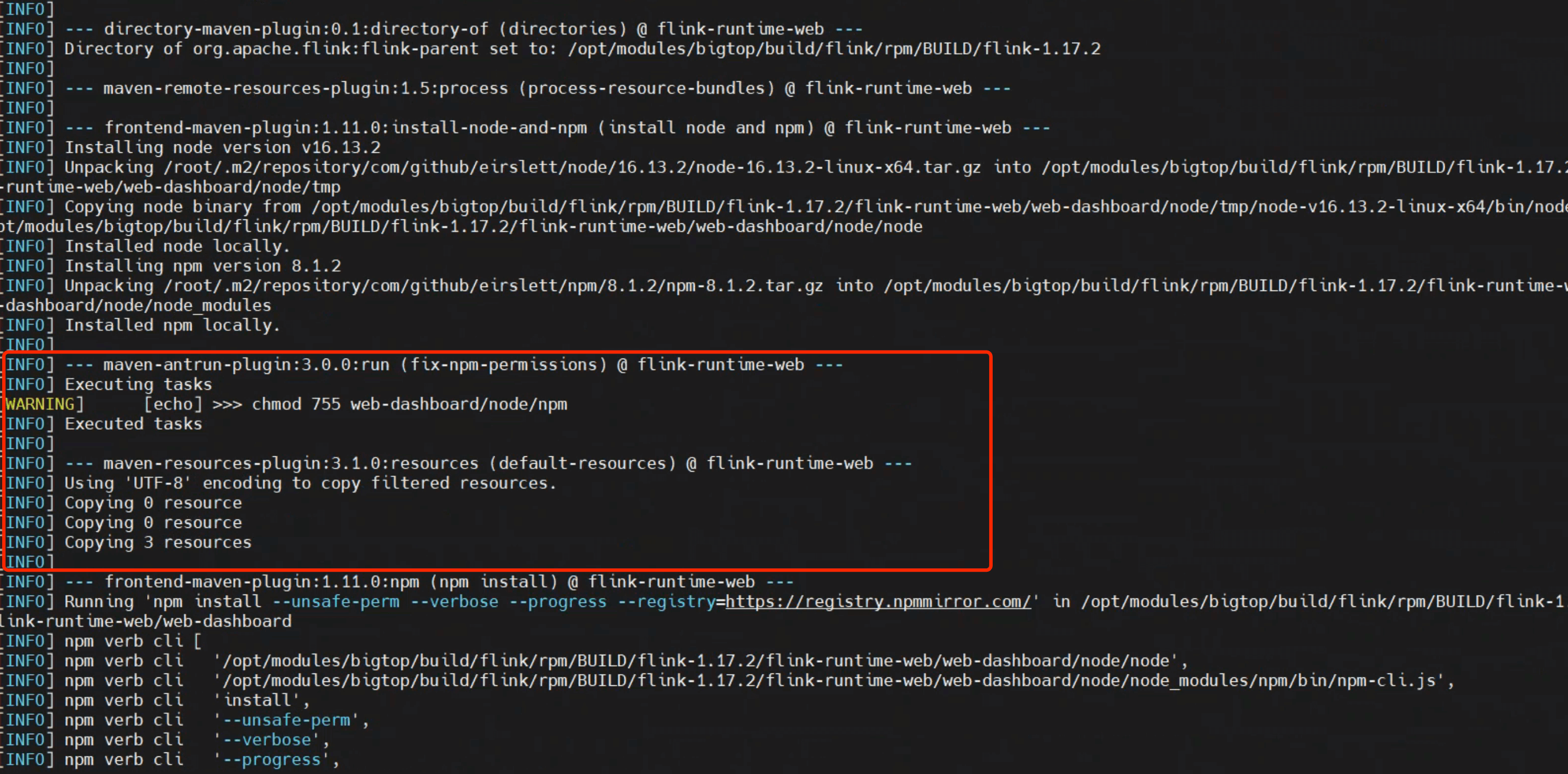
# 执行结果验证
通过执行 mvn clean install -X,我们可在日志中看到:
chmod成功执行;npm可正常安装模块与执行构建检查。
如下图所示: