
 Brunch Dev Server 反向代理 API
# 一、使用方式
目标
让 Ambari-Web(Brunch)本地开发服务具备“后端反向代理”能力:
- 页面资源:仍由
http://localhost:3333提供 - API 请求:统一代理到远端
Ambari Server(避免跨域、保持调用路径一致) - WebSocket:支持
upgrade透传(便于联调实时能力)
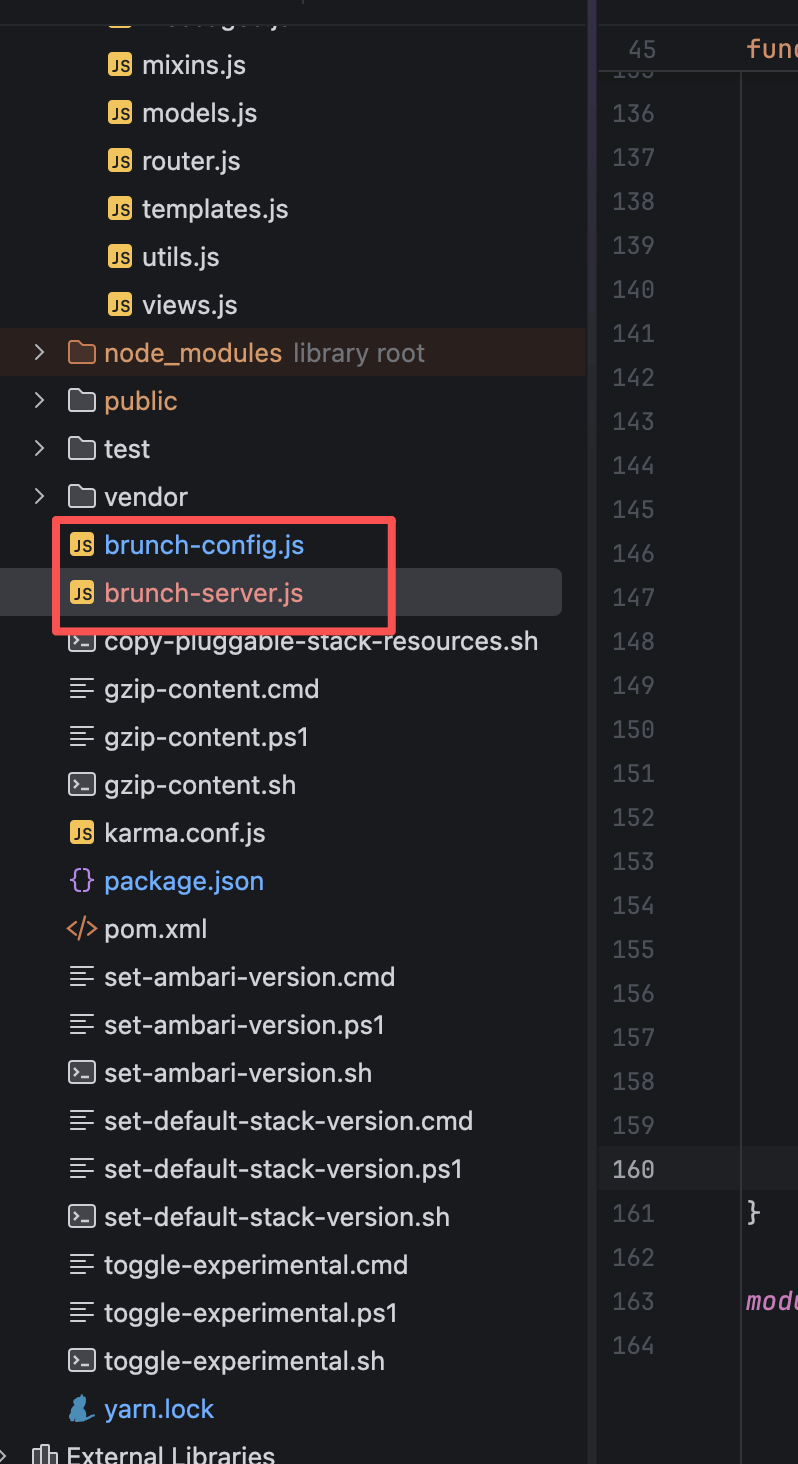
# 1、文件放置位置
下面的内容保存至:
ambari-web/brunch-server.js- 与
brunch-config.js保持同一层目录
# 2、参数与行为速查
| 项目 | 默认值 | 作用 |
|---|---|---|
| Dev Server 端口 | 3333 | Ambari-Web 本地访问入口 |
| 代理后端 | http://dev1.test.com:8080 | Ambari Server 地址(可用环境变量覆盖) |
| 代理前缀 | /api | 命中此前缀的请求才会走代理(可用环境变量覆盖) |
| CORS | 默认开启 | 给本地调试兜底(可通过 noCors 关闭) |
| WS 支持 | 开启 | upgrade 请求命中前缀时透传 |
建议
Ambari-Web 的请求路径通常围绕 /api/v1/...,所以把 AMBARI_PROXY_PREFIX 设为 /api 最省心:前端代码完全不用改。
# 二、brunch-server.js(反向代理版)
说明
这份 server 文件做了几件事:
- 使用
http-proxy代理匹配前缀的请求到 Ambari Server - 非 API 请求继续走静态资源服务(Brunch 构建产物)
upgrade事件处理 WebSocket 透传- 代理错误返回 502(避免页面端“无响应”难排查)
/**
 * 版权所有 (c) JaneTTR 2025
 * 项目名称:ambari-env
 * 11本文件属于付费部分代码,仅供个人学习和研究使用。
 *
 * 禁止行为:
 * 1. 未经授权,不得将本文件或其编译后的代码用于任何商业用途;
 * 2. 禁止重新分发本文件或其修改版本;
 * 3. 禁止通过反编译、反向工程等手段试图绕过授权验证。
 *
 * 商业授权:
 * 如需将本文件或其编译后的代码用于商业用途,必须获得版权所有者的书面授权。
 * 联系方式:
 * 邮箱:3832514048@qq.com
 *
 * 责任声明:
 * 本文件按“现状”提供,不附带任何形式的担保,包括但不限于适销性、特定用途适用性或无侵权的担保。
 * 如有任何疑问,请联系版权所有者。
 */


'use strict';

var http = require('http');
var httpProxy = require('http-proxy');
var sysPath = require('path');
var url = require('url');
var express;

try {
    // Prefer the dependency that ships with pushserve (same runtime as brunch default server).
    express = require('pushserve/node_modules/express');
} catch (error) {
    express = require('express');
}

function normalizePath(pathname) {
    return pathname || '/';
}

function ignoreSocketError() {
    // Intentionally ignore transient socket errors like ECONNRESET from upstream disconnects.
}

function startServer(options, callback) {
    if (typeof options === 'function') {
        callback = options;
        options = null;
    }

    options = options || {};
    callback = callback || function () {
    };

    if (options.path == null) options.path = '.';
    if (options.port == null) options.port = 3333;
    if (options.base == null) options.base = '/';
    if (options.indexPath == null) options.indexPath = sysPath.join(options.path, 'index.html');
    if (options.noCors == null) options.noCors = false;
    if (options.noPushState == null) options.noPushState = false;
    if (options.noLog == null) options.noLog = false;

    var proxyTarget = process.env.AMBARI_PROXY_TARGET || options.proxyTarget || 'http://dev1.test.com:8080';
    var proxyPrefix = process.env.AMBARI_PROXY_PREFIX || options.proxyPrefix || '/api';
    proxyPrefix = proxyPrefix.charAt(0) === '/' ? proxyPrefix : '/' + proxyPrefix;

    var app = express();
    var proxy = httpProxy.createProxyServer({
        target: proxyTarget,
        changeOrigin: true,
        ws: true,
        xfwd: true
    });

    function isProxyRequest(pathname) {
        var normalizedPath = normalizePath(pathname);
        return normalizedPath === proxyPrefix || normalizedPath.indexOf(proxyPrefix + '/') === 0;
    }

    proxy.on('error', function (error, request, response) {
        if (response && !response.headersSent) {
            response.writeHead(502, {'Content-Type': 'application/json'});
            response.end(JSON.stringify({
                message: 'Proxy request failed',
                target: proxyTarget,
                details: error && error.message ? error.message : 'Unknown proxy error'
            }));
            return;
        }
        if (request && request.socket) {
            request.socket.destroy();
        }
    });

    if (!options.noCors) {
        app.use(function (request, response, next) {
            response.header('Cache-Control', 'no-cache');
            response.header('Access-Control-Allow-Origin', '*');
            next();
        });
    }

    app.use(function (request, response, next) {
        if (request && request.socket && typeof request.socket.on === 'function' && !request.socket.__ambariProxyErrorHandled) {
            request.socket.__ambariProxyErrorHandled = true;
            request.socket.on('error', ignoreSocketError);
        }
        if (isProxyRequest(url.parse(request.url).pathname)) {
            proxy.web(request, response);
            return;
        }
        next();
    });

    app.use(options.base, express.static(sysPath.resolve(options.path)));

    if (!options.noPushState) {
        app.all('*', function (request, response) {
            response.sendfile(options.indexPath);
        });
    }

    var server = http.createServer(app);

    server.on('upgrade', function (request, socket, head) {
        if (socket && typeof socket.on === 'function' && !socket.__ambariProxyErrorHandled) {
            socket.__ambariProxyErrorHandled = true;
            socket.on('error', ignoreSocketError);
        }
        if (isProxyRequest(url.parse(request.url).pathname)) {
            proxy.ws(request, socket, head);
            return;
        }
        socket.destroy();
    });

    server.on('clientError', function (error, socket) {
        if (socket && socket.writable) {
            socket.end('HTTP/1.1 400 Bad Request\r\n\r\n');
            return;
        }
        if (socket && typeof socket.destroy === 'function') {
            socket.destroy();
        }
    });

    server.on('error', function (error) {
        console.error('Dev server error:', error && error.message ? error.message : error);
    });

    server.listen(options.port, function (error) {
        if (!options.noLog) {
            console.log('Application started on http://localhost:' + options.port);
            console.log('Proxying ' + proxyPrefix + ' to ' + proxyTarget);
            console.log('Use AMBARI_PROXY_TARGET / AMBARI_PROXY_PREFIX to override defaults');
        }
        callback(error, options);
    });

    return server;
}

module.exports.startServer = startServer;
1
2
3
4
5
6
7
8
9
10
11
12
13
14
15
16
17
18
19
20
21
22
23
24
25
26
27
28
29
30
31
32
33
34
35
36
37
38
39
40
41
42
43
44
45
46
47
48
49
50
51
52
53
54
55
56
57
58
59
60
61
62
63
64
65
66
67
68
69
70
71
72
73
74
75
76
77
78
79
80
81
82
83
84
85
86
87
88
89
90
91
92
93
94
95
96
97
98
99
100
101
102
103
104
105
106
107
108
109
110
111
112
113
114
115
116
117
118
119
120
121
122
123
124
125
126
127
128
129
130
131
132
133
134
135
136
137
138
139
140
141
142
143
144
145
146
147
148
149
150
151
152
153
154
155
156
157
158
159
160
161
162
163
164
2
3
4
5
6
7
8
9
10
11
12
13
14
15
16
17
18
19
20
21
22
23
24
25
26
27
28
29
30
31
32
33
34
35
36
37
38
39
40
41
42
43
44
45
46
47
48
49
50
51
52
53
54
55
56
57
58
59
60
61
62
63
64
65
66
67
68
69
70
71
72
73
74
75
76
77
78
79
80
81
82
83
84
85
86
87
88
89
90
91
92
93
94
95
96
97
98
99
100
101
102
103
104
105
106
107
108
109
110
111
112
113
114
115
116
117
118
119
120
121
122
123
124
125
126
127
128
129
130
131
132
133
134
135
136
137
138
139
140
141
142
143
144
145
146
147
148
149
150
151
152
153
154
155
156
157
158
159
160
161
162
163
164
# 三、使用示例与常见联调姿势
# 1、环境变量覆盖(多环境切换)
export AMBARI_PROXY_TARGET="http://dev1.test.com:8080"
export AMBARI_PROXY_PREFIX="/api"
yarn start
1
2
3
2
3
AMBARI_PROXY_TARGET="http://dev1.test.com:8080" \
AMBARI_PROXY_PREFIX="/api" \
yarn start
1
2
3
2
3
// Make sure to add code blocks to your code group
经验值
AMBARI_PROXY_PREFIX 保持 /api,前端 Ember 侧基本不需要改任何路径,代理命中面最大。
# 2、代理是否生效:两步验证
浏览器打开:
http://localhost:3333控制台 Network 看请求:
- 访问
/api/v1/clusters等接口时,请求仍然打到localhost:3333(前端视角) - 后端真实流量被转发到
AMBARI_PROXY_TARGET
- 访问
想更直观一点
看启动日志里这一行:
Proxying /api to http://dev1.test.com:8080
这行能输出,通常说明配置命中、服务启动正常。
# 四、重新启动即可生效
注意
修改完 brunch-server.js 后,重新 start 就好:
- 停掉当前进程
- 再执行一次
yarn start(或你的启动命令)