
 [不看会报错]-Trino开启准备工作
# 一、PEM 证书准备(Trino 必备)
Trino 在启用 Kerberos + HTTPS 模式后,会依赖 PEM 证书提供 HTTP/REST/UI 的加密访问,因此必须在启动前准备好 PEM。
可以是企业 CA,也可以是自签证书。以下为自签示例。
# 1、生成 key + crt
sudo openssl req -newkey rsa:2048 -nodes \
-keyout /etc/trino/conf/trino.key \
-x509 -days 365 \
-out /etc/trino/conf/trino.crt \
-subj "/CN=$(hostname -f)"
1
2
3
4
5
2
3
4
5
# 2、合并生成 PEM
sudo cat /etc/trino/conf/trino.crt /etc/trino/conf/trino.key > /etc/trino/conf/trino.pem
1
# 3、证书权限设置
sudo chown trino:hadoop /etc/trino/conf/trino.pem
sudo chmod 640 /etc/trino/conf/trino.pem
1
2
2
关联章节:Trino 缺失 PEM 导致启动失败?
# 二、选看(一)Trino 启动后 Hive Catalog 无法连接
说明:2.2.1 以上版本可不看
从 ttr-2.2.1 起,Hive Catalog 的 Kerberos 配置项已在模板中完整修复,默认不会出现本节描述的问题。 如果使用 低于 2.2.1 的旧版本(如 ttr-2.2.0 及早期自定义包),请务必阅读本节,否则可能遇到 Hive Catalog 连接失败。
本节适用于:Trino 启动正常,但查询 Hive 报错 / 没权限 / 无法连接 Metastore 的情况。
# 1、问题现象
常见错误表现
GSS initiate failedjavax.security.sasl.SaslExceptionHDFS AccessDeniedExceptionHive Metastore 无法认证show tables报无权限或直接失败
# 2、问题原因
Hive Catalog 的 Kerberos 认证链路依赖:
- Trino → Hive Metastore
- Trino → HDFS
- Trino Principal 与 Hive Principal 的 keytab 是否正确
hive.properties 缺任何一项,Catalog 就无法正常加载。
# 3、解决方法:补齐 Hive Catalog 配置
配置路径:
/etc/trino/catalog/hive.properties
1
下图为正常渲染示例:
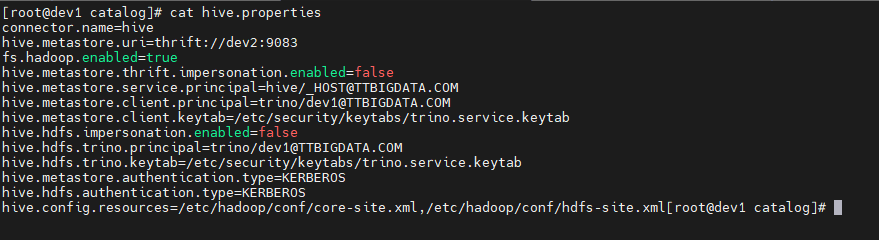
connector.name=hive
hive.metastore.uri=thrift://dev2:9083

fs.hadoop.enabled=true
hive.metastore.thrift.impersonation.enabled=false

hive.metastore.service.principal=hive/_HOST@TTBIGDATA.COM
hive.metastore.client.principal=trino/dev1@TTBIGDATA.COM
hive.metastore.client.keytab=/etc/security/keytabs/trino.service.keytab

hive.hdfs.impersonation.enabled=false
hive.hdfs.trino.principal=trino/dev1@TTBIGDATA.COM
hive.hdfs.trino.keytab=/etc/security/keytabs/trino.service.keytab

hive.metastore.authentication.type=KERBEROS
hive.hdfs.authentication.type=KERBEROS

hive.config.resources=/etc/hadoop/conf/core-site.xml,/etc/hadoop/conf/hdfs-site.xml
1
2
3
4
5
6
7
8
9
10
11
12
13
14
15
16
17
18
2
3
4
5
6
7
8
9
10
11
12
13
14
15
16
17
18
关联章节:Hive Catalog 无法连接如何排查?
# 三、选看(二)Trino 启动失败:HTTP Kerberos 配置缺失
说明:2.2.1 以上版本可不看
从 ttr-2.2.1 版本起,HTTP Kerberos 认证所需的模板已修复,config.properties 会自动渲染完全。
仅 旧版本(ttr-2.2.0 以下) 会出现本节的启动失败情况。
适用于:Trino 直接启动失败,报 service-name must not be null 的情况。
# 1、问题现象
Invalid configuration property http-server.authentication.krb5.service-name: must not be null
1
伴随:
http.authentication.krb5.config must not be nullConfiguration is invalid
# 2、导致原因
Trino 的 HTTP 层使用 SPNEGO 认证,但 Ambari 模板未正确渲染以下字段:
- 服务名(service-name)
- keytab
- krb5.conf 路径
导致 Trino 在 bootstrap 阶段直接退出。
# 3、解决方法:补齐 config.properties
必须确保以下字段存在:
| 配置项 | 示例值 | 说明 |
|---|---|---|
| http-server.authentication.type | KERBEROS | 开启 HTTP Kerberos |
| http-server.authentication.krb5.service-name | HTTP | 必须与 keytab principal 前缀一致 |
| http-server.authentication.krb5.keytab | /etc/security/keytabs/spnego.service.keytab | HTTP 层的 keytab |
| http.authentication.krb5.config | /etc/krb5.conf | 必须存在 |
查看完整修复步骤