
 [22201]Hive 使用 Tez 引擎插入数据失败
# 一、报错分析
# 1、Hive 侧现象:TezTask 执行失败
在 Hue 中执行 INSERT 后,Hive 直接返回 TezTask 失败:
Error while processing statement: FAILED: Execution Error, return code 2 from org.apache.hadoop.hive.ql.exec.tez.TezTask.
Vertex failed, vertexName=Map 1
...
DAG did not succeed due to VERTEX_FAILURE. failedVertices:1 killedVertices:1
1
2
3
4
2
3
4
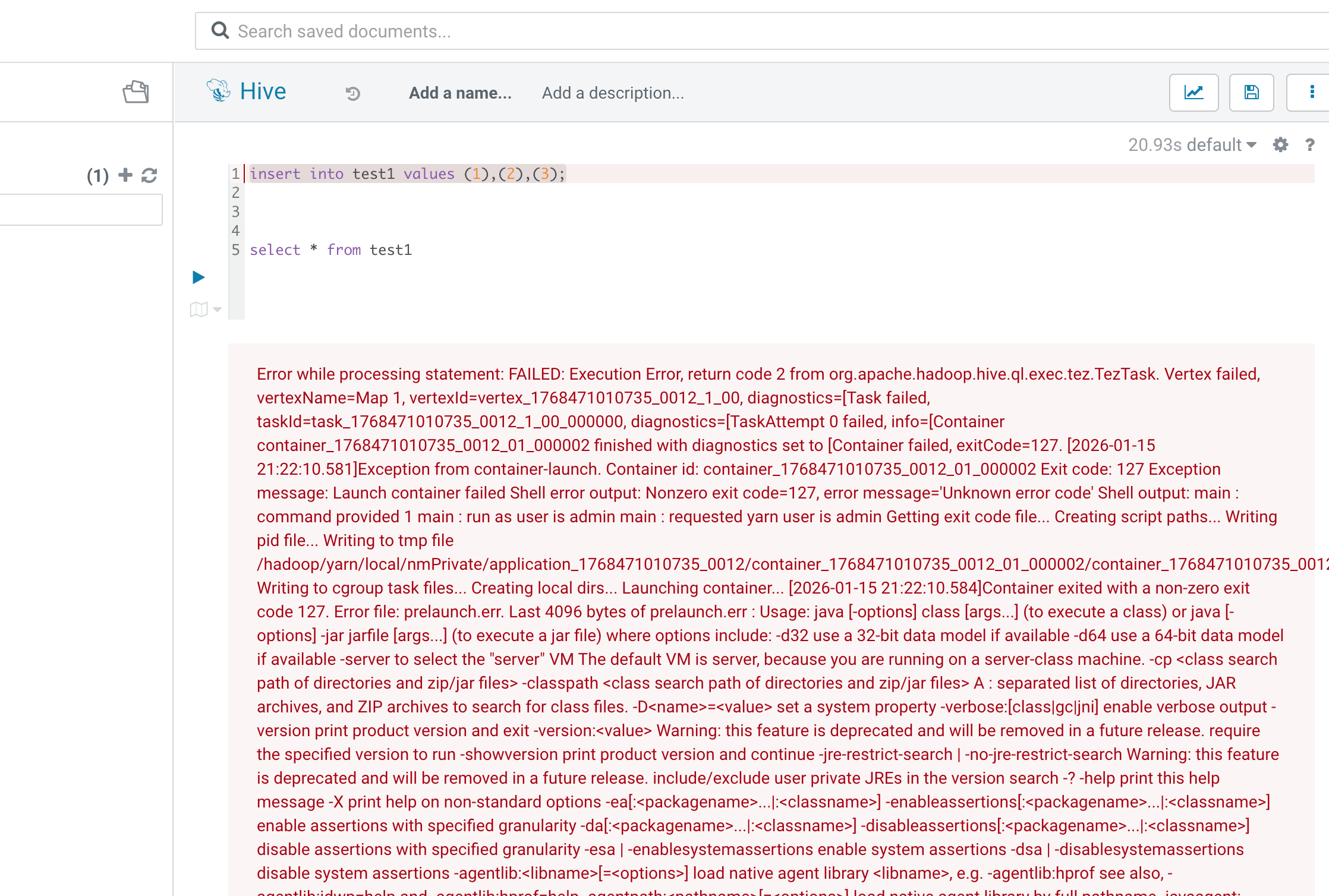
从 Hive 的报错文案来看,容易把注意力放在:
- Tez Vertex 失败
- Map 阶段异常
- Reducer 被 Kill(联动失败)
但这类报错通常只是“上层结果”,真正原因需要下钻到 YARN Container 的启动诊断。
# 2、YARN 侧关键信号:ExitCode=127 + prelaunch.err
日志中出现非常关键的组合信号:
Container exited with a non-zero exit code 127prelaunch.err中出现command not found- Java Usage 输出被反复打印
典型片段如下:
Container failed, exitCode=127.
...
Last 4096 bytes of stderr :
/bin/bash: line 1: -XX:+PrintGCDetails: command not found
1
2
3
4
2
3
4
经验判断
ExitCode=127 在 Linux 语义里通常指向:命令不存在 / 命令无法执行。 放在 YARN Container 场景中,优先怀疑:启动脚本拼接后的命令行被 Shell 误解析。
# 3、Tez 失败形态:Map Vertex 反复重试后失败
这类问题在 Tez 运行界面里呈现出“高度一致的确定性失败”:
- TaskAttempt 反复重试
- 每次都在 Container 启动阶段失败
- 最终 Map Vertex 标记失败,Reducer 触发联动 Kill
这里的关键点在于: 不是跑着跑着挂了,而是 JVM 压根没成功起来。
处理办法可参考
# 三、处理结果
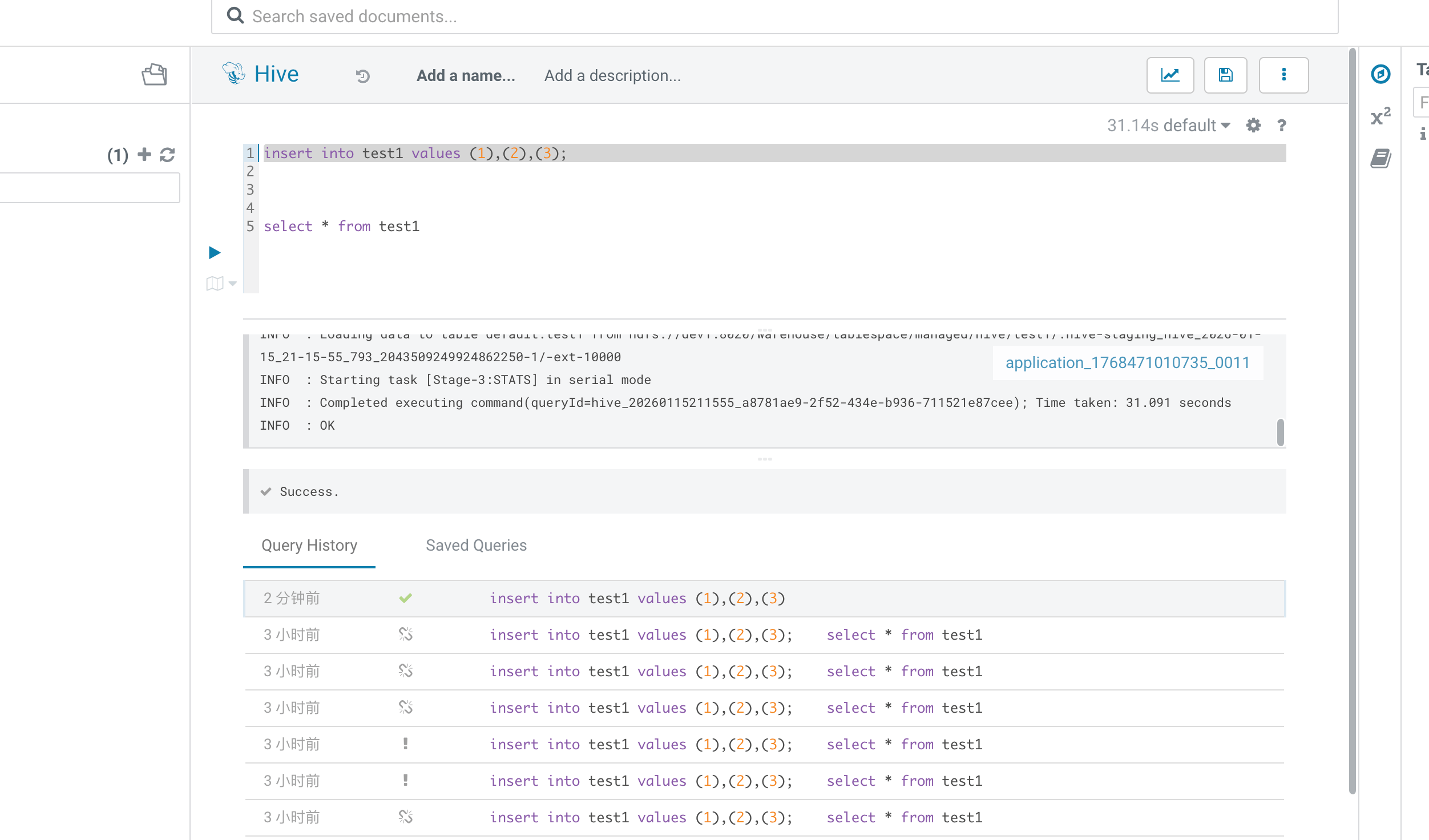
# 1、回到 Hue 再次执行 INSERT
配置生效后,再回到 Hue 中执行同一条插入语句。
现象变化非常明确:
- 不再出现 Tez Vertex 启动失败
- TaskAttempt 不再因 ExitCode=127 重试
- SQL 可以正常执行完成
# 2、完整的报错日志
Error while processing statement: FAILED: Execution Error, return code 2 from
org.apache.hadoop.hive.ql.exec.tez.TezTask. Vertex failed, vertexName=Map 1, vertexId=vertex_1768471010735_0012_1_00,
diagnostics=[Task failed, taskId=task_1768471010735_0012_1_00_000000, diagnostics=[TaskAttempt 0 failed, info=[Container
container_1768471010735_0012_01_000002 finished with diagnostics set to [Container failed,
exitCode=127. [2026-01-15 21:22:10.581]Exception from container-launch. Container id:
container_1768471010735_0012_01_000002 Exit code: 127 Exception message: Launch container failed Shell error output:
Nonzero exit code=127, error message='Unknown error code' Shell output: main : command provided 1 main : run as user is
admin main : requested yarn user is admin Getting exit code file... Creating script paths... Writing pid file... Writing
to tmp file
/hadoop/yarn/local/nmPrivate/application_1768471010735_0012/container_1768471010735_0012_01_000002/container_1768471010735_0012_01_000002.pid.tmp
Writing to cgroup task files... Creating local dirs... Launching container... [2026-01-15 21:22:10.584]Container exited
with a non-zero exit code 127. Error file: prelaunch.err. Last 4096 bytes of prelaunch.err : Usage: java [-options]
class [args...] (to execute a class) or java [-options] -jar jarfile [args...] (to execute a jar file) where options
include: -d32 use a 32-bit data model if available -d64 use a 64-bit data model if available -server to select the "
server" VM The default VM is server, because you are running on a server-class machine. -cp <class search path of
directories and zip/jar files> -classpath <class search path of directories and zip/jar files> A : separated list of
directories, JAR archives, and ZIP archives to search for class files. -D<name>=<value> set a system property
-verbose:[class|gc|jni] enable verbose output -version print product version and exit -version:<value> Warning: this
feature is deprecated and will be removed in a future release. require the specified version to run -showversion print
product version and continue -jre-restrict-search | -no-jre-restrict-search Warning: this feature is deprecated and will
be removed in a future release. include/exclude user private JREs in the version search -? -help print this help message
-X print help on non-standard options -ea[:<packagename>...|:<classname>]
-enableassertions[:<packagename>...|:<classname>] enable assertions with specified granularity
-da[:<packagename>...|:<classname>] -disableassertions[:<packagename>...|:<classname>] disable assertions with specified
granularity -esa | -enablesystemassertions enable system assertions -dsa | -disablesystemassertions disable system
assertions -agentlib:<libname>[=<options>] load native agent library <libname>, e.g. -agentlib:hprof see also,
-agentlib:jdwp=help and -agentlib:hprof=help -agentpath:<pathname>[=<options>] load native agent library by full
pathname -javaagent:<jarpath>[=<options>] load Java programming language agent, see java.lang.instrument
-splash:<imagepath> show splash screen with specified image
See http://www.oracle.com/technetwork/java/javase/documentation/index.html for more details. Last 4096 bytes of stderr :
/bin/bash: line 1:undefined: -XX:+PrintGCDetails: command not found [2026-01-15 21:22:10.585]Container exited with a
non-zero exit code 127. Error file: prelaunch.err. Last 4096 bytes of prelaunch.err : Usage: java [-options]
class [args...] (to execute a class) or java [-options] -jar jarfile [args...] (to execute a jar file) where options
include: -d32 use a 32-bit data model if available -d64 use a 64-bit data model if available -server to select the "
server" VM The default VM is server, because you are running on a server-class machine. -cp <class search path of
directories and zip/jar files> -classpath <class search path of directories and zip/jar files> A : separated list of
directories, JAR archives, and ZIP archives to search for class files. -D<name>=<value> set a system property
-verbose:[class|gc|jni] enable verbose output -version print product version and exit -version:<value> Warning: this
feature is deprecated and will be removed in a future release. require the specified version to run -showversion print
product version and continue -jre-restrict-search | -no-jre-restrict-search Warning: this feature is deprecated and will
be removed in a future release. include/exclude user private JREs in the version search -? -help print this help message
-X print help on non-standard options -ea[:<packagename>...|:<classname>]
-enableassertions[:<packagename>...|:<classname>] enable assertions with specified granularity
-da[:<packagename>...|:<classname>] -disableassertions[:<packagename>...|:<classname>] disable assertions with specified
granularity -esa | -enablesystemassertions enable system assertions -dsa | -disablesystemassertions disable system
assertions -agentlib:<libname>[=<options>] load native agent library <libname>, e.g. -agentlib:hprof see also,
-agentlib:jdwp=help and -agentlib:hprof=help -agentpath:<pathname>[=<options>] load native agent library by full
pathname -javaagent:<jarpath>[=<options>] load Java programming language agent, see java.lang.instrument
-splash:<imagepath> show splash screen with specified image
See http://www.oracle.com/technetwork/java/javase/documentation/index.html for more details. Last 4096 bytes of stderr :
/bin/bash: line 1: -XX:+PrintGCDetails: command not found ]], TaskAttempt 1 failed, info=[Container
container_1768471010735_0012_01_000003 finished with diagnostics set to [Container failed,
exitCode=127. [2026-01-15 21:22:14.372]Exception from container-launch. Container id:
container_1768471010735_0012_01_000003 Exit code: 127 Exception message: Launch container failed Shell error output:
Nonzero exit code=127, error message='Unknown error code' Shell output: main : command provided 1 main : run as user is
admin main : requested yarn user is admin Getting exit code file... Creating script paths... Writing pid file... Writing
to tmp file
/hadoop/yarn/local/nmPrivate/application_1768471010735_0012/container_1768471010735_0012_01_000003/container_1768471010735_0012_01_000003.pid.tmp
Writing to cgroup task files... Creating local dirs... Launching container... [2026-01-15 21:22:14.375]Container exited
with a non-zero exit code 127. Error file: prelaunch.err. Last 4096 bytes of prelaunch.err : Usage: java [-options]
class [args...] (to execute a class) or java [-options] -jar jarfile [args...] (to execute a jar file) where options
include: -d32 use a 32-bit data model if available -d64 use a 64-bit data model if available -server to select the "
server" VM The default VM is server, because you are running on a server-class machine. -cp <class search path of
directories and zip/jar files> -classpath <class search path of directories and zip/jar files> A : separated list of
directories, JAR archives, and ZIP archives to search for class files. -D<name>=<value> set a system property
-verbose:[class|gc|jni] enable verbose output -version print product version and exit -version:<value> Warning: this
feature is deprecated and will be removed in a future release. require the specified version to run -showversion print
product version and continue -jre-restrict-search | -no-jre-restrict-search Warning: this feature is deprecated and will
be removed in a future release. include/exclude user private JREs in the version search -? -help print this help message
-X print help on non-standard options -ea[:<packagename>...|:<classname>]
-enableassertions[:<packagename>...|:<classname>] enable assertions with specified granularity
-da[:<packagename>...|:<classname>] -disableassertions[:<packagename>...|:<classname>] disable assertions with specified
granularity -esa | -enablesystemassertions enable system assertions -dsa | -disablesystemassertions disable system
assertions -agentlib:<libname>[=<options>] load native agent library <libname>, e.g. -agentlib:hprof see also,
-agentlib:jdwp=help and -agentlib:hprof=help -agentpath:<pathname>[=<options>] load native agent library by full
pathname -javaagent:<jarpath>[=<options>] load Java programming language agent, see java.lang.instrument
-splash:<imagepath> show splash screen with specified image
See http://www.oracle.com/technetwork/java/javase/documentation/index.html for more details. Last 4096 bytes of stderr :
/bin/bash: line 1: -XX:+PrintGCDetails: command not found [2026-01-15 21:22:14.375]Container exited with a non-zero exit
code 127. Error file: prelaunch.err. Last 4096 bytes of prelaunch.err : Usage: java [-options] class [args...] (to
execute a class) or java [-options] -jar jarfile [args...] (to execute a jar file) where options include: -d32 use a
32-bit data model if available -d64 use a 64-bit data model if available -server to select the "server" VM The default
VM is server, because you are running on a server-class machine. -cp <class search path of directories and zip/jar
files> -classpath <class search path of directories and zip/jar files> A : separated list of directories, JAR archives,
and ZIP archives to search for class files. -D<name>=<value> set a system property -verbose:[class|gc|jni] enable
verbose output -version print product version and exit -version:<value> Warning: this feature is deprecated and will be
removed in a future release. require the specified version to run -showversion print product version and continue
-jre-restrict-search | -no-jre-restrict-search Warning: this feature is deprecated and will be removed in a future
release. include/exclude user private JREs in the version search -? -help print this help message -X print help on
non-standard options -ea[:<packagename>...|:<classname>] -enableassertions[:<packagename>...|:<classname>] enable
assertions with specified granularity -da[:<packagename>...|:<classname>]
-disableassertions[:<packagename>...|:<classname>] disable assertions with specified granularity -esa |
-enablesystemassertions enable system assertions -dsa | -disablesystemassertions disable system assertions
-agentlib:<libname>[=<options>] load native agent library <libname>, e.g. -agentlib:hprof see also, -agentlib:jdwp=help
and -agentlib:hprof=help -agentpath:<pathname>[=<options>] load native agent library by full pathname
-javaagent:<jarpath>[=<options>] load Java programming language agent, see java.lang.instrument -splash:<imagepath> show
splash screen with specified image See http://www.oracle.com/technetwork/java/javase/documentation/index.html for more
details. Last 4096 bytes of stderr : /bin/bash: line 1: -XX:+PrintGCDetails: command not found ]], TaskAttempt 2 failed,
info=[Container container_1768471010735_0012_01_000004 finished with diagnostics set to [Container failed,
exitCode=127. [2026-01-15 21:22:15.376]Exception from container-launch. Container id:
container_1768471010735_0012_01_000004 Exit code: 127 Exception message: Launch container failed Shell error output:
Nonzero exit code=127, error message='Unknown error code' Shell output: main : command provided 1 main : run as user is
admin main : requested yarn user is admin Getting exit code file... Creating script paths... Writing pid file... Writing
to tmp file
/hadoop/yarn/local/nmPrivate/application_1768471010735_0012/container_1768471010735_0012_01_000004/container_1768471010735_0012_01_000004.pid.tmp
Writing to cgroup task files... Creating local dirs... Launching container... [2026-01-15 21:22:15.378]Container exited
with a non-zero exit code 127. Error file: prelaunch.err. Last 4096 bytes of prelaunch.err : Usage: java [-options]
class [args...] (to execute a class) or java [-options] -jar jarfile [args...] (to execute a jar file) where options
include: -d32 use a 32-bit data model if available -d64 use a 64-bit data model if available -server to select the "
server" VM The default VM is server, because you are running on a server-class machine. -cp <class search path of
directories and zip/jar files> -classpath <class search path of directories and zip/jar files> A : separated list of
directories, JAR archives, and ZIP archives to search for class files. -D<name>=<value> set a system property
-verbose:[class|gc|jni] enable verbose output -version print product version and exit -version:<value> Warning: this
feature is deprecated and will be removed in a future release. require the specified version to run -showversion print
product version and continue -jre-restrict-search | -no-jre-restrict-search Warning: this feature is deprecated and will
be removed in a future release. include/exclude user private JREs in the version search -? -help print this help message
-X print help on non-standard options -ea[:<packagename>...|:<classname>]
-enableassertions[:<packagename>...|:<classname>] enable assertions with specified granularity
-da[:<packagename>...|:<classname>] -disableassertions[:<packagename>...|:<classname>] disable assertions with specified
granularity -esa | -enablesystemassertions enable system assertions -dsa | -disablesystemassertions disable system
assertions -agentlib:<libname>[=<options>] load native agent library <libname>, e.g. -agentlib:hprof see also,
-agentlib:jdwp=help and -agentlib:hprof=help -agentpath:<pathname>[=<options>] load native agent library by full
pathname -javaagent:<jarpath>[=<options>] load Java programming language agent, see java.lang.instrument
-splash:<imagepath> show splash screen with specified image
See http://www.oracle.com/technetwork/java/javase/documentation/index.html for more details. Last 4096 bytes of stderr :
/bin/bash: line 1: -XX:+PrintGCDetails: command not found [2026-01-15 21:22:15.379]Container exited with a non-zero exit
code 127. Error file: prelaunch.err. Last 4096 bytes of prelaunch.err : Usage: java [-options] class [args...] (to
execute a class) or java [-options] -jar jarfile [args...] (to execute a jar file) where options include: -d32 use a
32-bit data model if available -d64 use a 64-bit data model if available -server to select the "server" VM The default
VM is server, because you are running on a server-class machine. -cp <class search path of directories and zip/jar
files> -classpath <class search path of directories and zip/jar files> A : separated list of directories, JAR archives,
and ZIP archives to search for class files. -D<name>=<value> set a system property -verbose:[class|gc|jni] enable
verbose output -version print product version and exit -version:<value> Warning: this feature is deprecated and will be
removed in a future release. require the specified version to run -showversion print product version and continue
-jre-restrict-search | -no-jre-restrict-search Warning: this feature is deprecated and will be removed in a future
release. include/exclude user private JREs in the version search -? -help print this help message -X print help on
non-standard options -ea[:<packagename>...|:<classname>] -enableassertions[:<packagename>...|:<classname>] enable
assertions with specified granularity -da[:<packagename>...|:<classname>]
-disableassertions[:<packagename>...|:<classname>] disable assertions with specified granularity -esa |
-enablesystemassertions enable system assertions -dsa | -disablesystemassertions disable system assertions
-agentlib:<libname>[=<options>] load native agent library <libname>, e.g. -agentlib:hprof see also, -agentlib:jdwp=help
and -agentlib:hprof=help -agentpath:<pathname>[=<options>] load native agent library by full pathname
-javaagent:<jarpath>[=<options>] load Java programming language agent, see java.lang.instrument -splash:<imagepath> show
splash screen with specified image See http://www.oracle.com/technetwork/java/javase/documentation/index.html for more
details. Last 4096 bytes of stderr : /bin/bash: line 1: -XX:+PrintGCDetails: command not found ]], TaskAttempt 3 failed,
info=[Container container_1768471010735_0012_01_000005 finished with diagnostics set to [Container failed,
exitCode=127. [2026-01-15 21:22:16.835]Exception from container-launch. Container id:
container_1768471010735_0012_01_000005 Exit code: 127 Exception message: Launch container failed Shell error output:
Nonzero exit code=127, error message='Unknown error code' Shell output: main : command provided 1 main : run as user is
admin main : requested yarn user is admin Getting exit code file... Creating script paths... Writing pid file... Writing
to tmp file
/hadoop/yarn/local/nmPrivate/application_1768471010735_0012/container_1768471010735_0012_01_000005/container_1768471010735_0012_01_000005.pid.tmp
Writing to cgroup task files... Creating local dirs... Launching container... [2026-01-15 21:22:16.837]Container exited
with a non-zero exit code 127. Error file: prelaunch.err. Last 4096 bytes of prelaunch.err : Usage: java [-options]
class [args...] (to execute a class) or java [-options] -jar jarfile [args...] (to execute a jar file) where options
include: -d32 use a 32-bit data model if available -d64 use a 64-bit data model if available -server to select the "
server" VM The default VM is server, because you are running on a server-class machine. -cp <class search path of
directories and zip/jar files> -classpath <class search path of directories and zip/jar files> A : separated list of
directories, JAR archives, and ZIP archives to search for class files. -D<name>=<value> set a system property
-verbose:[class|gc|jni] enable verbose output -version print product version and exit -version:<value> Warning: this
feature is deprecated and will be removed in a future release. require the specified version to run -showversion print
product version and continue -jre-restrict-search | -no-jre-restrict-search Warning: this feature is deprecated and will
be removed in a future release. include/exclude user private JREs in the version search -? -help print this help message
-X print help on non-standard options -ea[:<packagename>...|:<classname>]
-enableassertions[:<packagename>...|:<classname>] enable assertions with specified granularity
-da[:<packagename>...|:<classname>] -disableassertions[:<packagename>...|:<classname>] disable assertions with specified
granularity -esa | -enablesystemassertions enable system assertions -dsa | -disablesystemassertions disable system
assertions -agentlib:<libname>[=<options>] load native agent library <libname>, e.g. -agentlib:hprof see also,
-agentlib:jdwp=help and -agentlib:hprof=help -agentpath:<pathname>[=<options>] load native agent library by full
pathname -javaagent:<jarpath>[=<options>] load Java programming language agent, see java.lang.instrument
-splash:<imagepath> show splash screen with specified image
See http://www.oracle.com/technetwork/java/javase/documentation/index.html for more details. Last 4096 bytes of stderr :
/bin/bash: line 1: -XX:+PrintGCDetails: command not found [2026-01-15 21:22:16.837]Container exited with a non-zero exit
code 127. Error file: prelaunch.err. Last 4096 bytes of prelaunch.err : Usage: java [-options] class [args...] (to
execute a class) or java [-options] -jar jarfile [args...] (to execute a jar file) where options include: -d32 use a
32-bit data model if available -d64 use a 64-bit data model if available -server to select the "server" VM The default
VM is server, because you are running on a server-class machine. -cp <class search path of directories and zip/jar
files> -classpath <class search path of directories and zip/jar files> A : separated list of directories, JAR archives,
and ZIP archives to search for class files. -D<name>=<value> set a system property -verbose:[class|gc|jni] enable
verbose output -version print product version and exit -version:<value> Warning: this feature is deprecated and will be
removed in a future release. require the specified version to run -showversion print product version and continue
-jre-restrict-search | -no-jre-restrict-search Warning: this feature is deprecated and will be removed in a future
release. include/exclude user private JREs in the version search -? -help print this help message -X print help on
non-standard options -ea[:<packagename>...|:<classname>] -enableassertions[:<packagename>...|:<classname>] enable
assertions with specified granularity -da[:<packagename>...|:<classname>]
-disableassertions[:<packagename>...|:<classname>] disable assertions with specified granularity -esa |
-enablesystemassertions enable system assertions -dsa | -disablesystemassertions disable system assertions
-agentlib:<libname>[=<options>] load native agent library <libname>, e.g. -agentlib:hprof see also, -agentlib:jdwp=help
and -agentlib:hprof=help -agentpath:<pathname>[=<options>] load native agent library by full pathname
-javaagent:<jarpath>[=<options>] load Java programming language agent, see java.lang.instrument -splash:<imagepath> show
splash screen with specified image See http://www.oracle.com/technetwork/java/javase/documentation/index.html for more
details. Last 4096 bytes of stderr : /bin/bash: line 1: -XX:+PrintGCDetails: command not found ]]], Vertex did not
succeed due to OWN_TASK_FAILURE, failedTasks:1 killedTasks:0, Vertex vertex_1768471010735_0012_1_00 [Map 1]
killed/failed due to:OWN_TASK_FAILURE]Vertex killed, vertexName=Reducer 2, vertexId=vertex_1768471010735_0012_1_01,
diagnostics=[Vertex received Kill while in RUNNING state., Vertex did not succeed due to OTHER_VERTEX_FAILURE,
failedTasks:0 killedTasks:1, Vertex vertex_1768471010735_0012_1_01 [Reducer 2] killed/failed due to:
OTHER_VERTEX_FAILURE]DAG did not succeed due to VERTEX_FAILURE. failedVertices:1 killedVertices:1
1
2
3
4
5
6
7
8
9
10
11
12
13
14
15
16
17
18
19
20
21
22
23
24
25
26
27
28
29
30
31
32
33
34
35
36
37
38
39
40
41
42
43
44
45
46
47
48
49
50
51
52
53
54
55
56
57
58
59
60
61
62
63
64
65
66
67
68
69
70
71
72
73
74
75
76
77
78
79
80
81
82
83
84
85
86
87
88
89
90
91
92
93
94
95
96
97
98
99
100
101
102
103
104
105
106
107
108
109
110
111
112
113
114
115
116
117
118
119
120
121
122
123
124
125
126
127
128
129
130
131
132
133
134
135
136
137
138
139
140
141
142
143
144
145
146
147
148
149
150
151
152
153
154
155
156
157
158
159
160
161
162
163
164
165
166
167
168
169
170
171
172
173
174
175
176
177
178
179
180
181
182
183
184
185
186
187
188
189
190
191
192
193
194
195
196
197
198
199
2
3
4
5
6
7
8
9
10
11
12
13
14
15
16
17
18
19
20
21
22
23
24
25
26
27
28
29
30
31
32
33
34
35
36
37
38
39
40
41
42
43
44
45
46
47
48
49
50
51
52
53
54
55
56
57
58
59
60
61
62
63
64
65
66
67
68
69
70
71
72
73
74
75
76
77
78
79
80
81
82
83
84
85
86
87
88
89
90
91
92
93
94
95
96
97
98
99
100
101
102
103
104
105
106
107
108
109
110
111
112
113
114
115
116
117
118
119
120
121
122
123
124
125
126
127
128
129
130
131
132
133
134
135
136
137
138
139
140
141
142
143
144
145
146
147
148
149
150
151
152
153
154
155
156
157
158
159
160
161
162
163
164
165
166
167
168
169
170
171
172
173
174
175
176
177
178
179
180
181
182
183
184
185
186
187
188
189
190
191
192
193
194
195
196
197
198
199