
 [Step3]log4j 日志配置改造
# 一、说明
上一篇已经把 ambari.properties 调整到了适合本机源码启动的状态。
接下来还需要把日志体系一并改好,否则即使服务能启动,后续排查问题时也会很吃力。
默认安装模式下,Ambari Server 的日志通常落在系统目录中。
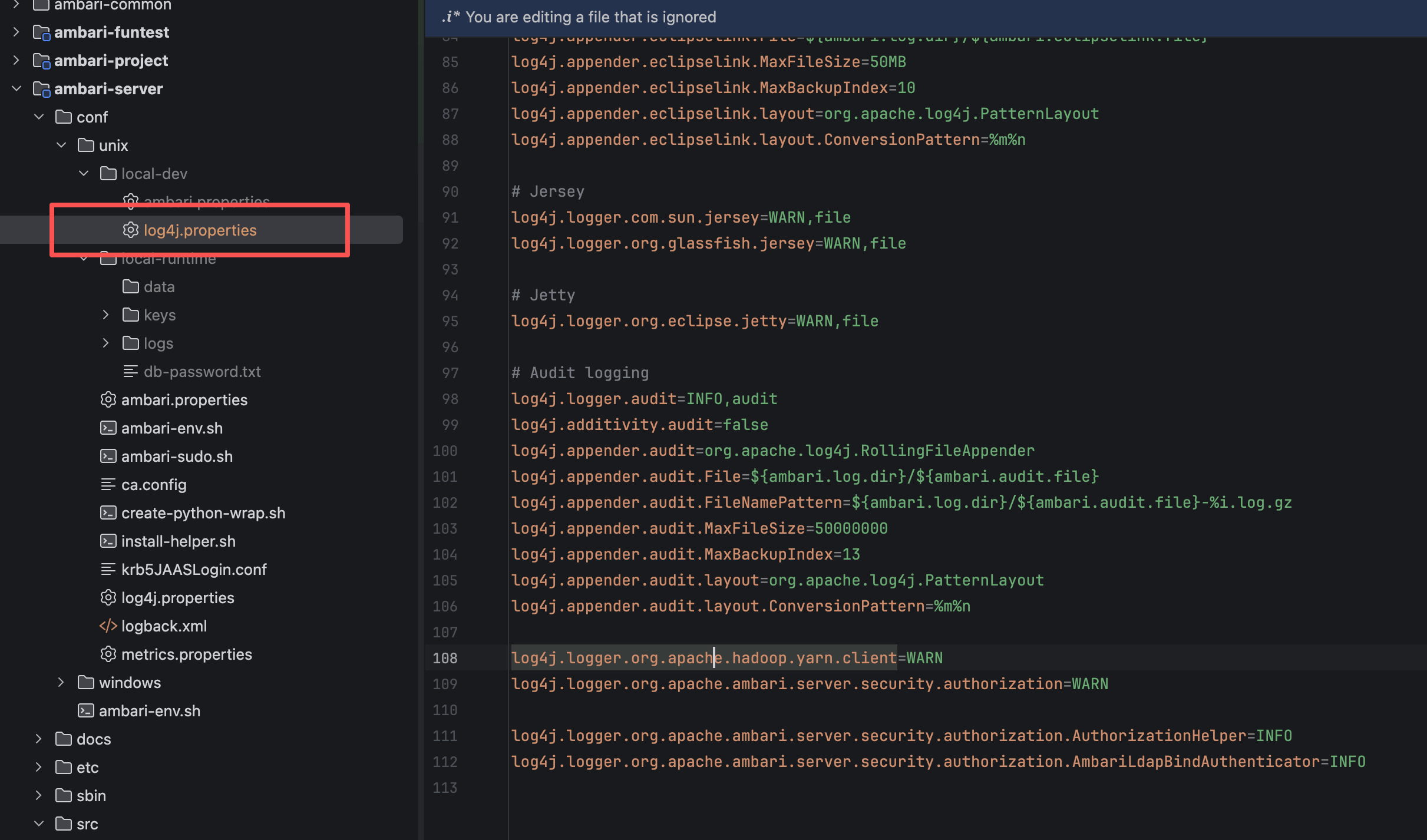 但本机 Debug 场景下,更合适的做法是把日志统一输出到项目内的
 local-runtime/logs,这样有几个直接好处:
- 启动日志和运行日志都集中在本地工程内,查看更方便
- 不会和系统已安装的 Ambari 日志互相混淆
- 反复清理、反复重建时更容易维护
- 配合 IDE 控制台输出,定位异常更直接
这一篇就专门处理 log4j.properties 的本地化。
本章目标
这一章要解决的不是“有没有日志”,而是“日志是否足够清晰、是否能直接服务于本机 Debug”。
# 二、改造目标
本地 Debug 的日志配置,重点不是追求复杂,而是追求清楚。
围绕这个目标,可以把这次改造拆成四件事:
| 目标 | 作用 |
|---|---|
| 日志目录本地化 | 统一输出到 local-runtime/logs |
| 控制台与文件双输出 | 启动时能直接在终端或 IDE 中看到关键日志 |
| 核心日志分文件落盘 | 数据库检查、审计、配置变更等单独保存 |
| 降低无关组件噪音 | Jetty、Jersey 等第三方日志按需收敛 |
注意
本篇讨论的是 DEV-ONLY 配置,也就是专门给本机调试使用的日志方案。
不要直接把这一套原样照搬到生产环境。
# 三、完整配置示例
下面这份 log4j.properties,可以作为 Ambari Server 本机 Debug 场景下的参考模板:
# Copyright 2011 The Apache Software Foundation
#
# Licensed to the Apache Software Foundation (ASF) under one
# or more contributor license agreements.  See the NOTICE file
# distributed with this file for additional information
# regarding copyright ownership.  The ASF licenses this file
# to you under the Apache License, Version 2.0 (the
# "License"); you may not use this file except in compliance
# with the License.  You may obtain a copy of the License at
#
#     http://www.apache.org/licenses/LICENSE-2.0
#
# Unless required by applicable law or agreed to in writing, software
# distributed under the License is distributed on an "AS IS" BASIS,
# WITHOUT WARRANTIES OR CONDITIONS OF ANY KIND, either express or implied.
# See the License for the specific language governing permissions and
# limitations under the License.

# ================================================================
# DEV-ONLY log4j — logs go to local-runtime/logs (gitignored)
# Production template: conf/unix/log4j.properties
# ================================================================

ambari.root.dir=/请更换成你项目路径,必须绝对路径/ambari/ambari-server/conf/unix/local-runtime
ambari.log.dir=${ambari.root.dir}/logs
ambari.log.file=ambari-server.log
ambari.config-changes.file=ambari-config-changes.log
ambari.alerts.file=ambari-alerts.log
ambari.eclipselink.file=ambari-eclipselink.log
ambari.audit.file=ambari-audit.log
ambari.dbcheck.file=ambari-server-check-database.log

# Print INFO+ to both file and console in dev
log4j.rootLogger=INFO,file,console

# Console appender (dev-only convenience)
log4j.appender.console=org.apache.log4j.ConsoleAppender
log4j.appender.console.layout=org.apache.log4j.PatternLayout
log4j.appender.console.layout.ConversionPattern=%d{ISO8601} %5p [%t] %c{1}:%L - %m%n

# Direct log messages to a log file
log4j.appender.file=org.apache.log4j.RollingFileAppender
log4j.appender.file.File=${ambari.log.dir}/${ambari.log.file}
log4j.appender.file.MaxFileSize=80MB
log4j.appender.file.MaxBackupIndex=60
log4j.appender.file.layout=org.apache.log4j.PatternLayout
log4j.appender.file.layout.ConversionPattern=%d{ISO8601} %5p [%t] %c{1}:%L - %m%n

# Log config changes
log4j.logger.configchange=INFO,configchange
log4j.additivity.configchange=false
log4j.appender.configchange=org.apache.log4j.FileAppender
log4j.appender.configchange.File=${ambari.log.dir}/${ambari.config-changes.file}
log4j.appender.configchange.layout=org.apache.log4j.PatternLayout
log4j.appender.configchange.layout.ConversionPattern=%d{ISO8601} %5p - %m%n

# Log alert state changes
log4j.logger.alerts=INFO,alerts
log4j.additivity.alerts=false
log4j.appender.alerts=org.apache.log4j.FileAppender
log4j.appender.alerts.File=${ambari.log.dir}/${ambari.alerts.file}
log4j.appender.alerts.layout=org.apache.log4j.PatternLayout
log4j.appender.alerts.layout.ConversionPattern=%d{ISO8601} %m%n

# Log database check process
log4j.logger.org.apache.ambari.server.checks.DatabaseConsistencyChecker=INFO, dbcheck
log4j.additivity.org.apache.ambari.server.checks.DatabaseConsistencyChecker=false
log4j.appender.dbcheck=org.apache.log4j.FileAppender
log4j.appender.dbcheck.File=${ambari.log.dir}/${ambari.dbcheck.file}
log4j.appender.dbcheck.layout=org.apache.log4j.PatternLayout
log4j.appender.dbcheck.layout.ConversionPattern=%d{ISO8601} %5p - %m%n

log4j.logger.org.apache.ambari.server.checks.DatabaseConsistencyCheckHelper=INFO, dbcheckhelper
log4j.additivity.org.apache.ambari.server.checks.DatabaseConsistencyCheckHelper=false
log4j.appender.dbcheckhelper=org.apache.log4j.FileAppender
log4j.appender.dbcheckhelper.File=${ambari.log.dir}/${ambari.dbcheck.file}
log4j.appender.dbcheckhelper.layout=org.apache.log4j.PatternLayout
log4j.appender.dbcheckhelper.layout.ConversionPattern=%d{ISO8601} %5p - %m%n

# EclipsLink -> slf4j bridge
log4j.logger.eclipselink=TRACE,eclipselink
log4j.additivity.eclipselink=false
log4j.appender.eclipselink=org.apache.log4j.RollingFileAppender
log4j.appender.eclipselink.File=${ambari.log.dir}/${ambari.eclipselink.file}
log4j.appender.eclipselink.MaxFileSize=50MB
log4j.appender.eclipselink.MaxBackupIndex=10
log4j.appender.eclipselink.layout=org.apache.log4j.PatternLayout
log4j.appender.eclipselink.layout.ConversionPattern=%m%n

# Jersey
log4j.logger.com.sun.jersey=WARN,file
log4j.logger.org.glassfish.jersey=WARN,file

# Jetty
log4j.logger.org.eclipse.jetty=WARN,file

# Audit logging
log4j.logger.audit=INFO,audit
log4j.additivity.audit=false
log4j.appender.audit=org.apache.log4j.RollingFileAppender
log4j.appender.audit.File=${ambari.log.dir}/${ambari.audit.file}
log4j.appender.audit.FileNamePattern=${ambari.log.dir}/${ambari.audit.file}-%i.log.gz
log4j.appender.audit.MaxFileSize=50000000
log4j.appender.audit.MaxBackupIndex=13
log4j.appender.audit.layout=org.apache.log4j.PatternLayout
log4j.appender.audit.layout.ConversionPattern=%m%n

log4j.logger.org.apache.hadoop.yarn.client=WARN
log4j.logger.org.apache.ambari.server.security.authorization=WARN

log4j.logger.org.apache.ambari.server.security.authorization.AuthorizationHelper=INFO
log4j.logger.org.apache.ambari.server.security.authorization.AmbariLdapBindAuthenticator=INFO
2
3
4
5
6
7
8
9
10
11
12
13
14
15
16
17
18
19
20
21
22
23
24
25
26
27
28
29
30
31
32
33
34
35
36
37
38
39
40
41
42
43
44
45
46
47
48
49
50
51
52
53
54
55
56
57
58
59
60
61
62
63
64
65
66
67
68
69
70
71
72
73
74
75
76
77
78
79
80
81
82
83
84
85
86
87
88
89
90
91
92
93
94
95
96
97
98
99
100
101
102
103
104
105
106
107
108
109
110
111
112
# 四、先看最重要的两行
# 1、日志根目录
ambari.root.dir=/请更换成你项目路径,必须绝对路径/ambari/ambari-server/conf/unix/local-runtime
ambari.log.dir=${ambari.root.dir}/logs
2
这里是整份配置的基础。
它的作用非常直接,就是把所有日志统一收敛到本地工程里的 local-runtime/logs。
这样改完之后,日志目录不会再分散到系统路径中,而是固定落在本地调试环境内。
推荐做法
local-runtime 建议继续保留在 .gitignore 中。
这样运行日志、临时文件、调试残留都不会污染代码仓库。
# 2、日志文件命名
ambari.log.file=ambari-server.log
ambari.config-changes.file=ambari-config-changes.log
ambari.alerts.file=ambari-alerts.log
ambari.eclipselink.file=ambari-eclipselink.log
ambari.audit.file=ambari-audit.log
ambari.dbcheck.file=ambari-server-check-database.log
2
3
4
5
6
这一组配置把不同类型日志拆成了不同文件。 这样做比全部塞进一个大文件更适合本机调试,因为你排查不同问题时,目标文件非常明确。
| 文件名 | 用途 |
|---|---|
ambari-server.log | 主启动日志、运行日志 |
ambari-config-changes.log | 配置变更相关日志 |
ambari-alerts.log | 告警状态变化日志 |
ambari-eclipselink.log | 持久层相关日志 |
ambari-audit.log | 审计日志 |
ambari-server-check-database.log | 数据库一致性检查日志 |
# 五、主日志为什么同时输出到文件和控制台
# 1、rootLogger 配置
log4j.rootLogger=INFO,file,console
这一行决定了本机 Debug 期间最常见的体验: 同一份主日志,既写入文件,也打印到控制台。
这样设计很适合开发态使用,原因很简单:
- 启动失败时,不需要第一时间切到日志目录找文件
- 在 IDEA、PyCharm、终端里能直接看到关键异常
- 需要回溯完整信息时,文件里也保留了完整内容
# 2、控制台输出格式
log4j.appender.console.layout.ConversionPattern=%d{ISO8601} %5p [%t] %c{1}:%L - %m%n
这套格式里包含了几个对排错特别有用的信息:
- 时间
- 日志级别
- 线程名
- 类名
- 行号
- 消息体
对于本机 Debug 场景来说,%c{1}:%L 这个组合非常实用。
它能直接让你看到日志是从哪个类、哪一行附近打出来的,定位速度会快很多。
实战价值
生产环境有时会更强调日志性能和统一采集格式,但本地调试时,行号 和 类名 的价值非常高。