
 [22203]解决办法
# 一、问题现象与背景
# 1、服务表面现象
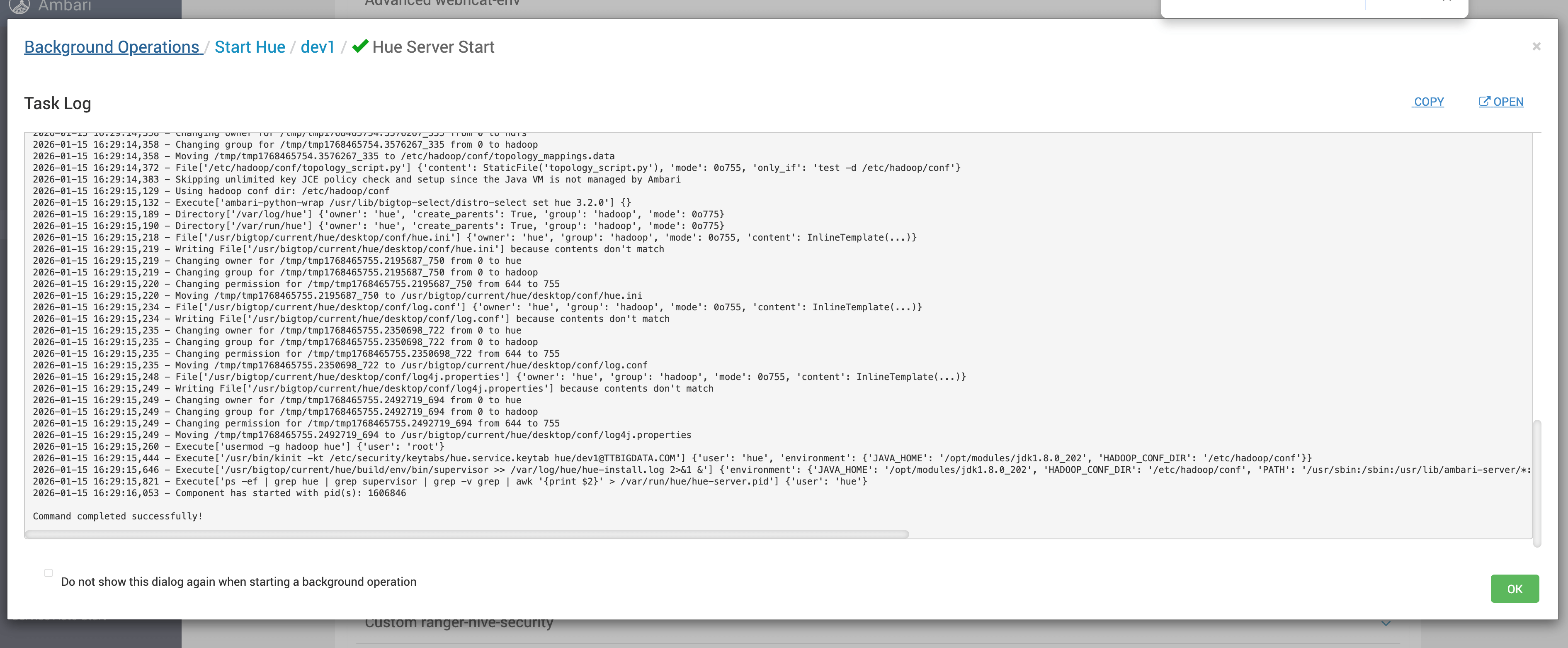
在 Ambari 页面中启动 Hue 服务时,可以观察到以下现象:
- Hue 服务能够被拉起
- 端口短暂监听成功
- 过几秒后进程自动退出
- Ambari 反复尝试重启但始终失败
整体表现为 “看似启动成功,实则立即死亡”。
# 2、问题环境特征
该问题出现在以下典型场景中:
- 使用 Bigtop 编译安装 Hue
- 通过 Ambari 管理服务
- Hue 非 root 用户运行
- 目录权限存在人工或脚本调整历史
这些条件叠加后,非常容易引出权限类隐患。
# 二、日志分析与关键信息定位
# 1、Gunicorn 启动日志解读
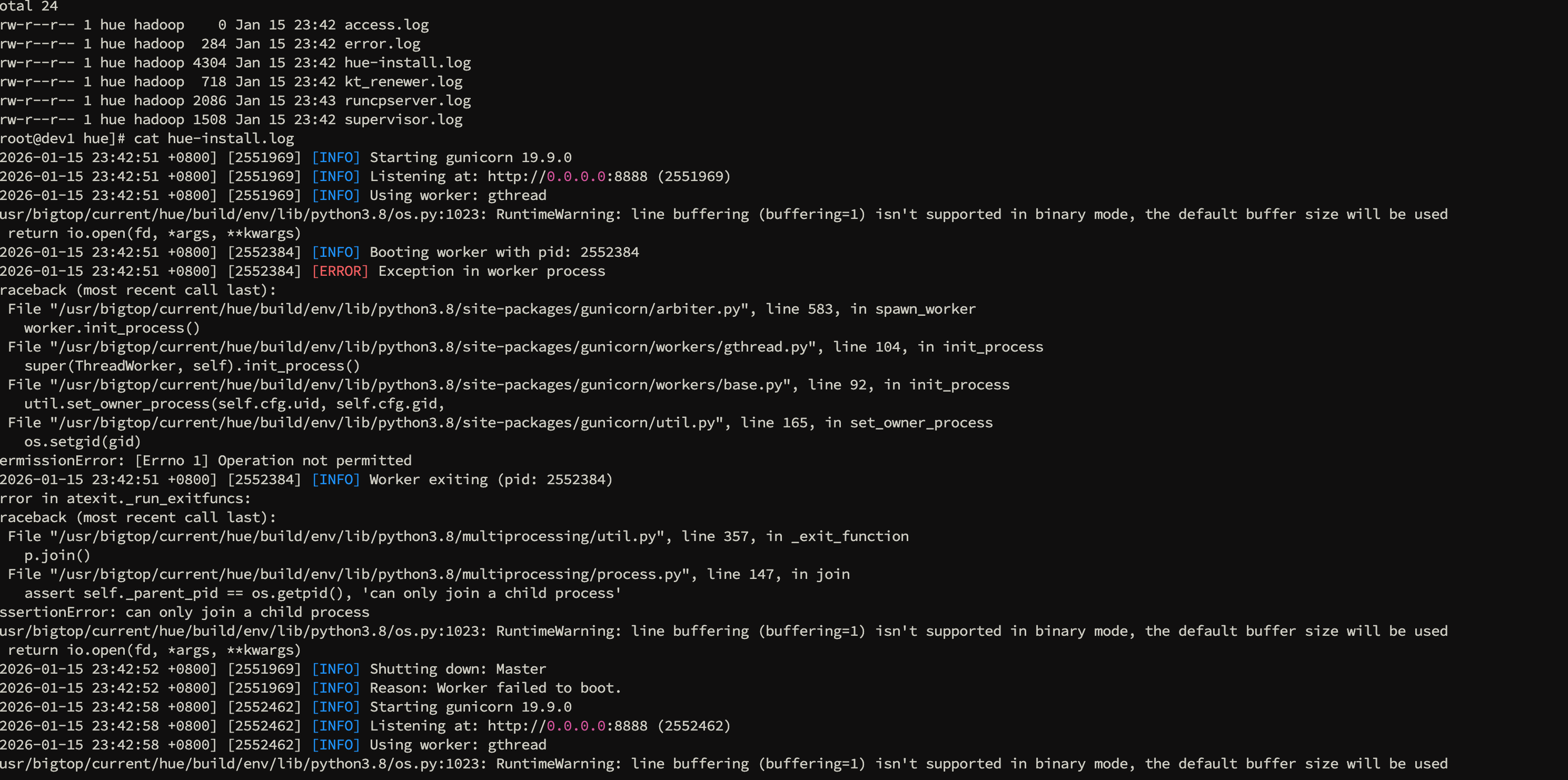
从 Hue 日志可以看到,Gunicorn Master 进程启动过程是正常的:
[2026-01-15 23:42:51 +0800] [2551969] [INFO] Starting gunicorn 19.9.0
[2026-01-15 23:42:51 +0800] [2551969] [INFO] Listening at: http://0.0.0.0:8888 (2551969)
[2026-01-15 23:42:51 +0800] [2551969] [INFO] Using worker: gthread
/usr/bigtop/current/hue/build/env/lib/python3.8/os.py:1023: RuntimeWarning: line buffering (buffering=1) isn't supported in binary mode, the default buffer size will be used
  return io.open(fd, *args, **kwargs)
[2026-01-15 23:42:51 +0800] [2552384] [INFO] Booting worker with pid: 2552384
[2026-01-15 23:42:51 +0800] [2552384] [ERROR] Exception in worker process
Traceback (most recent call last):
  File "/usr/bigtop/current/hue/build/env/lib/python3.8/site-packages/gunicorn/arbiter.py", line 583, in spawn_worker
    worker.init_process()
  File "/usr/bigtop/current/hue/build/env/lib/python3.8/site-packages/gunicorn/workers/gthread.py", line 104, in init_process
    super(ThreadWorker, self).init_process()
  File "/usr/bigtop/current/hue/build/env/lib/python3.8/site-packages/gunicorn/workers/base.py", line 92, in init_process
    util.set_owner_process(self.cfg.uid, self.cfg.gid,
  File "/usr/bigtop/current/hue/build/env/lib/python3.8/site-packages/gunicorn/util.py", line 165, in set_owner_process
    os.setgid(gid)
PermissionError: [Errno 1] Operation not permitted
[2026-01-15 23:42:51 +0800] [2552384] [INFO] Worker exiting (pid: 2552384)
Error in atexit._run_exitfuncs:
Traceback (most recent call last):
  File "/usr/bigtop/current/hue/build/env/lib/python3.8/multiprocessing/util.py", line 357, in _exit_function
    p.join()
  File "/usr/bigtop/current/hue/build/env/lib/python3.8/multiprocessing/process.py", line 147, in join
    assert self._parent_pid == os.getpid(), 'can only join a child process'
AssertionError: can only join a child process
/usr/bigtop/current/hue/build/env/lib/python3.8/os.py:1023: RuntimeWarning: line buffering (buffering=1) isn't supported in binary mode, the default buffer size will be used
  return io.open(fd, *args, **kwargs)
[2026-01-15 23:42:52 +0800] [2551969] [INFO] Shutting down: Master
[2026-01-15 23:42:52 +0800] [2551969] [INFO] Reason: Worker failed to boot.
[2026-01-15 23:42:58 +0800] [2552462] [INFO] Starting gunicorn 19.9.0
[2026-01-15 23:42:58 +0800] [2552462] [INFO] Listening at: http://0.0.0.0:8888 (2552462)
[2026-01-15 23:42:58 +0800] [2552462] [INFO] Using worker: gthread
/usr/bigtop/current/hue/build/env/lib/python3.8/os.py:1023: RuntimeWarning: line buffering (buffering=1) isn't supported in binary mode, the default buffer size will be used
  return io.open(fd, *args, **kwargs)
[2026-01-15 23:42:58 +0800] [2552564] [INFO] Booting worker with pid: 2552564
[2026-01-15 23:42:58 +0800] [2552564] [ERROR] Exception in worker process
Traceback (most recent call last):
  File "/usr/bigtop/current/hue/build/env/lib/python3.8/site-packages/gunicorn/arbiter.py", line 583, in spawn_worker
    worker.init_process()
  File "/usr/bigtop/current/hue/build/env/lib/python3.8/site-packages/gunicorn/workers/gthread.py", line 104, in init_process
    super(ThreadWorker, self).init_process()
  File "/usr/bigtop/current/hue/build/env/lib/python3.8/site-packages/gunicorn/workers/base.py", line 92, in init_process
    util.set_owner_process(self.cfg.uid, self.cfg.gid,
  File "/usr/bigtop/current/hue/build/env/lib/python3.8/site-packages/gunicorn/util.py", line 165, in set_owner_process
    os.setgid(gid)
PermissionError: [Errno 1] Operation not permitted
[2026-01-15 23:42:58 +0800] [2552564] [INFO] Worker exiting (pid: 2552564)
Error in atexit._run_exitfuncs:
Traceback (most recent call last):
  File "/usr/bigtop/current/hue/build/env/lib/python3.8/multiprocessing/util.py", line 357, in _exit_function
    p.join()
  File "/usr/bigtop/current/hue/build/env/lib/python3.8/multiprocessing/process.py", line 147, in join
    assert self._parent_pid == os.getpid(), 'can only join a child process'
AssertionError: can only join a child process
/usr/bigtop/current/hue/build/env/lib/python3.8/os.py:1023: RuntimeWarning: line buffering (buffering=1) isn't supported in binary mode, the default buffer size will be used
  return io.open(fd, *args, **kwargs)
[2026-01-15 23:42:59 +0800] [2552462] [INFO] Shutting down: Master
[2026-01-15 23:42:59 +0800] [2552462] [INFO] Reason: Worker failed to boot.
1
2
3
4
5
6
7
8
9
10
11
12
13
14
15
16
17
18
19
20
21
22
23
24
25
26
27
28
29
30
31
32
33
34
35
36
37
38
39
40
41
42
43
44
45
46
47
48
49
50
51
52
53
54
55
56
57
58
2
3
4
5
6
7
8
9
10
11
12
13
14
15
16
17
18
19
20
21
22
23
24
25
26
27
28
29
30
31
32
33
34
35
36
37
38
39
40
41
42
43
44
45
46
47
48
49
50
51
52
53
54
55
56
57
58
这一步说明:
- Python 虚拟环境无异常
- Gunicorn 组件本身可用
- 端口监听成功
问题 并不在启动入口阶段。
# 2、Worker 失败的决定性异常
真正导致服务退出的是 worker 初始化阶段的异常:
PermissionError: [Errno 1] Operation not permitted
1
异常栈明确指向:
os.setgid(gid)
1
也就是说,worker 在尝试切换运行组时被系统拒绝,随后:
- Worker 直接退出
- Master 感知 worker 启动失败
- 整个 Hue 服务被关闭
关键结论
Hue 秒退的直接原因不是 Hue 本身,而是 Gunicorn worker 无法完成 setgid
# 三、运行用户与目录权限对照分析
# 1、Hue 实际运行用户确认
通过 Hue 自带命令查看配置:
sudo -u hue /usr/bigtop/current/hue/build/env/bin/hue config_dump \
| egrep -i "user|group|uid|gid"
1
2
2
点我查看完整日志
[root@dev1 hue]# sudo -u hue /usr/bigtop/current/hue/build/env/bin/hue config_dump \
>   | egrep -i "gunicorn|daemon|user|group|uid|gid" | head -n 160

which: no xmlsec1 in (/usr/local/sbin:/usr/local/bin:/usr/sbin:/usr/bin:/root/bin)
    config_jdbc_libs_path=/user/oozie/libext/jdbc_drivers
    config_jars_libs_path=/user/oozie/libext/libs
      server_user=hue
        Username of the CM user used for authentication.
        Password of the user used for authentication.
        username/password
      navmetadataserver_cmdb_user=hue
        Username of the CM user used for authentication.
        CM password of the user used for authentication.
      navmetadataserver_ldap_user=hue
        Username of the LDAP user used for authentication.
        LDAP password of the user used for authentication.
      navmetadataserver_saml_user=hue
        Username of the SAML user used for authentication.
        SAML password of the user used for authentication.
      Hue will try to close the Hive query when the user leaves the
      Hue will use at most this many HiveServer2 sessions per user at
      properties that users are authorized to set.
    auth_username=hue
      Auth username of the hue user used for authentications.
      LDAP/PAM/.. password of the hue user used for authentications.
      user selected file downloads on WebHdfs & S3.
      Hue will try to close the Impala query when the user leaves the
      properties that users are authorized to set.
    user_scratch_dir_permission=False
    auth_username=hue
      Auth username of the hue user used for authentications.
      LDAP/PAM/.. password of the hue user used for authentications.
    daemon_api_password=None
      Password for Impala Daemon when username/password authentication
      is enabled for the Impala Daemon UI.
    daemon_api_password_script=None
      Execute this script to produce the Impala Daemon Password. This
      will be used when `daemon_api_password` is not set.
    daemon_api_username=None
      Username for Impala Daemon when username/password authentication
      is enabled for the Impala Daemon UI.
    daemon_api_auth_scheme=digest
      The authentication scheme to use with 'daemon_api_username' and
      'daemon_api_password' when authenticating to the Impala Daemon
      Share submitted jobs information with all users. If set to
      Disable the job kill button for all users in the job browser.
  useradmin:
     Configuration options for the "user admin" application
      New user home directory is created with these permissions
      Disable to use umask from hdfs else new user home directory
    default_user_group=default
      The name of a default group for users at creation time, or at
      Configuration options for user password policy
        Enable user password policy.
    authenticate_url_google=https://www.googleapis.com/oauth2/v1/userinfo
    username_map={}
      JSON formatted hash of username simplifications. Example:
    remote_deployement_dir=/user/hue/oozie/deployments/_$USER_-oozie-$JOBID-$TIME
      when submitted by a non-owner. Parameters are $TIME, $USER and
      $JOBID, e.g. /user/$USER/hue/deployments/$JOBID-$TIME
      user running Hue.
    create_users_on_login=True
      Create users from IdP on login.
    required_attributes=['uid']
    user_attribute_mapping={'uid': ('username',)}
      user attributes.
    username_source=attributes
      Username can be sourced from 'attributes' or 'nameid'
    required_groups=[]
      Comma separated list of group names which are all required to
    required_groups_attribute=groups
      Name of the SAML attribute containing the list of groups the
      user belongs to.
      To log users out of magic-sso, CDP control panel use Logout URL
      Number of seconds when the privilege list of a user is cached.
      If set to true, CherryPy will be used. Otherwise, Gunicorn will
    gunicorn_work_class=gthread
      Gunicorn work class: gevent or evenlet, gthread or sync.
    gunicorn_number_of_workers=1
      The number of Gunicorn worker processes. If not specified, it
      LDAP password of the hue user used for LDAP authentications. For
    ldap_username=hue
      LDAP username of the hue user used for LDAP authentications. For
    auth_username=hue
      Auth username of the hue user used for authentications. For
      LDAP/PAM/.. password of the hue user used for authentications.
    user_access_history_size=10
      Number of user access to remember per view per user.
      user=
        The username for the SMTP host.
        The password for the SMTP user.
        Execute this script to produce the SMTP user password. This
      slack_bot_user_token=None
      Configuration options for analytics user usage for admins
      user=root
        Database username.
        determine whether the user's browser supports cookies.
        The cookie containing the users' session ID will expire after
        The cookie containing the users' session ID will be secure.
        The cookie containing the users' session ID will use the HTTP
        Use session-length cookies. Logs out the user when she closes
      concurrent_user_session_limit=0
        If set, limits the number of concurrent user sessions. 1
        represents 1 session per user. Default: 0 (unlimited sessions
        per user)
    server_user=hue
      Username to run servers as.
    server_group=hue
      Group to run servers as.
    default_user=hue
      This should be the user running hue webserver
    default_hdfs_superuser=hdfs
      This should be the hdfs super user
      Configuration options for user authentication into the web
      backend=['desktop.auth.backend.AllowFirstUserDjangoBackend']
        everyone), desktop.auth.backend.AllowFirstUserDjangoBackend
        (relies on Django and user manager, after the first login).
      user_augmentor=desktop.auth.backend.DefaultUserAugmentor
        Class which defines extra accessor methods for User objects.
        To use Python unix pwd module to get the username from the
        use. This will set the username to what is being returned by
      remote_user_header=HTTP_REMOTE_USER
        When using the desktop.auth.backend.RemoteUserDjangoBackend,
        remote user. The HTTP header in the request is converted to a
        name. So, for example, if the header is called Remote-User
        that would be configured as HTTP_REMOTE_USER
      ignore_username_case=True
        Ignore the case of usernames when searching for existing users
      force_username_lowercase=True
        Force usernames to lowercase when creating new users.
      force_username_uppercase=False
        Force usernames to uppercase when creating new users.
        Users will expire after they have not logged in for 'n' amount
        of seconds.A negative number means that users will never
      expire_superusers=True
        Apply 'expires_after' to superusers.
        Users will automatically be logged out after 'n' seconds of
        the user when you create the user and then force them to
        lock out this IP and optionally user agent?
      login_lock_out_by_combination_browser_user_agent_and_ip=False
        If True, lock out based on IP and browser user agent
      login_lock_out_use_user_agent=False
        If True, lock out based on an IP address AND a user agent.This
        means requests from different user agents but from the same IP
      login_lock_out_by_combination_user_and_ip=False
        If True, lock out based on IP and user
        If True, will auto log any request as a `hue` user that needs
      create_users_on_login=True
        Create users when they login with their LDAP credentials.
      sync_groups_on_login=True
        Synchronize a users groups when they login.
      ignore_username_case=True
        Ignore the case of usernames when searching for existing users
      force_username_lowercase=True
        Force usernames to lowercase when creating new users from
      force_username_uppercase=False
        Force usernames to uppercase when creating new users from
      subgroups=suboordinate
        Choose which kind of subgrouping to use: nested or
      login_groups=[]
        A comma-separated list of Ldap groups with users that can
      ldap_username_pattern=None
        A pattern to use for constructing LDAP usernames.
        The password for the bind user.
[root@dev1 hue]#
1
2
3
4
5
6
7
8
9
10
11
12
13
14
15
16
17
18
19
20
21
22
23
24
25
26
27
28
29
30
31
32
33
34
35
36
37
38
39
40
41
42
43
44
45
46
47
48
49
50
51
52
53
54
55
56
57
58
59
60
61
62
63
64
65
66
67
68
69
70
71
72
73
74
75
76
77
78
79
80
81
82
83
84
85
86
87
88
89
90
91
92
93
94
95
96
97
98
99
100
101
102
103
104
105
106
107
108
109
110
111
112
113
114
115
116
117
118
119
120
121
122
123
124
125
126
127
128
129
130
131
132
133
134
135
136
137
138
139
140
141
142
143
144
145
146
147
148
149
150
151
152
153
154
155
156
157
158
159
160
161
162
163
164
165
2
3
4
5
6
7
8
9
10
11
12
13
14
15
16
17
18
19
20
21
22
23
24
25
26
27
28
29
30
31
32
33
34
35
36
37
38
39
40
41
42
43
44
45
46
47
48
49
50
51
52
53
54
55
56
57
58
59
60
61
62
63
64
65
66
67
68
69
70
71
72
73
74
75
76
77
78
79
80
81
82
83
84
85
86
87
88
89
90
91
92
93
94
95
96
97
98
99
100
101
102
103
104
105
106
107
108
109
110
111
112
113
114
115
116
117
118
119
120
121
122
123
124
125
126
127
128
129
130
131
132
133
134
135
136
137
138
139
140
141
142
143
144
145
146
147
148
149
150
151
152
153
154
155
156
157
158
159
160
161
162
163
164
165
这说明:
- Hue 以
hue用户运行 - Gunicorn worker 期望切换到
hue组
同时,通过进程与运行截图可以确认,核心配置如下:
server_user=hue
server_group=hue
default_user=hue
1
2
3
2
3
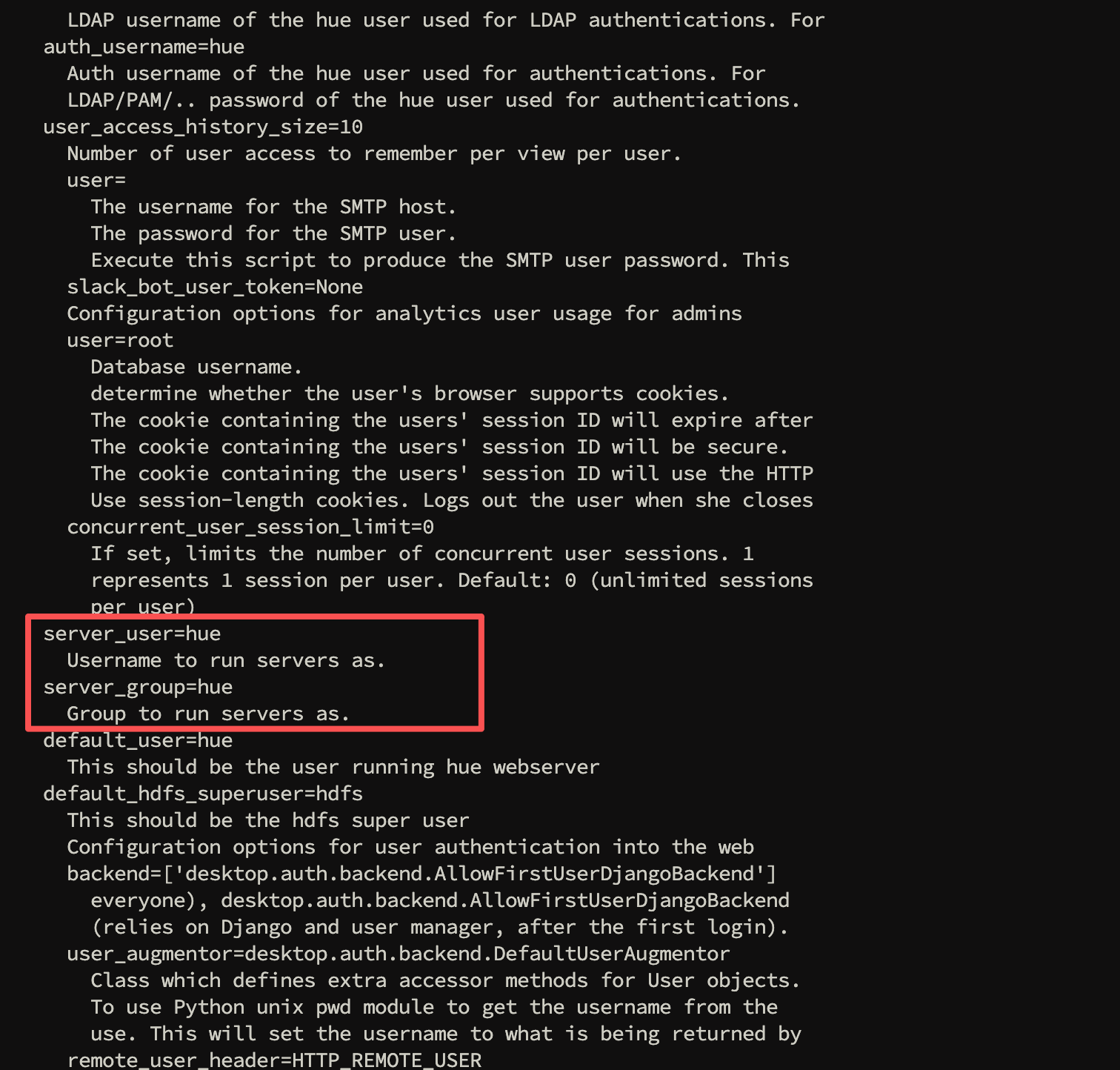
Hue 服务运行身份:
hue:hue
# 2、Hue 目录属主属组情况
再对照 Hue 相关目录的实际权限:
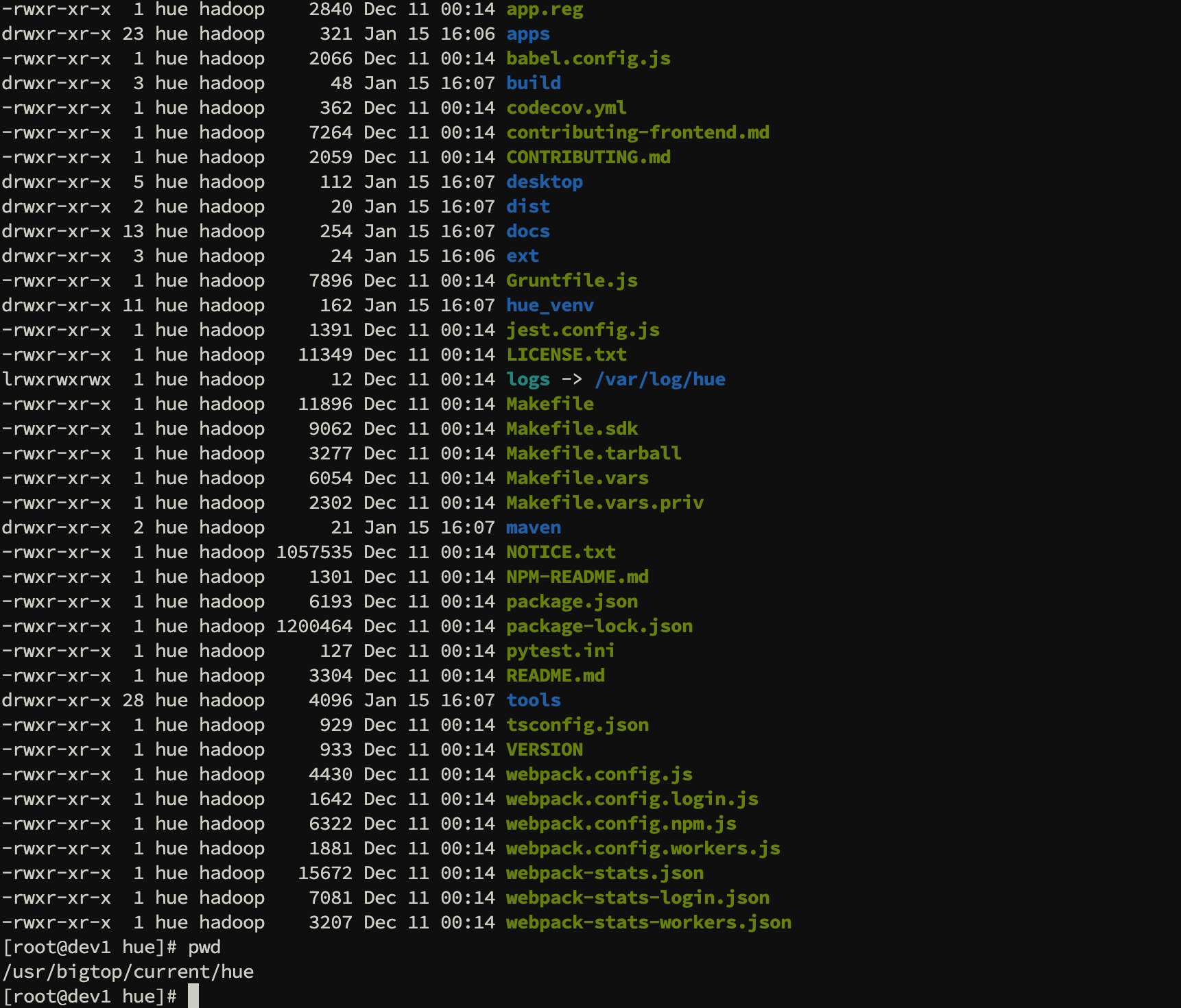
目录权限表现为:
属主:hue
属组:hadoop
1
2
2
此时冲突点已经非常清晰:
- 进程尝试
setgid(hue) - 目录属组却是
hadoop - 非 root 用户 无权完成该组切换操作
权限冲突本质
运行配置中的 server_group
与目录真实属组 不一致
# 四、问题修复与结果验证
# 1、修复方式说明
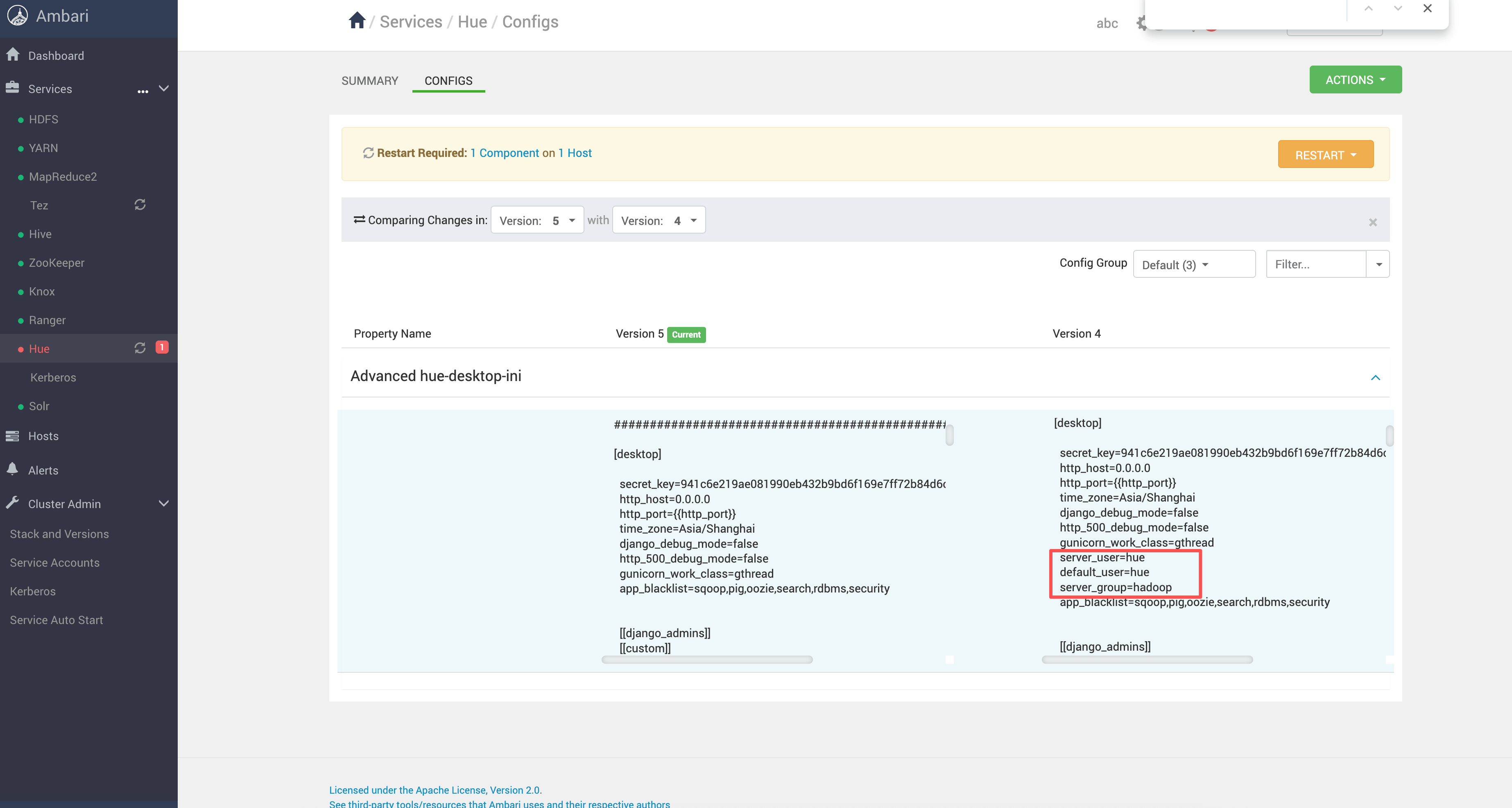
正确的处理方式不是强行改目录权限,而是 让 Hue 的运行组与目录属组保持一致。
在 Ambari 中进入:
Hue → Configs → Advanced → Advanced hue-desktop-ini
1
在 [desktop] 段中显式配置:
server_user=hue
default_user=hue
server_group=hadoop
1
2
3
2
3
# 2、重启与验证结果
保存配置并重启 Hue 后,查看日志:

可以确认:
- Gunicorn worker 正常启动
- 不再出现
PermissionError - Hue 服务稳定运行
- Ambari 状态恢复正常
经验总结
- Hue 秒退优先排查 worker 是否真正启动
setgid报错必查 server_group 与目录属组- Bigtop 环境下,多数目录默认属组为
hadoop - 配置对齐权限模型,比 chmod 更安全、更可控