
 [开启Kerberos]-Trino启动-配置文件处理
# 一、问题背景
ttr-2.2.1 以上版本已修复
在 ttr-2.2.1 及以上版本中,该 Trino 配置模板已经在软件包中补齐,不会再出现下述缺失字段的报错。
若仍使用 ttr-2.2.0 及更早版本,需要按照本文方式补齐模板内容。
如需补丁包,可访问 👉 作者站点 (opens new window)
在 BIGTOP 3.2.0 + 早期 Ambari 定制环境 中,当集群开启 Kerberos 后,会出现 Trino 启动失败、身份认证字段为空的情况。
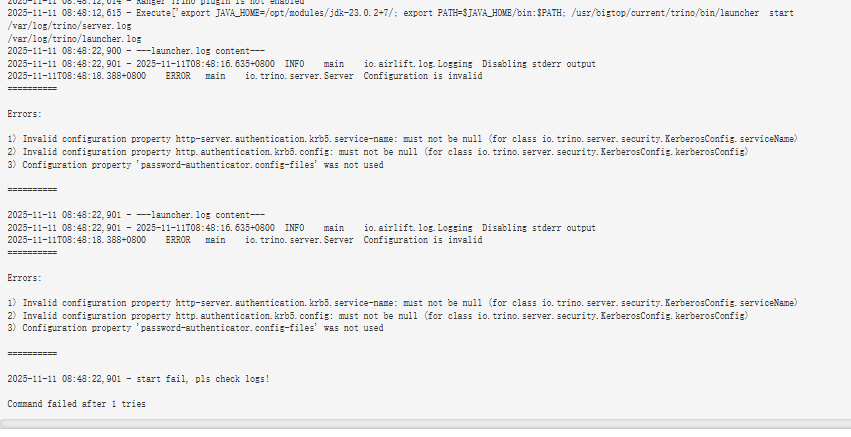
如下图所示,启动阶段直接失败:
# 二、报错细节分析
# 1、Ambari 启动阶段日志输出
2025-11-11 08:48:12,615 - Execute['export JAVA_HOME=/opt/modules/jdk-23.0.2+7/; export PATH=$JAVA_HOME/bin:$PATH; /usr/bigtop/current/trino/bin/launcher  start                 --etc-dir=/usr/bigtop/current/trino/etc  > /var/log/trino/trino_coordinator.out 2>&1 '] {'environment': {'JAVA_HOME': '/opt/modules/jdk-23.0.2+7/'}, 'user': 'trino', 'not_if': 'ambari-sudo.sh  -H -E test -f /var/run/trino/launcher.pid && ambari-sudo.sh  -H -E pgrep -F /var/run/trino/launcher.pid'}
/var/log/trino/server.log
/var/log/trino/launcher.log
2025-11-11 08:48:22,900 - ---launcher.log content---
2025-11-11 08:48:22,901 - 2025-11-11T08:48:16.635+0800	INFO	main	io.airlift.log.Logging	Disabling stderr output
2025-11-11T08:48:18.388+0800	ERROR	main	io.trino.server.Server	Configuration is invalid
==========

Errors:

1) Invalid configuration property http-server.authentication.krb5.service-name: must not be null (for class io.trino.server.security.KerberosConfig.serviceName)
2) Invalid configuration property http.authentication.krb5.config: must not be null (for class io.trino.server.security.KerberosConfig.kerberosConfig)
3) Configuration property 'password-authenticator.config-files' was not used

==========

2025-11-11 08:48:22,901 - ---launcher.log content---
2025-11-11 08:48:22,901 - 2025-11-11T08:48:16.635+0800	INFO	main	io.airlift.log.Logging	Disabling stderr output
2025-11-11T08:48:18.388+0800	ERROR	main	io.trino.server.Server	Configuration is invalid
==========

Errors:

1) Invalid configuration property http-server.authentication.krb5.service-name: must not be null (for class io.trino.server.security.KerberosConfig.serviceName)
2) Invalid configuration property http.authentication.krb5.config: must not be null (for class io.trino.server.security.KerberosConfig.kerberosConfig)
3) Configuration property 'password-authenticator.config-files' was not used

==========

2025-11-11 08:48:22,901 - start fail, pls check logs!
1
2
3
4
5
6
7
8
9
10
11
12
13
14
15
16
17
18
19
20
21
22
23
24
25
26
27
28
29
30
2
3
4
5
6
7
8
9
10
11
12
13
14
15
16
17
18
19
20
21
22
23
24
25
26
27
28
29
30
# 2、关键错误项说明
| 字段名 | 作用说明 | 当前问题点 |
|---|---|---|
| http-server.authentication.krb5.service-name | Kerberos HTTP/SPNEGO 服务名 | 被渲染为空(模板缺失) |
| http.authentication.krb5.config | 指定 krb5.conf 路径 | 被渲染为空(模板缺失) |
| password-authenticator.config-files | 密码认证配置,无实际使用 | 可忽略,与故障无关 |
提示
从报错可以明确判断:Ambari 模板没有正确渲染 Kerberos 必填字段,导致 Trino 直接拒绝启动。
# 三、原因定位:模板缺失导致字段未生成
Ambari 生成 Trino 配置文件时依赖:
TRINO/package/templates/config.properties.j2
1
所有最终写入到 config.properties 的内容,都来自此模板依据 UI 配置动态渲染。
若模板未包含 Kerberos 相关字段:
- UI 即使开启 Kerberos
- 参数也无法写入
- Trino 校验配置时必然报错
属于典型的 模板缺项 → 配置不完整 → 服务启动失败。
# 四、修复方式:补齐 config.properties.j2 模板内容
只需要在 Ambari Server 中补齐模板文件:
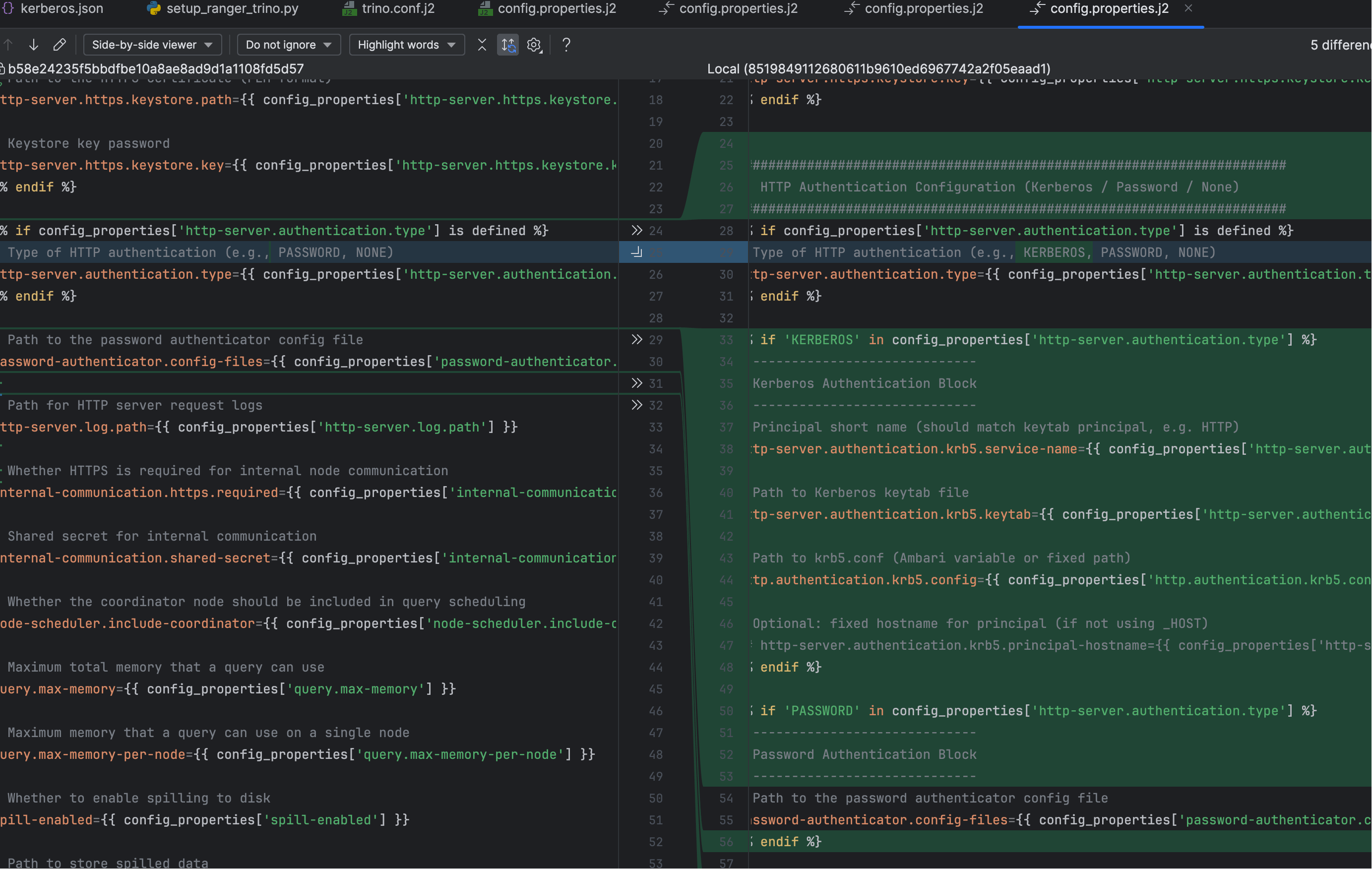
ambari-server/src/main/resources/stacks/BIGTOP/3.2.0/services/TRINO/package/templates/config.properties.j2
1
如下图所示,需加入缺失的 Kerberos 字段模板:
完成修改后:
- 重启 Ambari Server
- 在 Ambari UI → Trino → 重载配置并重启服务
- 观察新生成的
/etc/trino/conf/config.properties
此时 Trino 就会正常解析 Kerberos 认证配置。
# 五、模板渲染后的 Trino 配置参考(可用于对照检查)
以下是渲染成功后的配置文件用于参考:
[root@dev1 conf]# cat config.properties
# Whether this node acts as the Trino coordinator (only one node should be true)
coordinator=true

# Discovery URI used by Trino nodes to find each other
discovery.uri=http://dev1:8380

# Port for HTTP server
http-server.http.port=8380

# Whether HTTPS is enabled for the HTTP server
http-server.https.enabled=true

# Port for HTTPS server
http-server.https.port=8443

# Path to the HTTPS certificate (PEM format)
http-server.https.keystore.path=/etc/trino/conf/trino.pem

# Keystore key password
http-server.https.keystore.key=changeit


#######################################################################
#  HTTP Authentication Configuration (Kerberos / Password / None)
#######################################################################
# Type of HTTP authentication (e.g., KERBEROS, PASSWORD, NONE)
http-server.authentication.type=KERBEROS

# -----------------------------
# Kerberos Authentication Block
# -----------------------------
# Principal short name (should match keytab principal, e.g. HTTP)
http-server.authentication.krb5.service-name=HTTP

# Path to Kerberos keytab file
http-server.authentication.krb5.keytab=/etc/security/keytabs/spnego.service.keytab

# Path to krb5.conf (Ambari variable or fixed path)
http.authentication.krb5.config=/etc/krb5.conf

# Optional: fixed hostname for principal (if not using _HOST)


#######################################################################
#  Logging / Internal Communication / Misc
#######################################################################
# Path for HTTP server request logs
http-server.log.path=/var/log/trino/http-request.log

# Whether HTTPS is required for internal node communication
internal-communication.https.required=false

# Shared secret for internal communication
internal-communication.shared-secret=trino

# Whether the coordinator node should be included in query scheduling
node-scheduler.include-coordinator=true

# Maximum total memory that a query can use
query.max-memory=2GB

# Maximum memory that a query can use on a single node
query.max-memory-per-node=1GB

# Whether to enable spilling to disk
spill-enabled=false

# Path to store spilled data
spiller-spill-path=/data/trino/spill

# Directory where Trino plugins are located
plugin.dir=/usr/bigtop/current/trino/plugins[root@dev1 conf]#
1
2
3
4
5
6
7
8
9
10
11
12
13
14
15
16
17
18
19
20
21
22
23
24
25
26
27
28
29
30
31
32
33
34
35
36
37
38
39
40
41
42
43
44
45
46
47
48
49
50
51
52
53
54
55
56
57
58
59
60
61
62
63
64
65
66
67
68
69
70
71
72
73
74
75
2
3
4
5
6
7
8
9
10
11
12
13
14
15
16
17
18
19
20
21
22
23
24
25
26
27
28
29
30
31
32
33
34
35
36
37
38
39
40
41
42
43
44
45
46
47
48
49
50
51
52
53
54
55
56
57
58
59
60
61
62
63
64
65
66
67
68
69
70
71
72
73
74
75
# 需要重点确认的关键字段
| 配置项 | 典型渲染值 | 说明 |
|---|---|---|
| http-server.authentication.type | KERBEROS | 开启 HTTP Kerberos |
| http-server.authentication.krb5.service-name | HTTP | 必须与 keytab principal 前缀一致 |
| http-server.authentication.krb5.keytab | spnego.service.keytab | Trino HTTP 使用的 keytab |
| http.authentication.krb5.config | /etc/krb5.conf | 必须存在,否则立即报错 |
警告
以上任意项缺失,Trino 在 Kerberos 环境下都会直接启动失败。
# 六、重新启动验证
在补齐模板 → 更新配置 → 重启 Trino 后:
- Trino 能正常加载所有 Kerberos 字段
- “service-name must not be null”等错误不再出现
至此,故障已完全恢复。