
 [Step3] 调整 Kerberos Client 配置不改报错
# 一、问题背景与触发条件
# 1.1 环境前提
本章节的修改点属于 Kerberos Client 配置,所以大前提是:集群已经开启 Kerberos。
本章定位
这一步不改 Ranger、不改 Haproxy,只调整 Kerberos 客户端行为,让“主机名解析”更可控。
# 1.2 为什么要改 rdns / dns_canonicalize_hostname
在 Ranger Admin HA 场景中,通常会引入统一访问域名(例如 ranger-ha.hadoop.com),并通过 Haproxy 做入口转发。
如果 Kerberos 客户端开启了反向解析或主机名规范化,可能出现:
- 客户端把
ranger-ha.hadoop.com解析/规范化为其它主机名(短主机名、FQDN 变化、反向解析回来的名称) - 参与 Kerberos 认证的 服务主机名发生漂移
- 进而导致 SPNEGO 认证链路不稳定,表现为 403 或认证异常
两个配置的含义
rdns = false:关闭 Kerberos 的 反向 DNS 解析(reverse DNS)dns_canonicalize_hostname = false:关闭 Kerberos 的 主机名规范化(canonicalize)
# 二、修改方式:通过 Ambari 调整 advanced krb5-conf
# 2.1 修改位置
在 Ambari 中进入:
- Kerberos
- Configs
- 找到:
advanced krb5-conf
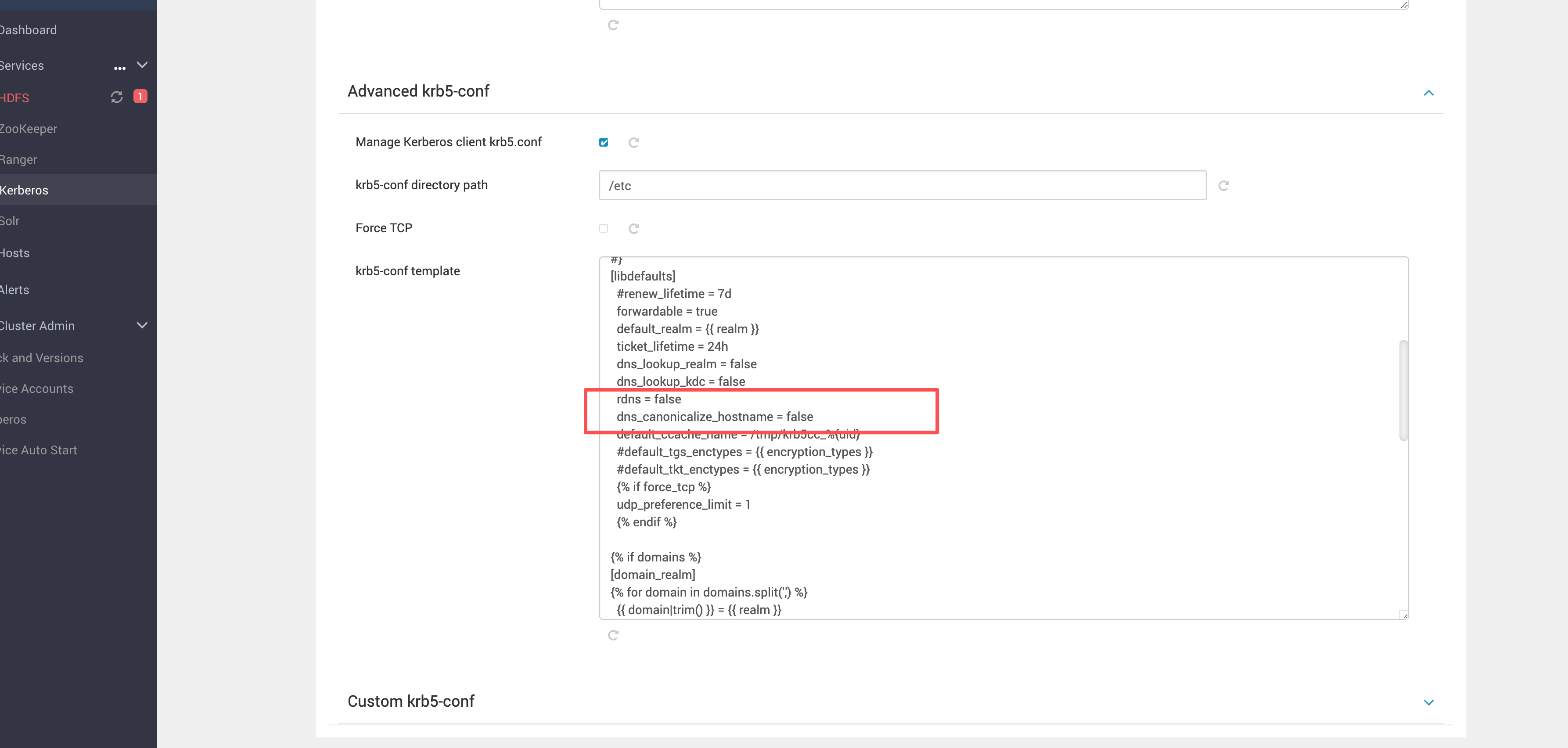
然后在 [libdefaults] 中加入(或确认存在):
rdns = false
dns_canonicalize_hostname = false
2
关键点
不要只改某一台机器的 /etc/krb5.conf。
既然是 Ambari 环境,统一从 advanced krb5-conf 下发,才能保证全局一致。
# 2.2 完整 krb5-conf 内容
下面是完整内容(保持原始模板结构,便于直接粘贴到 Ambari 的 advanced krb5-conf):
{#
# Licensed to the Apache Software Foundation (ASF) under one
# or more contributor license agreements.  See the NOTICE file
# distributed with this work for additional information
# regarding copyright ownership.  The ASF licenses this file
# to you under the Apache License, Version 2.0 (the
# "License"); you may not use this file except in compliance
# with the License.  You may obtain a copy of the License at
#
#   http://www.apache.org/licenses/LICENSE-2.0
#
# Unless required by applicable law or agreed to in writing, software
# distributed under the License is distributed on an "AS IS" BASIS,
# WITHOUT WARRANTIES OR CONDITIONS OF ANY KIND, either express or implied.
# See the License for the specific language governing permissions and
# limitations under the License.
#}
[libdefaults]
  #renew_lifetime = 7d
  forwardable = true
  default_realm = {{ realm }}
  ticket_lifetime = 24h
  dns_lookup_realm = false
  dns_lookup_kdc = false
  rdns = false
  dns_canonicalize_hostname = false
  default_ccache_name = /tmp/krb5cc_%{uid}
  #default_tgs_enctypes = {{ encryption_types }}
  #default_tkt_enctypes = {{ encryption_types }}
  {% if force_tcp %}
  udp_preference_limit = 1
  {% endif %}

{% if domains %}
[domain_realm]
{% for domain in domains.split(',') %}
  {{ domain|trim() }} = {{ realm }}
{% endfor %}
{% endif %}

[logging]
  default = FILE:/var/log/krb5kdc.log
  admin_server = FILE:/var/log/kadmind.log
  kdc = FILE:/var/log/krb5kdc.log

[realms]
  {{ realm }} = {
{% if master_kdc %}
    master_kdc = {{ master_kdc|trim() }}
{% endif %}

{% set _kdc_hosts = kdc_hosts|default('', true)|trim() %}
{% if _kdc_hosts %}
{% set kdc_host_list = _kdc_hosts.split(',') %}
{% if kdc_host_list and kdc_host_list|length > 0 %}
    admin_server = {{ admin_server_host|default(kdc_host_list[0]|trim(), True) }}
{% if kdc_host_list %}
{% if master_kdc and (master_kdc not in kdc_host_list) %}
    kdc = {{ master_kdc|trim() }}
{% endif %}
{% for kdc_host in kdc_host_list %}
{% if kdc_host|trim() %}
    kdc = {{ kdc_host|trim() }}
{% endif %}
{% endfor %}
{% endif %}
{% endif %}
{% endif %}
  }

{# Append additional realm declarations below #}
2
3
4
5
6
7
8
9
10
11
12
13
14
15
16
17
18
19
20
21
22
23
24
25
26
27
28
29
30
31
32
33
34
35
36
37
38
39
40
41
42
43
44
45
46
47
48
49
50
51
52
53
54
55
56
57
58
59
60
61
62
63
64
65
66
67
68
69
70
71
# 三、重启生效与错误对照
# 3.1 修改后重启
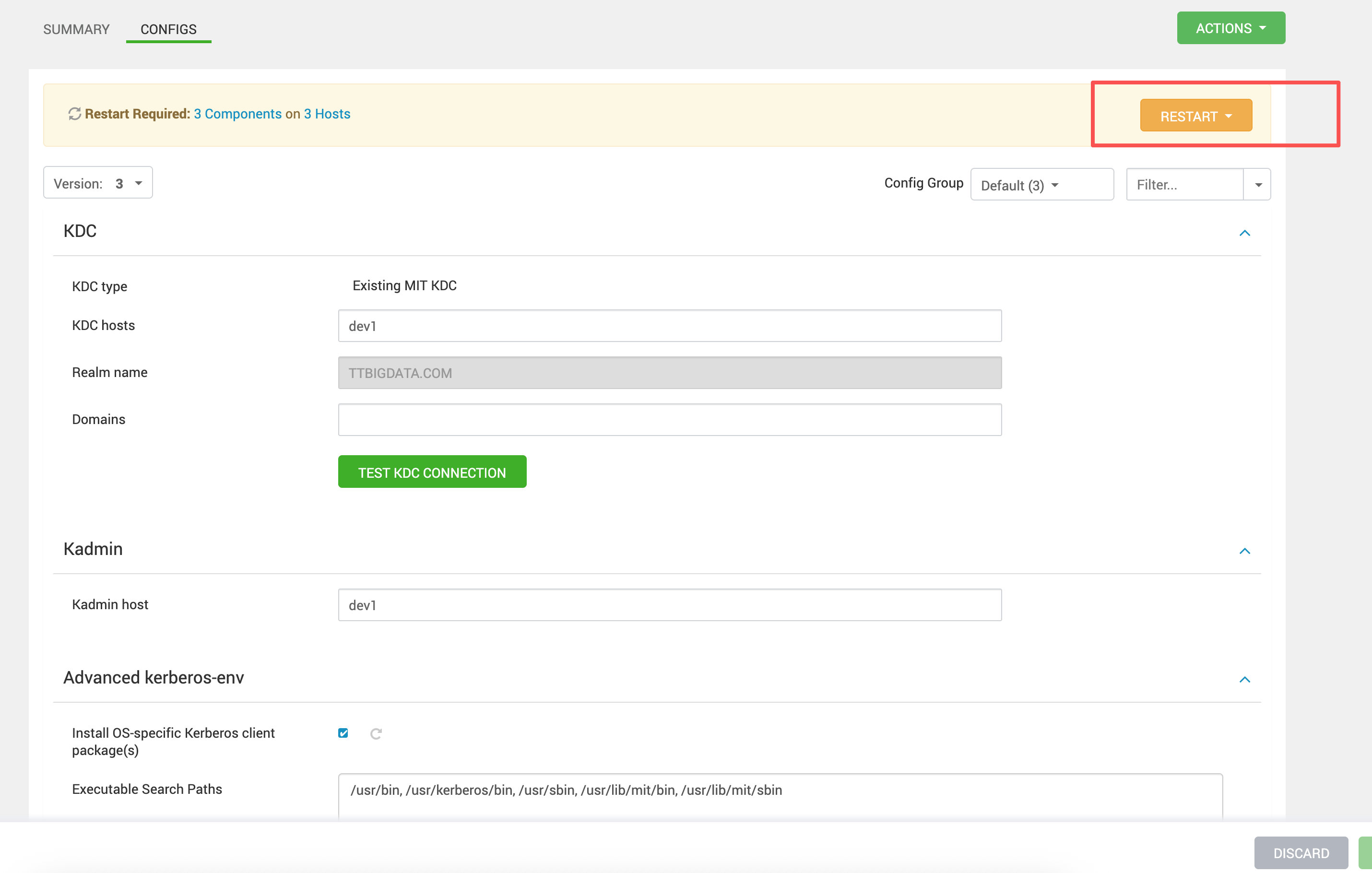
保存配置后,Ambari 会提示需要重启相关服务,直接按提示重启即可。
笔记
通常会涉及到依赖 Kerberos Client 的组件(例如 Ranger、HDFS、YARN 等)。 本章不展开服务依赖清单,按 Ambari 提示重启即可。
# 3.2 不修改时的典型现象
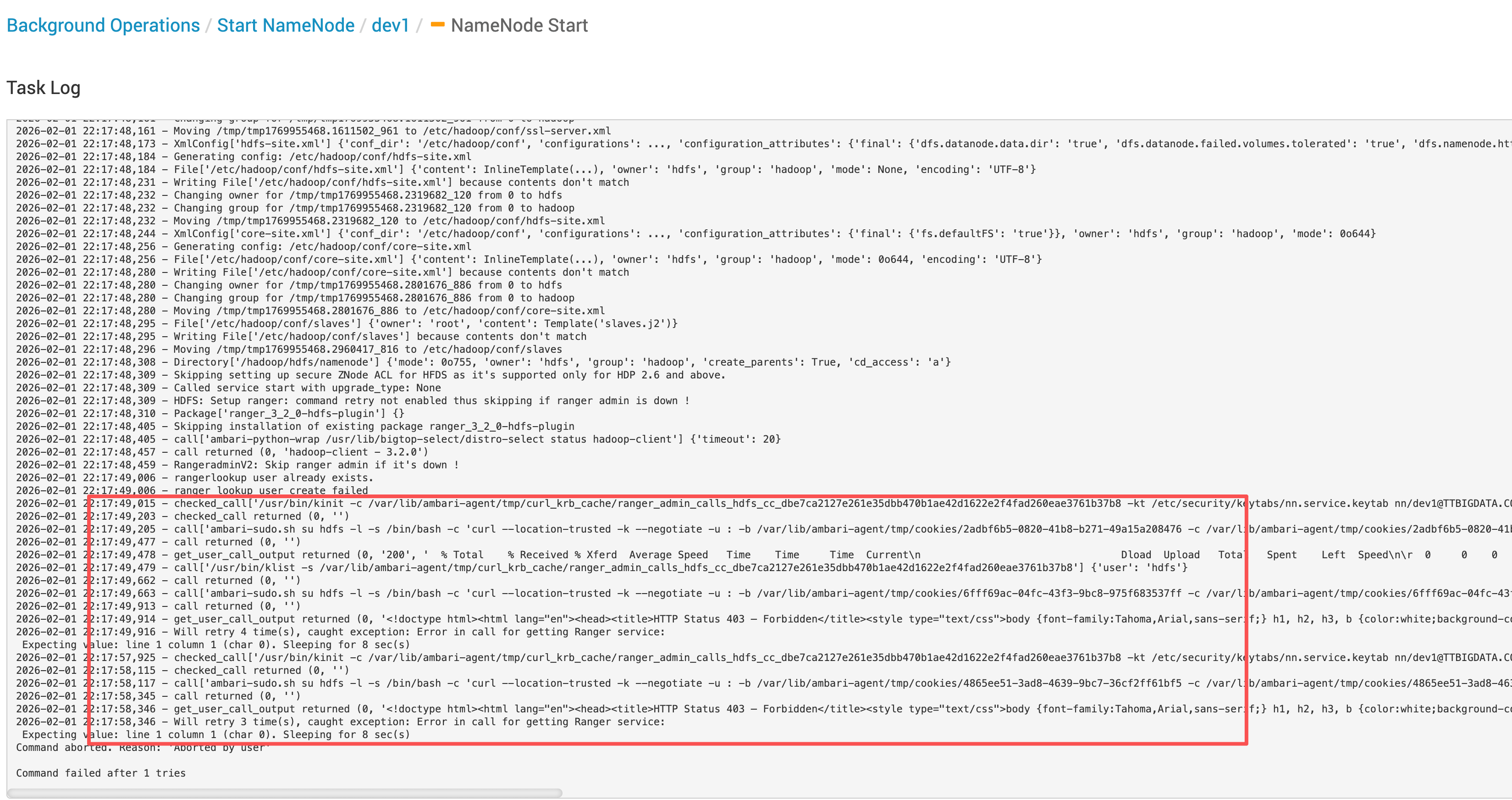
如果 rdns / dns_canonicalize_hostname 未关闭,常见表现是:
- Ambari 调用 Ranger API 获取 service 时返回 403
- 返回体是 HTML(Forbidden 页面),导致 JSON 解析失败并触发重试
- 日志里会看到
Expecting value: line 1 column 1这类报错(本质是“拿到 HTML 当 JSON 解析”)
# 3.2.1 Ambari 侧调用日志
2026-02-01 22:17:49,015 - checked_call['/usr/bin/kinit -c /var/lib/ambari-agent/tmp/curl_krb_cache/ranger_admin_calls_hdfs_cc_dbe7ca2127e261e35dbb470b1ae42d1622e2f4fad260eae3761b37b8 -kt /etc/security/keytabs/nn.service.keytab nn/dev1@TTBIGDATA.COM > /dev/null'] {'user': 'hdfs'}
2026-02-01 22:17:49,203 - checked_call returned (0, '')
2026-02-01 22:17:49,205 - call['ambari-sudo.sh su hdfs -l -s /bin/bash -c 'curl --location-trusted -k --negotiate -u : -b /var/lib/ambari-agent/tmp/cookies/2adbf6b5-0820-41b8-b271-49a15a208476 -c /var/lib/ambari-agent/tmp/cookies/2adbf6b5-0820-41b8-b271-49a15a208476 -w '"'"'%{http_code}'"'"' http://ranger-ha.hadoop.com:16080/login.jsp --connect-timeout 10 --max-time 12 -o /dev/null 1>/tmp/tmp4hjpgiyg 2>/tmp/tmprgg1rwsd''] {'quiet': False, 'env': {'KRB5CCNAME': '/var/lib/ambari-agent/tmp/curl_krb_cache/ranger_admin_calls_hdfs_cc_dbe7ca2127e261e35dbb470b1ae42d1622e2f4fad260eae3761b37b8'}}
2026-02-01 22:17:49,477 - call returned (0, '')
2026-02-01 22:17:49,478 - get_user_call_output returned (0, '200', '  % Total    % Received % Xferd  Average Speed   Time    Time     Time  Current\n                                 Dload  Upload   Total   Spent    Left  Speed\n\r  0     0    0     0    0     0      0      0 --:--:-- --:--:-- --:--:--     0\r  0     0    0     0    0     0      0      0 --:--:-- --:--:-- --:--:--     0\r100  4283  100  4283    0     0  51602      0 --:--:-- --:--:-- --:--:-- 50988')
2026-02-01 22:17:49,479 - call['/usr/bin/klist -s /var/lib/ambari-agent/tmp/curl_krb_cache/ranger_admin_calls_hdfs_cc_dbe7ca2127e261e35dbb470b1ae42d1622e2f4fad260eae3761b37b8'] {'user': 'hdfs'}
2026-02-01 22:17:49,662 - call returned (0, '')
2026-02-01 22:17:49,663 - call['ambari-sudo.sh su hdfs -l -s /bin/bash -c 'curl --location-trusted -k --negotiate -u : -b /var/lib/ambari-agent/tmp/cookies/6fff69ac-04fc-43f3-9bc8-975f683537ff -c /var/lib/ambari-agent/tmp/cookies/6fff69ac-04fc-43f3-9bc8-975f683537ff '"'"'http://ranger-ha.hadoop.com:16080/service/public/v2/api/service?serviceName=abc_hadoop&serviceType=hdfs&isEnabled=true'"'"' --connect-timeout 10 --max-time 12 -X GET 1>/tmp/tmp3hxhy0gx 2>/tmp/tmpglfdsjwl''] {'quiet': False, 'env': {'KRB5CCNAME': '/var/lib/ambari-agent/tmp/curl_krb_cache/ranger_admin_calls_hdfs_cc_dbe7ca2127e261e35dbb470b1ae42d1622e2f4fad260eae3761b37b8'}}
2026-02-01 22:17:49,913 - call returned (0, '')
2026-02-01 22:17:49,914 - get_user_call_output returned (0, '<!doctype html><html lang="en"><head><title>HTTP Status 403 – Forbidden</title><style type="text/css">body {font-family:Tahoma,Arial,sans-serif;} h1, h2, h3, b {color:white;background-color:#525D76;} h1 {font-size:22px;} h2 {font-size:16px;} h3 {font-size:14px;} p {font-size:12px;} a {color:black;} .line {height:1px;background-color:#525D76;border:none;}</style></head><body><h1>HTTP Status 403 – Forbidden</h1></body></html>', '  % Total    % Received % Xferd  Average Speed   Time    Time     Time  Current\n                                 Dload  Upload   Total   Spent    Left  Speed\n\r  0     0    0     0    0     0      0      0 --:--:-- --:--:-- --:--:--     0\r100   431  100   431    0     0   7065      0 --:--:-- --:--:-- --:--:--  7183')
2026-02-01 22:17:49,916 - Will retry 4 time(s), caught exception: Error in call for getting Ranger service:
 Expecting value: line 1 column 1 (char 0). Sleeping for 8 sec(s)
2
3
4
5
6
7
8
9
10
11
12
快速结论
这类日志并不代表 Kerberos 完全失败,而是 访问结果变成了 HTML 403 页面,导致后续处理链路异常。
# 3.3 Ranger Admin 侧典型报错
当认证链路异常时,Ranger Admin 侧常见日志如下:
2026-01-31 22:12:53,741 [http-nio-6080-exec-6] WARN [RangerKrbFilter.java:510] Authentication exception: GSSException: Failure unspecified at GSS-API level (Mechanism level: Invalid argument (400) - Cannot find key of appropriate type to decrypt AP REP - AES128 CTS mode with HMAC SHA1-96)
...
Caused by: sun.security.krb5.KrbException: Invalid argument (400) - Cannot find key of appropriate type to decrypt AP REP - AES128 CTS mode with HMAC SHA1-96
...
2
3
4
经验结论
当出现 Cannot find key of appropriate type to decrypt AP REP 时,优先检查两类问题:
- 客户端侧主机名解析/规范化导致服务名参与认证不一致(本章处理的点)
- 服务端 keytab 加密算法不匹配(通常与 Step2 的
-e aes256/aes128对应)
本章先把“主机名解析的不确定性”消掉,后续排障会更直观。